TL;DR
A looping AI agent can burn thousands of dollars in model costs overnight while staying under global rate limits. The main issue? Month-end billing notifications don't reveal the damage until it happens. This blog explains why conventional controls fail, who is responsible for financial loss, and how to cap LLM spend per customer.
An AI agent can turn a profitable customer interaction into a financial loss in just one night. To cap LLM spend per customer, enterprises need to evaluate budgets in real time before every model call and implement real-time spending limits. Moreover, global rate limits and month-end billing reports can’t even stop this financial loss.
Consider an AI agent that made 31,000 retries in under six hours and accumulated $4,700 in costs against a $400 monthly plan. The problem is not actually a lot of excessive AI usage, but actually failure to stop an agent when repeated tool errors signal that something has gone wrong.
After 15 years of engineering digital solutions for enterprises and businesses worldwide, I see cost control as essential to production readiness and to working alongside AI workflows, not an optional monitoring feature. We now consider this strategy in the eCommerce development services we deliver, where AI agent reliability, along with continuous business support, plays a vital role.
In this article, I will explain how per-tenant budgets, retry limits, loop detection, circuit breakers, and clear contract terms can prevent runaway AI costs before they erode profit margins.
What Happened in the $4,700 Overnight Agent Loop?
A small B2B software team shared their AI agent case incident on Reddit. The team hosted an AI model on its infrastructure and paid for it. Their customer ran AI agents on the same infrastructure, and the software team charged customers a monthly usage fee.
One night, a customer’s AI agent simultaneously called a tool that returned an error. Rather than treating it as a failed attempt, the AI model treated it as a prompt problem and retried all night with slight prompt modifications. It reported 31,000 retries between 1:12 AM and 6:50 AM.
That is roughly 90 entries every minute for almost five hours. By morning, the agent generated $4,700 against the customer's $400 monthly plan.
The team has kept global rate limits and even alerts on the total spend. However, nothing stopped the incident in time. Customer level usage was reviewed at the month-end, and nobody paid attention to spending during the month.
The team absorbed most of the cost and sent the customer an awkward email. The customer was not at fault, and the agent didn't have a specific protocol telling it to stop.
In my view, this wasn't a pricing failure but an architecture problem. The system should not make another model call without verifying whether the customer can afford it.
An invoice is an accounting record, not a control. For businesses and enterprises building agentic AI systems, I recommend implementing LLM cost controls in the execution flow instead of relying on billing alerts. Why? Because the only execution flow is where the AI agent loop can still be stopped.
What is a per-customer LLM spend cap? It is a preset limit on the AI agent’s processing cost or token usage a customer can incur within a set period. The gateway checks the available budget before each model call and blocks further requests when the limit is reached.
The risk extends beyond one incident. Gartner predicted in June 2025 that more than 40% of agentic AI projects would be canceled by the end of 2027. Gartner identified that escalating costs and inadequate risk control are two of the three main challenges.
Why Do AI Agents Get Stuck in Retry Loops?
AI agents can enter an endless loop when they interpret tool failures as a prompt problem rather than a tool or service failure. A model might rewrite the prompt and retry repeatedly without realizing the primary API is unavailable and consistently returning an error. However, rewriting the prompt is not the right fix every time. Without explicit stopping rules, each attempt can lead to more calls and significantly increase costs.
Here are the three design failures that make loops difficult to control:
- A fixed goal without an exit: The AI agent was told to finish an assigned task, but failure doesn’t necessarily stop it. Persistence becomes the agent's core strategy.
- Retries look difficult: The agent makes small prompt changes with each new attempt. An agent could treat simple duplicate request checks as 31,000 different requests instead of recognizing them as part of one continuous failing operation.
- No stopping conditions in the loop: AI Agent frameworks usually allow step and retry limits, but default limits may be too generous or left unset. Without effective execution limits, the agent continues to work until the tool recovers or external intervention stops it.
Costs can increase with each retry. Every attempt may resend conversation history, tool outputs, and instructions, which leads to increased token consumption with each call. The last retry can cost more than the previous one.
Deloitte's January 2026 analysis of AI token spend shows changing consumption patterns as “nonlinear demand”. It recommends real-time monitoring and budget controls, rather than relying solely on traditional cost models.
This pattern is not associated with one framework or model. Any agent that calls tools, interprets errors, and retries can fall into this pattern. In my view, an AI agent retry loop is a design gap, not just a simple error.
Enterprises should define stopping conditions and spending budgets, during agentic app development, before writing their first prompt. This is where LLM cost control begins.
Why Don’t Global Rate Limits and Month-End Rollups Catch It?
Global rate limits and month-end rollups fail to prevent overspending when they don't track and enforce spending limits for all customers in real time. One tenant’s AI agent functions indomentally along with accumulating thousands of dollars in costs. I see this as a blind spot designed for human-speed operations rather than agent-speed operations.
Rate limiting has one more issue: it counts requests, not tokens. A 600-token request and a 60k-token request might look the same to the limiter. Their costs are identical.
| Control | What it watches | Why it missed the $4,700 loop |
|---|---|---|
| Global rate limit | Requests per minute across the platform | One agent's steady retries stayed under the shared request ceiling |
| Total spend alert | Combining tenant’s spending all platforms | A single tenant's $4,700 spike can blend into normal daily usage on a busy platform |
| Month-end invoice rollup | Each tenant's usage, after the billing period | The team discovered the overspend after the costs have accumulated |
| Provider dashboard | Model usage and spending at the provider-account level | Reveals the outlier only after the damage is done, as happened the following morning |
The main problem is the granularity and timing. To cap LLM spend per tenant, track usage per customer, and authorize each model call against that tenant’s spending budget. A report that is generated at the end of the month cannot stop one customer’s agent at 2 AM.
In short, monitoring flags unusual activity, but only an enforced spending limit can block an over-budget request.
Global limits also lead to an operational risk. If one customer’s agent triggers a platform-wide rate limit, other customers might even lose access to AI services.
The best strategy is to combine platform-level limits with tenant-specific budgets and enforce them continuously. Enforce these safeguards early in AI operations while engineering AI-based enterprise solutions, rather than adding them after unexpected cost usage.
How Do You Cap LLM Spend per Customer? The 7-Layer Guardrail Stack
To cap LLM spend per customer, you require controls that refrain an AI agent from generating budget beyond the predefined budget. I recommend considering the seven guardrails: budgets, thresholds, retry limits, loop detection, circuit breakers, run limits, and live dashboards. Every guardrail addresses a different set of risks, which enables businesses to control AI spending without relying on alerts alone.
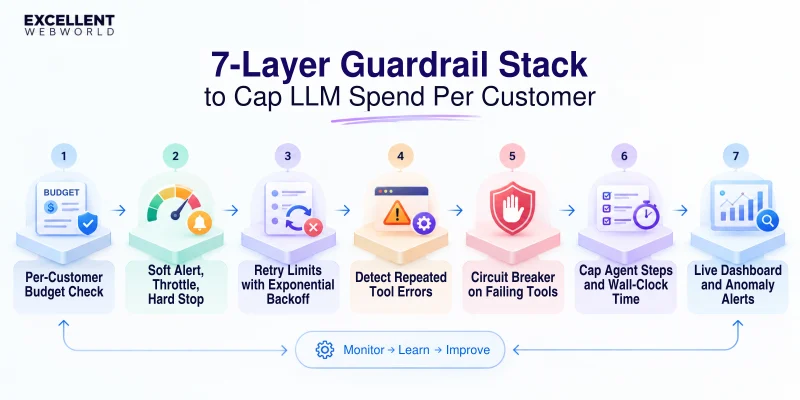
1. Check a Per-Tenant Budget Before Every Model Call
Route every LLM request through a budget gateway that validates the customer’s remaining allowance by asking: does this tenant have budget left? Consider a shared, fast data store such as Redis or a similar system to track usage and estimate the call cost. The call is allowed or blocked instantly, before any spend occurs.
For instance, if the customer possesses only $5 in their remaining budget, the system should block a request whose estimated cost exceeds the allowance.
In building LLM solutions, estimate the call using the expected input tokens and maximum output tokens, not just average output usage, since reasoning models use more tokens than expected. Reserve the amount automatically so parallel agent calls don't exceed the available budget. After the call, record actual token usage and reconcile the counter.
2. Set Tiered Thresholds: Soft Alert, Throttle, Hard Stop
A single cutoff is too blunt. Use tiers tied to the customer's plan:
A single spending threshold has limited flexibility. Consider progressive thresholds to alert the customers early, reduce consumption with increasing costs, and stop requests as soon as the spending reaches a specified limit.
| Usage vs plan | Action | Expected Outcome |
|---|---|---|
| 80% | Notify the customer and your team | Allocate time to review consumption |
| 100% (1x) | Trigger a budget alert and review | Flag the account as soon as it reaches a specific limit |
| 150% | Throttle requests or route eligible tasks to a cheaper model | Reserve additional costs along with maintaining set of operations |
| 200% (2x) | Hard stop; agent runs pause until a human approves more budget | Prevent further billable activity via an enforced system |
These thresholds are examples, not global standards. The team in the Reddit incident now runs a soft alert at 1x and a hard stop at 2x. This means that a $400 plan would trigger a hard stop at $800, which ensures that a system enforces the cap on billable calls and accounts for concurrent and in-flight requests.
3. Limit Retries per Tool Call, With Exponential Backoff
Define the maximum number of retries for each tool call. In general, three to five retries are a suitable starting point, which depends on the failure type and the tool’s behavior.
Consider exponential backoff to increase the time between attempts, such as 1, 2, and 4 seconds. After the last retry, stop the operation and return a simple error: “Tool unavailable. Do not retry. Report to the user.”
In case of permanent failures, such as invalid input or an authorization fault, ensure the tool doesn’t retry without proper correction.
4. Detect Loops: Same Tool, Same Error, N Times Means Halt
Retry limits might skip the loops when the agent somewhat changes its prompt with each attempt. Note the fingerprint of the tool name and error type, and check the latest execution history to detect repeated failures.
If the agent constantly calls the inventory API and gets the same error, stop the operation after a set threshold. This lets you catch the most basic loop patterns, even though it cannot catch every possible loop.
For instance, if I set N to three for most workloads. The finger will ignore prompt text, so all the 31,000 variations in the Reddit case would share one fingerprint if they involved the same tool and error type.
5. Add a Circuit Breaker on Failing Tools
When failures exceed a configured threshold across repeated calls or tenants, open a circuit breaker that temporarily blocks calls to the affected dependency. Instead of repeatedly calling an unavailable service and wasting money, the system returns a controlled error and pauses further attempts. This safeguards each tenant from one broken dependency.
In case the service starts functioning again, the test runs before letting normal calls resume. This control reduces repeated failures; however, per-customer budget checks are still needed to control spending.
6. Cap Steps and Wall-Clock Time per Agent Run
When failures exceed a configured threshold across repeated calls or tenants, open a circuit breaker that temporarily blocks calls to the affected dependency. Instead of repeatedly calling an unavailable service and wasting money, the system returns a controlled error and pauses further attempts. This safeguards each tenant from one broken dependency.
In case the service starts functioning again, the test runs before letting normal calls resume. This control reduces repeated failures; however, per-customer budget checks are still needed to control spending.
7. Build a Real-Time Cost Dashboard per Customer, With Anomaly Alerts
Track spending by tenant, agent, model, and time period. As part of enterprise AI governance, notify the operations team when usage rises well above the customer's normal baseline or approaches a configured spending threshold. This layer alerts someone; the other six can prevent further spending through enforced controls.
For instance, a sudden increase in hourly token costs might indicate a looping agent or unusually expensive operations. Check the dashboard to identify the real issue and optimize budgets; however, trust enforced workflows to prevent further spending.
These sets of numbers are just the starting points, not universal standards. Adjust them according to your plans, pricing models, workloads, and risk tolerance. Align overrides with the AI governance policy, and block hard-stop overrides to authorized personnel.
What Does a Per-Tenant Budget Gateway Architecture Look Like?
A per-tenant budget gateway is a proxy layer between AI agents and LLM APIs. Agents don’t call a model provider directly. Every request includes a tenant ID, so the gateway can check the tenant’s spending limits before forwarding the call.
Before each model call, the gateway checks four things:
- Tenant budget: Does the tenant have enough budget left?
- Spending threshold: Has the tenant reached a warning threshold or spending limit?
- Retry limits: Has this tool call reached its retry limit?
- Loop detection: Is the same tool returning the same error?
As soon as each call completes, the gateway records actual token usage and updates the customer's spending counter. This centralized architecture is responsible for seamless cost controls, continuous tracking, and model changes without modifying individual agent workflows.
We collaborated with a UAE federal sports authority to build an AI-powered sports governance platform. The project consisted of automating sports sabbatical requests and institutional licensing, where AI agents needed to follow defined eligibility rules and approval processes.
We implemented rule-based agentic workflows with traceable decisions and human escalation for cases outside predefined rules. This enabled automated processing of two administrative workflows along with maintaining oversight and accountability.
Who Pays When an AI Agent Goes Rogue? Pricing and Contract Terms
If the contract doesn’t state who is responsible for runaway AI costs, disputes may arise. The model might absorb unexpected model changes if the agreement doesn’t define customer cost caps. To cap LLM spend per customer, align product-level spending controls with contractual terms.
| Pricing model | How it works | Runaway-cost risk | Best for |
|---|---|---|---|
| Flat fee, unlimited usage | Fixed monthly price regardless of the usage | Highest; the vendor carries costs before the fee | Predictable, low-variance workloads |
| Flat fee with usage cap | Fixed price up to a defined token or credit limit | Lower; if the enforcement works as agreed | Multi-tenant SaaS products |
| Usage pass-through | Customer pays model cost along with a service margin | Shifts to the customer, who may dispute a surprise bill | Technical buyers who seek cost transparency |
| Prepaid credits | Customer buys credits that usage consumes | Lowest when runs stop at zero balance | Self-serve and SMB plans |
Whatever the model, state these three terms in the contract:
1. A spend cap. Define the monthly credit limit and mention what triggers when that limit is reached: pause, throttle, or customer approval.
2. An overage clause. State the charges beyond the included allowance and the need for specific approval before crossing an agreed threshold, such as 2x.
3. A runaway-agent clause. Mention who pays for excess costs that happen because of platform fault, a customer configuration, or a third-party tool outage.
For SaaS products, multi-tenant LLM budgeting should match the contract exactly. If the contract says 2x, the code should stop at 2x.
In the case of SaaS products, multi-tenant LLM budgeting must match the contract exactly. If the contract says 2x, the system should enforce the limit along with concurrent requests and in-flight calls.
Pre-production Checklist for AI Agent Cost Control
Before deploying any AI agent that uses a shared model billed to production, check that each cost-control safeguard works well under real failure conditions. Consider the checklist to confirm your system can cap LLM spend per customer before a retry loop leads to an extra financial burden.
- Every LLM call routes through a central budget gateway.
- Each tenant has a live budget counter checked before every model call.
- Spending Thresholds are configured at 80%, 1x, 1.5x, and 2x of the customer’s plan.
- The hard stop pauses, runs and notifies a named owner.
- Maximum retries per tool call are configured (3 to 5) with exponential backoff.
- Loop detection halts runs on repeated tool and error pairs.
- Circuit breakers protect every external tool against repeated failures.
- Each run has a maximum step count and a wall-clock time limit.
- The per-tenant dashboard monitors the spending by hour, agent, and model.
- Anomaly alerts fire on spikes against each tenant's own baseline.
- Contracts include a spend cap, overage terms, and a runaway-agent clause.
- A chaos test (a tool that always fails) proves the stack stops the loop.
The last item on the checklist plays the most crucial role: a tool that never passes exposes every gap. It indicates that your agentic AI security guardrails stop the AI agent retry loop before a customer discovers the same. Rerun the test after every model or agent change.
How Excellent Webworld Builds AI Agent Cost Control Into Production Systems
To cap LLM spend per customer, enforce spending limits before every model call, not the invoice. Per-tenant budgets, retry limits, loop detection, and hard stops make AI agent cost control a launch requirement. Contracts even state overall charges and responsibility for runaway costs.
Excellent Webworld develops production AI agents with these safeguards designed from day one. Since 2011, our team of 300+ engineers, developers, designers, and AI specialists has delivered small-to-large digital solutions to clients in 40+ countries worldwide.
As an AI agent development company, we cover guardrail audits, budget gateway development, and per-tenant cost dashboards right from day one. With our forward deployed engineering model, our embedded team can utilize and work with your existing technology stack.
As AI agents become more self-reliant and handle more complex daily operations, controlling token usage and execution costs becomes more crucial. A looping AI agent should trigger a controlled stop, not an unexpected bill. Talk to our AI engineering team about a guardrail review before you put your agents into production.
Key Takeaways
- Global rate limits are not enough: One tenant can generate runaway costs without exceeding platform-wide request limits.
- Check the budget before every model call: Track the per-tenant token usage, estimate costs, and account for concurrent requests.
- Estimate hard stops, not just alerts: Spending thresholds, retry limits, loop detection, and execution limits allow to stop overspending.
- Track costs in real-time: Monitor spending according to tenant, agent, and model to identify usual usage before costs escalate.
- Align contracts with technical records: State spending caps, overage terms, and responsibility for runaway-agent costs, then enforce the agreed limits in code.
Frequently Asked Questions
Route every model call through a budget gateway that checks the tenant’s remaining budget before the call runs. Store a live counter per tenant, estimate each call’s cost, and record actual usage afterward. Reserve the estimate first, so parallel runs cannot overspend together.
Set a soft alert at 100% (1x) of the plan and a hard stop at 200% (2x). Add retry limits and loop detection so one failing tool cannot drain the budget overnight.
Three to five retries per tool call works for most agents. Space them with exponential backoff, such as 1, 2, 4 and 8 seconds.
After the final retry, return a clear message that the tool is unavailable and stop retrying the operation. Pair this with loop detection, because an AI agent retry often rewords prompts and slips past a simple retry counter.
Global rate limits monitor total traffic across all customers. They even count requests, not tokens. One tenant’s runaway loop can stay under the platform-wide ceiling while still costing many times that customer’s plan.
When a global limit is reached, it may throttle every customer at once. Per-tenant budgets catch the problem at its source without hurting other customers.
Tag every model request with a tenant ID, agent ID and run ID. Record input and output tokens per call and convert them to cost using your provider’s current rates. Also account for reasoning tokens, which most providers don’t count in output.
Stream these records to a data store that feeds a constantly refreshing dashboard. Notify when a tenant’s hourly spend rises far above its own baseline, not just the platform average.
If the contract does not say, the vendor usually absorbs the cost. Avoid this by adding a spend cap, an overage clause and a runaway-agent clause to customer agreements. Then enforce the same cap in code through multi-tenant LLM budgeting. A matching hard stop prevents further billable calls as soon as the limit is reached.

Article By


Paresh Sagar is the CEO of Excellent Webworld. He firmly believes in using technology to solve challenges. His dedication and attention to detail make him an expert in helping startups in different industries digitalize their businesses globally.