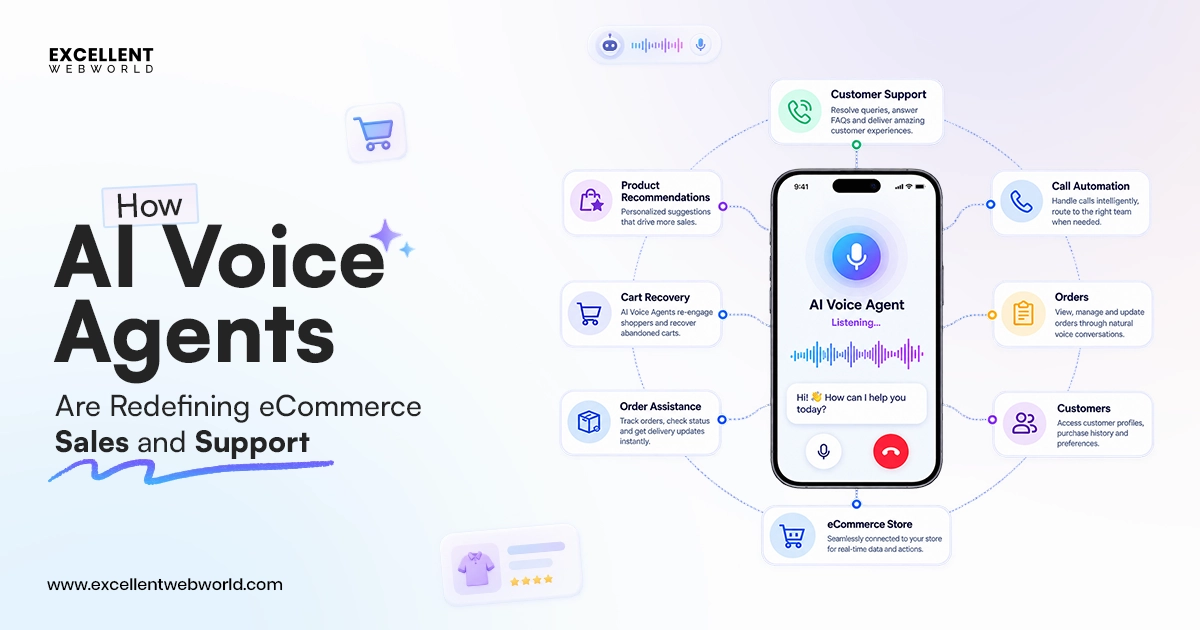
“Press 1 for sales. Press 2 for support. Press 3 to repeat the menu.”
As a CTO, I’ve seen enterprises spend years optimizing this experience. Well, that too, only to realize that customers don’t want to navigate a decision tree. What they actually want is to explain their problem, ask questions, and get things done.
That’s where traditional IVR starts to fall short.
Well, the AI voice agents are the game-changer in this so far. They transform the conversation. They can understand natural language, retain context, connect with enterprise systems, and take action in real time. But here’s the catch: deploying AI doesn’t automatically create enterprise value.
KPMG reports that 48% of organizations see significant productivity gains from AI, yet only 11% report substantial enterprise-wide impact.
So, my observation has confirmed that the gap reinforces one effective principle: AI works when it is designed around business outcomes, specifically.
Therefore, the decision on whether you should build an AI voice agent or buy one; cost, features, and use cases—everything combined makes it worthwhile. Let’s break it down.
What Is an AI Voice Agent
An AI voice agent is the primary system that has spoken conversational AI capabilities. This enables interaction with a person by acting or responding to what has been said. It’s not something that plays back the transcribed speech to trigger a fixed response.
However, modern AI voice agents are beyond those generic ones and call out the further step ahead.
The major difference between voice AI and AI voice agents is clear. Voice AI works in that text-to-speech is bolted onto a chatbot. Whereas the AI voice agent is the real-time pipeline of handling the incoming audio, converting it to text, and then having the LLM reason about what was said. Further, it decides on the response after churning data and then creates a response that is converted back to speech. Moreover, the entire loop needs to process fast enough to feel like a conversation rather than a call-and-response delay.
Well, the benchmark of “good enough” is derived as more strict compared to the text-based AI responses. Developing an AI chatbot is partially sufficient at times, as having it take about 3 secs to respond goes unnoticed and feels broken. Accordingly, the caller considers this as the line dropped. Even with such constraints, the latency reshapes every architectural decision in developing one. Well, the following section will better explain the difference between AI voice agents, bots, and traditional voice response performance.
AI Voice Agent vs IVR vs Voice Bot—What’s Actually Different?
As part of a single branch, a voice agent or bot, these terms are highly used (most interchangeably) in sales discussions. It should not be used that way, though. Having the wrong one in your use case will lead to a major setback for your voice AI project.
Remember, those traditional IVRs (“press 1 for sales”) are pure menu navigation. With zero understanding of language, that’s just routing based on button presses or, at best, simple keyword matching.
A voice bot adds speech recognition and basic intent matching. So, it can understand a handful of expected phrases, but it’s still following a decision tree someone built in advance; say something it doesn’t recognize, and it loops or transfers to a human.
While an AI voice agent is different in many ways. It uses an LLM to smoothly understand open-ended speech and hold context across the whole call. This can handle interruptions and decide dynamically what to say or do next. Also, this includes calling external tools like a booking system or even a CRM lookup mid-conversation. A few of the major parameters to differentiate are as follows:
| Dimension | Traditional IVR | Voice Bot | AI Voice Agent |
|---|---|---|---|
| Understanding | None — menu/DTMF only | Keyword/intent matching | Genuine language understanding (LLM) |
| Conversation flow | Fixed tree | Fixed tree with some branching | Dynamic, context-aware |
| Handles interruption | No | Rarely | Yes, when built for it |
| Memory across the call | No | Limited | Full context retained |
| Handles unexpected input | Fails or transfers | Fails or transfers | Reasons and adapts |
| Latency tolerance | High (menu-based) | Medium | Must be sub-1.5s to feel natural |
| Best fit | Simple routing | FAQ-style, narrow scope | Open-ended conversations, judgment calls |
In a nutshell, if your use case is “route the caller to the right department,” an IVR is still the cheapest and most reliable option. For having a real conversation that understands what the caller actually wants and acting on it, that’s where an AI voice agent comes as the best choice.
How an AI Voice Agent Actually Works
Most production voice agents follow the same core loop. No matter if it’s a $12,000 MVP or even a six-figure enterprise solution deployment. The AI voice agent understands the pipeline concerns, as they mostly depend on determining if an agent seems natural or robotic. Moreover, it works on how these fragmented pieces are wired together. The following aspects explain this better.
Audio in → Speech-to-text (STT):
Firstly, the caller’s voice is converted to text in real time. This has to run continuously, and the system has to detect when someone has stopped talking (endpointing) versus merely pausing in mid-sentence.
Reasoning (LLM + Tool calls):
Next, the transcribed text runs to the LLM. It decides what to say next, and if the conversation requires it, it calls for a tool. So, this goes ahead with either checking a calendar, pulling a customer record, or even placing an order. Accordingly, this is where most of the actual “intelligence” lives, and it’s also where most of the latency budget gets spent.
Text-to-speech (TTS):
The LLM’s response gets converted into natural-sounding audio and streamed back to the caller. So, this ideally starts to play before the full response has completed generating. Hence, there’s no dead air.
Turn-taking & interruption handling:
Lastly, effective AI voice agent development delivers the accuracy to detect when a caller begins talking over and then stops speaking instantly, just like a human. So, getting this wrong is the easiest way to let an agent presume it is artificial.
Additionally, the latency math is relentless. As the industry benchmarks in 2026 put median entire response time at roughly 680ms at the 50th percentile. That’s up to 1,180ms at the 95th percentile for well-engineered production agents. Its response stretches past 2 seconds, where callers start talking over the agent or may assume that the call dropped.
However, with every millisecond, that budget gets split across endpointing. Therefore, it detects when the caller stopped talking, with STT processing, LLM time-to-first-token, and TTS generation. So, having a slow system with a bloated conversation history will simply extend the budget even before a single word of answer is generated.
What are the core features of a Production-Grade AI voice agent?
Having the pipeline is one aspect, and handling what is actually separated is another thing. What a business can run calls through is another matter. So, most voice agent demos look impressive on a quiet mic with a scripted question. But what actually determines whether an agent survives contact with real callers comes down to four capability areas. So, the weakness in any one of them is usually what a “why does our voice agent feel robotic” complaint traces back to.
Conversational Intelligence
The agent needs to track context across the whole call. Well, this means resolving intent even when a caller changes direction mid-sentence. This also involves extracting names, dates, and account details accurately and recovering gracefully. Therefore, starting from a low-confidence input rather than looping.
Real-time Voice Experience
This is the latency and naturalness work. It’s made concrete: the first audio response is roughly 1.5 seconds, with clean barge-in handling. So, when a caller talks over the agent, and the agent streams the batch-generated speech instead, there’s no dead air.
Action & Workflow Execution
Next is the workflow execution of the voice agent that only talks, which isn’t actually useful in most business contexts. It needs to call tools mid-conversation, validate inputs before writing to a CRM or booking system, and complete multi-step tasks (verify identity, then check an order, then process a return) within a single call, not hand off to a human for each step.
Enterprise Readiness
Access control and encryption on every call, full interaction logging for audit purposes, observability into latency and failure rates, and the ability to scale across regions and languages without the whole system needing to be rebuilt per market.
| Feature area | What it means in practice | What breaks without it |
|---|---|---|
| Conversational intelligence | Multi-turn context, intent resolution, entity extraction | The caller repeats themselves, and the agent loses the thread |
| Real-time voice experience | Sub-1.5s response, barge-in handling, streaming audio | The agent feels robotic; callers talk over it or hang up |
| Action & workflow execution | Tool calling, validated writes, multi-step task completion | An agent can talk but can’t actually resolve anything |
| Enterprise readiness | Access control, encryption, audit logs, observability | Compliance risk, no visibility into failures at scale |
Who Should Build AI Voice Agents
Not every business needs one, and not every use case justifies the cost of getting latency and naturalness right. The clearest fits are high-volume, moderately structured conversations where a human is currently doing repetitive work: answering the same questions, qualifying the same kind of lead, booking the same kind of appointment.
By Use Cases
| Use case | Fit | Why |
|---|---|---|
| Inbound support triage | Strong | High volume, structured intents, clear escalation path |
| Appointment scheduling | Strong | Bounded task, calendar integration, low ambiguity |
| Outbound sales qualification | Strong | Repetitive script with branching, high call volume |
| IVR replacement | Strong | Direct upgrade path from an existing structured system |
| Complex Negotiation/Dispute resolution | Weak | Requires judgment and rapport current agents can’t reliably deliver |
| Emotionally sensitive calls (grief, crisis) | Avoid | Human judgment and empathy are not replaceable here |
By Industry Verticals
| Industry/Business Type | Strong AI Voice Agent Implementations | Adoption |
|---|---|---|
| E-commerce & Retail | AI voice agents in e-commerce make for order tracking and status updates, returns, product availability, payment reminders, and store inquiries. | Strong fit now |
| Healthcare Providers | AI voice agent for healthcare covers appointment scheduling and reminders, patient registration, insurance status updates, prior authorization status & non-clinical follow-ups | Fit with compliance investment |
| Real Estate | AI voice agent for real estate offers lead qualification, discovery questions, property-viewing/showing bookings, enquiry routing, follow-up calls | Strong fit now |
| Logistics & Transportation | Shipment tracking, delivery status, delivery scheduling, driver coordination, exception notifications | Strong fit now |
| Financial Services & Insurance / Fintech | Conversational AI voice agent is essential to process account-status enquiries, identity verification, Benefits & policy information Insurance claims intake & status | Fit with compliance investment |
| SaaS & Technology Companies | AI voice agent for customer service & support, password resets, subscription questions, ticket creation, account routing | Strong fit now |
| Field Service Businesses | Job booking, technician scheduling, service-window confirmations, dispatch coordination | Strong fit now |
| Hospitality & Restaurants | AI voice agent for restaurants includes reservations, booking modifications, guest requests, order-status updates | Strong fit now |
| B2B Sales Teams | Inbound lead qualification, discovery questions, meeting scheduling, CRM updates, follow-up calls | Strong fit now |
| HR & Internal IT Teams | IT ticket logging, employee policy questions, onboarding support, basic HR enquiries | Strong fit now |
| High-Stakes / Regulated Use Cases | Clinical triage, legal advice, or calls where an incorrect response could have serious consequences without a human safety net | Premature without robust human oversight and safeguards |
Why Build One (& Where It Still Falls Short)
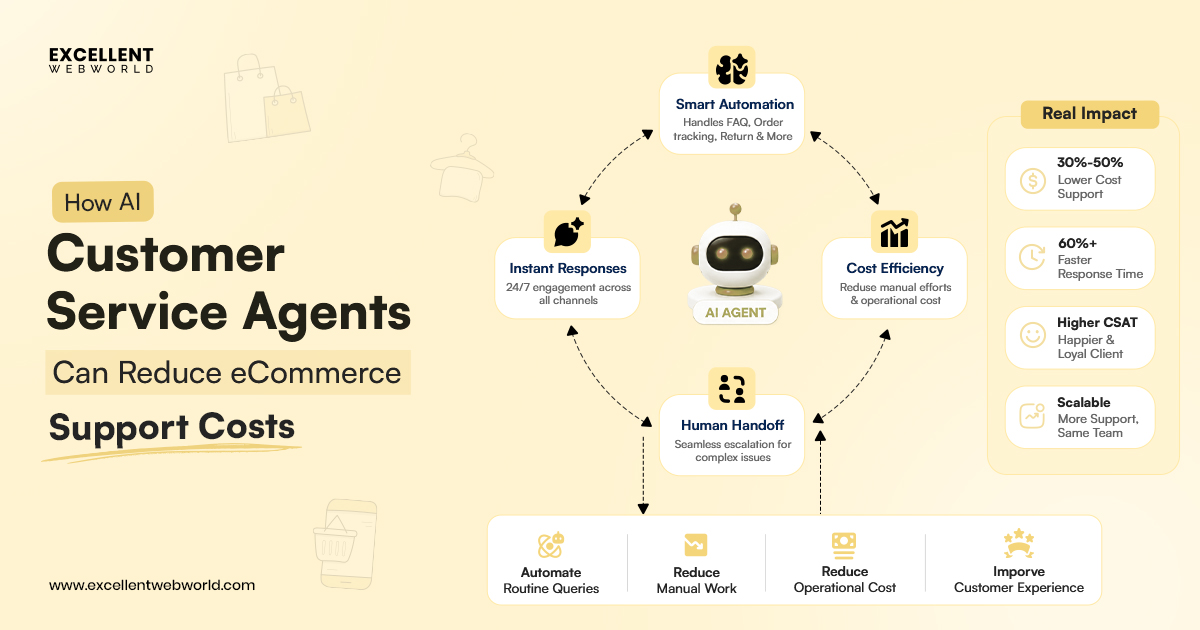
An AI voice agent can help businesses answer calls 24/7, provide consistent responses, and lower the cost of handling repeated requests. So, it’s a win-win for high-volume tasks such as appointment booking, order updates, lead qualification, and basic customer support.
In customer service, this shift is already visible through the adoption of AI-powered contact-center tools. Rather than simply replacing customer-service employees, BCG says that 50% to 55% of jobs in the US could be reshaped by AI over the next two to three years. AI agents automate routine inquiries and allow human agents to focus on complex issues, exceptions, and interactions. As that requires greater judgment and empathy.
Deloitte’s 2026 contact-center survey found that 64% of service leaders reported better employee productivity with AI. While 39% reported lower costs for each customer interaction. Moreover, another 43% expect AI to reduce contact-center costs by 30% or more over the next three years.
However, AI voice agents still have limits:
- Strong accents or background noise: The agent may misunderstand callers when the call quality is poor or even when the environment is loud.
- Complex negotiations: Agents can follow planned steps but may struggle with bargaining, disputes, or difficult complaints.
- Emotional situations: The agent may not fully understand when a caller is angry, upset, scared, or frustrated.
- Unexpected questions: The agent may not know how to answer requests outside its approved task, so it needs to transfer the call to a human quickly.
Well, it is quite proven that the best results come from giving an AI voice agent one clear job. So, an agent that tries to answer every possible question is more likely to make mistakes.
Build vs Buy: Why Deploy Custom AI Voice Agents?
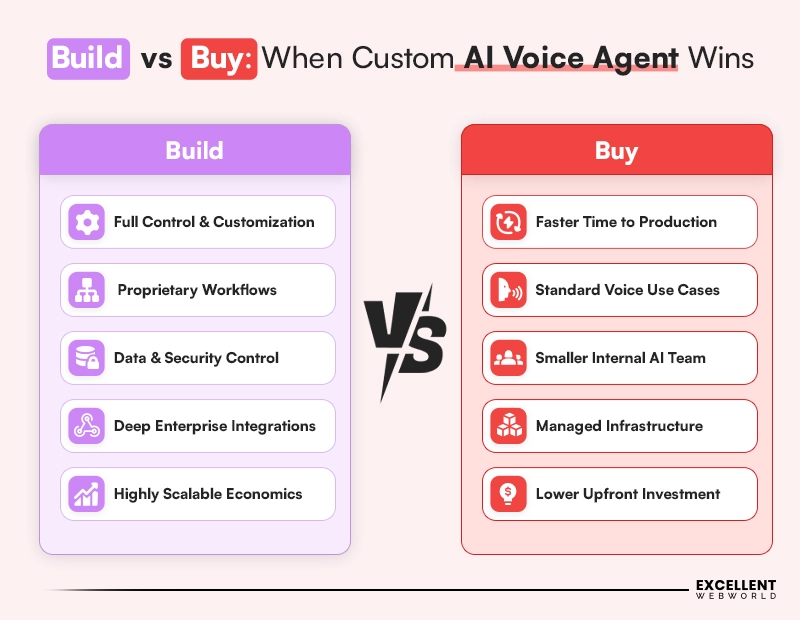
This is a decision many teams make too quickly when they deploy a voice AI agent. Platforms like Vapi, Retell, Synthflow, and Bland AI can launch an AI voice agent in days. That too, by bundling speech recognition, AI responses, voice generation, and telephony into one platform.
Moreover, that speed makes buying a smart choice for a proof of concept or a low-volume pilot. So, start small, testing whether the use case works, and avoiding a large upfront investment.
However, once the voice agent becomes part of everyday business, handling regular customer calls, bookings, leads, or support, the decision changes. At that stage, a custom solution may offer more control, stronger security, and better long-term cost management.
| Decision Factor | Buy: Managed AI Voice Agent Platform | Build: Custom AI Voice Agent |
|---|---|---|
| Time to launch | Fastest option: a prototype can go live in days | Longer delivery cycle, typically requires weeks to months for production readiness |
| Upfront investment | Lower initial cost; suitable for testing demand or validating a narrow workflow | Higher upfront cost for architecture, integrations, testing, security, and monitoring |
| Internal expertise | Minimal voice-AI engineering expertise needed to begin | Requires backend, telephony, AI integration, cloud, and security expertise |
| Best use case | Proofs of concept, internal pilots, low-volume calls, and standard workflows | High-volume, revenue-facing, regulated, or deeply integrated business workflows |
| Per-minute operating cost | Commonly priced at around $0.05–$0.16 per connected minute, often with bundled-platform markup | Can achieve better unit economics at scale by selecting individual STT, LLM, TTS, telephony, and infrastructure components |
| Cost at scale | Cost rises directly with usage; per-minute markup can become a significant recurring expense at thousands of call minutes | Higher initial build cost, but ongoing cost can be optimized as call volume increases |
| Customization | Limited to the platform’s available prompts, workflows, tools, and integrations | Full control over conversation flows, prompts, voice behavior, escalation paths, business rules, and integrations |
| Conversation design | Works well for standard support, booking, qualification, and FAQ flows | Supports industry-specific workflows, complex routing, multilingual logic, policy constraints, and custom agent behavior |
| Enterprise integrations | Depends on prebuilt connectors and vendor API limits | Direct integration with CRM, ERP, booking, ticketing, payments, data warehouses, and proprietary systems |
| Data ownership | Call recordings, transcripts, metadata, and processing locations depend on the vendor’s policy and infrastructure | Greater control over data storage, processing, retention, deletion, and access policies |
| Data residency | May be limited to the vendor’s supported regions and infrastructure choices | Can be deployed in the required cloud region, private cloud, VPC, on-premises environment, or jurisdiction |
| Compliance readiness | May offer compliance features, but the enterprise remains dependent on vendor assurances and supported configurations | Compliance controls can be designed around HIPAA, GDPR, SOC 2, PCI DSS, local call-recording rules, and internal policies |
| Security controls | Platform-defined identity, logging, permissions, encryption, and tool controls | Custom RBAC, encryption, key management, API permissions, audit logging, redaction, and approval workflows |
| Vendor dependency | High: The pricing, feature availability, uptime, platform roadmap, and deprecations remain vendor-controlled | Lower Enterprises own orchestration logic and can replace individual vendors. That too without rebuilding the complete system |
| Model flexibility | It’s usually limited to models and routing options. The platform supports that | Choose, switch, and route between OpenAI, Anthropic, Gemini, open-weight models, or private models. That’s based on cost, performance, and policy |
| Latency optimization | Limited visibility into the vendor’s internal pipeline and network routing | Full ability to optimize endpointing, model selection, streaming, TTS timing, regional hosting, and fallback behavior |
| Observability | Limited to the monitoring, transcripts, and analytics exposed by the vendor | Full visibility into latency, tool calls, token cost, call outcomes, failure points, transcripts, and escalation performance |
| Troubleshooting | Dependent on vendor dashboards, APIs, and support response time | Teams can inspect the full stack, diagnose bottlenecks, reproduce failures, and change the orchestration layer directly |
| Scalability | Easy to scale initially, subject to vendor capacity, rate limits, regional support, and pricing | Requires engineering investment, but supports architecture designed around expected traffic, fault tolerance, and cost targets |
| Long-term strategic value | Best for speed and learning whether the use case is viable | Best for owning a differentiated, revenue-touching, or operationally critical voice experience |
My Honest Opinion: Buying a ready-made platform is a good way to test an AI voice agent quickly. But when the agent handles regular sales, support, bookings, or sensitive customer data, a custom build gives the business more control.
You should go with a custom AI voice agent that can use trusted speech and AI tools. So, your business owns the workflow, data rules, integrations, and safety checks. This can lower costs as call volume grows and makes it easier to change the agent as business needs change.
Alain: Conversational AI Language Learning Platform
Built for real-time, adaptive conversations across web and Android—demonstrating the core capabilities required for enterprise AI voice agents.
- 7 Real-World Conversation Domains
- Adaptive, Context-Aware Dialogue
- Multilingual Support with Speech Feedback
- Responses Delivered in Under 1.5 Seconds
- 45% Higher Enrollment, 41% Course Completion
Key Components of an AI Voice Agent Development (What You Actually Need)
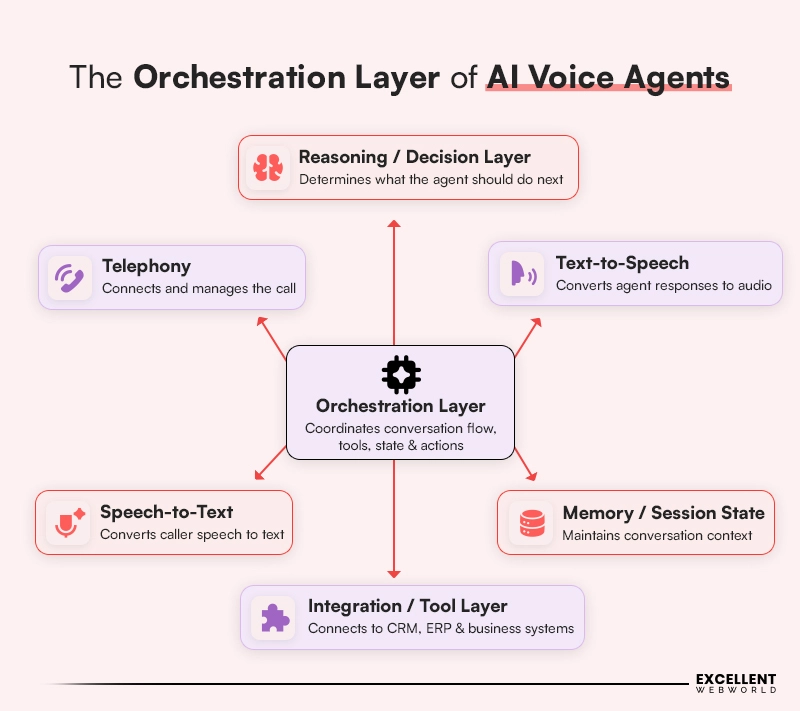
The components are the main parts an AI voice agent development needs to work with. The tech stack section ahead explains which tools or vendors you can choose for each part. So, together, these components help the agent listen, understand, respond, take action, and manage phone calls. Moreover, most voice agents use a speech-to-text → LLM → text-to-speech flow, supported by orchestration and telephony layers.
1. Speech-to-Text (STT / ASR)
This changes the caller’s spoken words into text so the AI can understand them.
What breaks without it:
The agent may mishear names, numbers, addresses, or requests. It may also struggle with accents, noise, people talking at the same time, or poor call quality.
2. Reasoning Layer (LLM)
The reasoning layer works as the agent’s brain. It understands what the caller wants, remembers the conversation, and decides what to say. Even chooses when to use a tool, such as checking an order or booking an appointment.
What breaks without it:
The agent cannot handle natural conversations. It may give generic answers, forget earlier details, or fail when a caller asks something outside a simple script.
3. Text-to-Speech (TTS)
The TTS changes the AI’s written response into a natural voice that the caller can hear.
What breaks without it:
The voice may sound robotic, slow, or unnatural. If it cannot stop quickly when the caller speaks, the agent may talk over the person and create a frustrating experience.
4. Orchestration Layer
Connects all parts of the voice agent. It manages conversation flow, remembers context, sends requests to the right tools, handles errors, and controls human handoffs.
What breaks without it:
The voice agent may lose track of the conversation, repeat questions, fail to recover from an error, or be unable to complete multi-step tasks. So, this is the main layer businesses should control in a custom AI voice agent.
5. Integration Layer
Connects the agent to business tools such as CRM systems, calendars, booking platforms, order databases, support tickets, and payment systems.
What breaks without it:
The agent can speak to customers but cannot actually complete tasks. For example, it may explain how to book an appointment but cannot check availability or confirm the booking.
6. Telephony and Communication Layer
The last one is this: the telephony connects the voice agent to phone calls, web calls, call routing, queues, call transfers, and contact center systems. So, it even works through technologies such as SIP or WebRTC.
What breaks without it:
The agent cannot receive or make real calls. It also cannot route a customer to the right team or transfer a difficult call to a human agent.
What are the major Tech Stack for building AI Voice Agents?
The voice AI stack is more fragmented than most people expect, much like the broader agentic AI development space. Accordingly, most production builds mix components from different vendors, and the choice between a fully bundled platform and a “bring your own key” stack of separate best-in-class tools is one of the first architectural decisions to make.
| Layer | Common choices |
|---|---|
| Speech-to-text (STT) | Deepgram, AssemblyAI, OpenAI Whisper, Inworld Realtime STT |
| LLM / reasoning layer | GPT-4/5-class models, Claude, Gemini, smaller open-weight models for cost-sensitive flows |
| Text-to-speech (TTS) | ElevenLabs, PlayHT, Azure Neural TTS, Inworld Realtime TTS-2, Cartesia Sonic |
| Orchestration/ telephony | Twilio, Telnyx, Vapi, Retell, LiveKit, Pipecat |
| Speech-to-speech (bundled) | OpenAI gpt-realtime, Google Gemini Live, Inworld Realtime API, Ultravox; skips the cascaded pipeline entirely |
| Observability | Custom call logging, transcript review tooling, latency dashboards |
Quick Tip: Endpointing matters more than people think. It’s how quickly a platform decides the caller has finished speaking directly that shapes how natural the agent feels. So, if you have badly tuned endpointing, then it may adversely cause an agent to talk over callers or leave awkward silences.
How to Build an AI Voice Agent — 10 Steps
| Steps | What My Team Does | What We Have Learned |
|---|---|---|
| 1. Define the scope | My team defines exactly what the AI voice agent can do, cannot do, and when it must transfer the caller to a human. | We have found that narrow tasks, such as appointment booking, delivery-status checks, or lead qualification, are best handled by AI. So, it works better than an agent designed to answer every question. |
| 2. Pick the architecture | We choose between a cascaded setup (speech-to-text → LLM → text-to-speech) and a speech-to-speech setup based on speed, control, cost, and compliance needs. | We use cascaded systems when clients need easier debugging and stronger control. We consider speech-to-speech when natural, fast conversation is the main priority. |
| 3. Set up speech-to-text | My team selects and tunes speech recognition for real accents, industry words, background noise, poor call quality, and callers talking over each other. | We have learned that a speech model that works well in a quiet demo may fail on real phone calls. Thus, Real call testing is essential. |
| 4. Connect the AI brain | We connect the AI to approved calendars, CRM systems, support tools, order databases, and knowledge bases. | My team keeps AI instructions short and uses trusted data sources because long prompts and unclear data can slow responses and lead to wrong answers. |
| 5. Set up text-to-speech | We choose a natural voice and configure it to start speaking while the AI is still creating the full response. | We have found that quick voice streaming avoids awkward silence and makes the conversation feel more natural. |
| 6. Handle interruptions | My team builds interruption support so the agent stops talking as soon as the caller speaks. | We have seen that callers lose trust quickly when an agent talks over them. Good interruption handling makes the agent feel less robotic. |
| 7. Plan the human handoff | We set rules for low-confidence answers, sensitive topics, system errors, complex requests, and callers who ask to speak with a person. | We believe a fast transfer with a short call summary is more useful than forcing the AI to answer a question it does not understand. |
| 8. Test with real conditions | My team tests real phone calls with different accents, noisy environments, unclear speech, interruptions, system errors, and unusual requests. | We do not rely only on quiet office tests. Real callers and real phone lines show the problems that matter before launch. |
| 9. Track the right metrics | We measure containment rate, task completion, handoff quality, first-response time, call duration, and customer satisfaction. | My team focuses on containment rate; how many calls the agent resolves without human help—because it shows real business value, not only speech accuracy. |
| 10. Launch small, then improve | We start with a small group of real calls, review transcripts and outcomes, improve the workflows, and expand gradually. | We have learned that every live launch reveals unexpected questions. A small pilot gives teams time to improve safely before full rollout. |
What is the AI Voice Agent Development Cost?
AI voice agent software costs are split into two very different buckets: the one-time build cost and the ongoing per-minute run cost.
Build cost by scope
| Tier | Scope | Estimated cost (USD) |
|---|---|---|
| Proof of concept | Single flow, one channel, no complex integrations | $8,000 – $25,000 |
| MVP / single channel | Phone or web, tuned STT/LLM/TTS, basic integrations | $12,000 – $45,000 |
| Advanced multi-channel | Multiple channels, multiple languages, complex workflows, telephony at scale | $45,000 – $150,000+ |
Ongoing run cost (per connected minute)
| Architecture | Approx. cost per minute (USD) |
|---|---|
| Cascaded (budget stack, English-only) | $0.007 – $0.03 |
| Cascaded (production-grade, tuned) | $0.07 – $0.13 |
| Speech-to-speech | $0.18 – $0.21 |
| Bundled managed platforms | $0.05 – $0.16 (markup over raw components) |
Well, the platform prices often exclude telephony, speech-to-text, AI-model usage, and text-to-speech fees. So, you can compare vendors by the total cost per connected minute, because the final cost can be much higher once all services are included.
Pro Tip:
The cost of developing an AI voice agent also depends on team location. US and Western European teams usually cost more, while a blended model, local leadership with an India-based AI engineering team, can reduce build costs while maintaining project oversight.
How Long Does it Actually Take to Develop an AI Voice Agent?
AI Voice agent development timelines are shaped by a single phase that most teams underestimate. It’s real-call latency tuning; in this a pipeline that feels responsive in a controlled test often needs real rework once it’s tested against actual phone lines, real accents, and real background noise. So, this is the voice-agent equivalent of “testing non-determinism” in broader agentic AI builds. Moreover, skipping it is the most common reason for launching slip.
| Phase | Duration |
|---|---|
| Scope definition & script mapping | 1–2 weeks |
| Architecture selection (cascaded vs speech-to-speech) | 1 week |
| STT/LLM/TTS integration & tuning | 3–5 weeks |
| Turn-taking & interruption handling | 2–3 weeks |
| Tool/system integrations | 1–3 weeks each |
| Real-condition testing & latency tuning | 3–5 weeks |
| Pilot on live call volume | 3–6 weeks |
In a nutshell, the realistic timelines are:
- Proof of concept: 4–6 weeks
- MVP, single channel: 8–12 weeks
- Advanced multi-channel, multi-language: 4–6 months
Few of the Major Limitations of AI Voice Agents
Here are the main limits businesses should plan for:
1. Speed vs cost:
Faster voice agents can sound more natural, but they usually cost more. So, lower-cost setups may need more tuning to avoid long pauses.
2. Accents and background noise:
The agent may misunderstand callers with regional accents, poor phone connections, loud surroundings, or mixed languages.
3. Interruptions:
The agent may sometimes talk over a caller or wait too long before responding. Hence, this happens when it cannot correctly understand if the caller has finished speaking or not.
4. Different rules in different regions:
Businesses must follow local rules for call recording, customer consent, AI disclosure, and data storage. Thus, these rules can vary by country, state, and industry.
5. Complex or sensitive calls:
AI voice agents should not handle serious negotiations, emotional complaints, crisis calls, legal advice, medical diagnosis, or other high-risk decisions without a human ready to take over.
Therefore, the safest approach is to give the AI voice agent a clear job. Ensure you use trusted business data, test it with real callers, and then provide a quick handoff to a trained human when the conversation becomes too complicated.
Where I See This Heading
Now, moving forward, the response times are shrinking fast. When phone systems, speech recognition, and the AI model all sit on one network instead of three stitched-together vendors, I’m seeing round-trip times drop under 200ms. Down from over a second just a year or two ago. So, that’s the difference between a natural pause and a broken one.
The all-in-one voice models are also closing the cost gap with older setups, and once pricing evens out, it’s expected that most teams will switch; they simply sound more natural and respond faster. Language coverage is moving just as quickly: tools that handled 15 languages a year ago are pushing toward 100+. Therefore, this matters if you’re talking to customers across regions.
The change that I have noticed most is the hardest to measure: these agents used to sound “clearly like a bot, but a helpful one.” Now, in short conversations, I’ve had a hard time telling them apart from a real person. That doesn’t mean full autonomy is close — the same gap between an impressive demo and a production-ready system shows up here too. But the direction is clear, and it isn’t slowing down.
An AI voice agent that actually works isn’t about picking the fanciest model; it’s about respecting one rule. That is, it has to feel like a real conversation. Every team that gets this right keeps the agent’s job narrow, tests against real, messy calls instead of clean demos, and treats speed as a day-one design decision.
If you’re weighing whether a voice agent fits your business, talk to my team. I’d rather tell you honestly where it fits than sell you a demo that won’t survive a real phone line.
Frequently Asked Questions
A basic AI voice agent usually costs around USD 20,000 to 50,000 to build. A more advanced enterprise solution with CRM integration, multiple languages, security controls, and complex workflows. So, it can cost USD 50,000 to 150,000+, plus ongoing telephony, speech, model, cloud, and monitoring costs.
Buy when you need to test a simple idea quickly or run a low-volume pilot. Build a custom or hybrid solution when the agent handles sensitive data, needs deep CRM/ERP integrations, must meet compliance requirements, or will become a high-volume, business-critical channel. Therefore, a hybrid approach often works best: use proven speech and AI agent services, while owning the workflow, integrations, security, and governance layer.
The most important feature is reliable orchestration: the system that manages conversation context, approved data access, tool calls, error handling, human handoffs, and security rules. A natural voice is important, but an agent cannot deliver business value if it cannot safely complete tasks or transfer complex calls with the right customer context.
Yes. Every enterprise AI voice agent should have a human-handoff option. The agent should transfer the call when it cannot understand the request, the caller asks for a person, the issue is sensitive, or the task needs human judgment. Thus, human handoff is especially important for complaints, payment disputes, legal or medical questions, account-security issues, emotional calls, and other high-risk situations.

Article By


Mayur Panchal is the CTO of Excellent Webworld. With his skills and expertise, he stays updated with industry trends and utilizes his technical expertise to address problems faced by entrepreneurs and startup owners.