Quick Summary
We will drive through the battle between single-page applications and vs multi-page applications (SPA vs MPA). Know which suits best for your web development architecture.
A single-page application loads everything on a single page. A multi-page application serves multiple pages as users navigate the app.
At a glance, know everything about single-page applications and multi-page applications in this detailed guide that we have brought for you.
You click and open a website and wait for the page to reload. After thinking twice, you click again, and still you are on the same page.
The experience feels fragmented and sluggish, doesn’t it? Now take an app where everything is perfect. DOM updates in the background. Instant navigation. Interactions carried out without reloads.
You can clearly see the difference, and that is what pushes the SPA vs MPA conversation into the discussion. What seems like a small difference in page behaviour leads to a big deal with routing and rendering layers.
One approach eradicates page reloads and sticks to fluid navigation. The other splits content into pages, making it easier to index.
It looks like technical differences, but are more about real user behavior and how the website responds. Let’s study what a single-page application and a multi-page application are in detail without wasting time.
What is a Single-Page Application (SPA)?
As the names suggest, it is a web app that loads a single HTML page. The app dynamically updates content as users interact with it without reloading the entire page.
If you look into platforms like Gmail and Google Maps, they are the best examples of SPA. Today, the scenario is a bit different, where many large platforms adopt hybrid architectures. However, pure SPAs are the best understood through applications designed primarily around client-side rendering.
For better SEO, first page reloads are managed with server-side rendering, whereas client-side JavaScript maintains responsive user interactions. The logic for SPA is that it does not reload the entire page; however, only the main content section of the page gets reloaded. Thus, preserves the same menu, header, and footer for the page.
Now, let’s describe SPA in technical terms. Most of the time, SPAs are used to create fast and seamless websites with the help of technologies like Angular, Vue.js, and React.js.
In short, if you’re looking to develop a website that is fast, easy to build, responsive, adaptive, and maintainable, then SPA is a choice for you.
What is a Multi-Page Application (MPA)?
Coming to the multi-page application, here multiple web pages are served to the user’s browsers as they navigate through the web app.
Basically, each page represents a functionality or a different section based on the user’s navigation. The fact is, MPA requires a full page load when you navigate from one functionality to another or to various sections.
For instance, MPA has a home page, contact form, user profile, admin profile, login page, product display page, and more. And, each of these pages has its own layout and functionality based on its purpose and functionality.
For traditional rendering setups, MPA is the most used approach for web development.
Key Technical Differences Between Single-Page Application (SPA) and Multi-Page Application (MPA)
Let’s have a clear and comprehensive comparison of single-page application vs multi page application.
| Aspects | Single-Page Application (SPA) | Multi-Page Application (MPA) |
|---|---|---|
| Page Loading | Faster navigation as the page loads only once for subsequent interactions | Need the entire page to load when navigating between the pages |
| Performance | As the page loads only once, it is faster and more seamless for the user navigation. | MPAs reload fully per page, slowing transitions. |
| Initial Load Time | Usually takes a longer time as all the necessary upfront resources are loaded for the subsequent actions | Less initial load time, as each page needs its own resources to be fetched from the server |
| SEO Friendliness | Achieves excellent SEO because of the advanced SPAs that use meta frameworks. These include Next.js, Nuxt, & SvelteKit with SSR/SSG | Considered more SEO friendly as each page has its own URL and content, which gives a boost to SEO |
| Security | Priority is more towards client-side security. This includes Content Security Policy (CSP), HTTPS, and proper input validation. Modern frameworks offer built-in XSS protection | Even though security is driven by coding practices, server-side rendering addresses specific risks like XSS in client-rendered content |
| Code Reusability | Better code reusability through component-based architecture, where reusable UI components can be shared across different views within the application | Limited code reusability, as each page may require its own set of HTML, CSS, and JavaScript resources |
| Testing | Needs extra considerations, especially for client-side interactions, which involve complex testing setups | Testing is simple, as each page is tested individually |
| Third-Party Integrations | Requires careful consideration of third-party integrations to ensure compatibility with client-side rendering and routing | Integrating third-party services or widgets can be simpler since each page operates independently |
| Resource Utilization | Decrease the server load time, as most of the app logic is handled on the client side | Needs more server resources for the frequent page requests |
| Scalability | Static SPA bundles can be served from a CDN with excellent scalability. The server only handles API requests, which can be separately scaled. | Scalability depends on server infrastructure; it requires scaling server resources for rendering. Can handle high traffic with proper load balancing and caching |
| Browser History Management | Requires explicit management of browser history using JavaScript, typically through HTML5 History API or routing libraries | Handled naturally by the browser, as each page load corresponds to a new entry in the history stack |
| Development Process | The process is iterative, as the app is developed and runs client-side in the browser. | The web app development process is quite straightforward, as the app is built on a server and deployed on a browser. |
For SPA vs MPA, here is one more brief for you. We have assembled a few conditions for you that will help you decide on the web application architecture for web application development.
Now, let’s compare both in detail.
How SPA & MPA Affects Core Web Vitals Performance
What are Core Web Vitals? They are a set of metrics that are defined by Google to measure user experience and the ranking of a page. Let’s look at each metric in this table.
| Metric | What It Measures | SPA Performance | MPA Performance |
|---|---|---|---|
| LCP (Largest Contentful Paint) | Loading performance | Can slow down when heavy scripts block initial content display | Get benefits with pre-rendered HTML, improving load speed |
| INP (Interaction to Next Paint) | Runtime responsiveness | Strong responsiveness after the initial load is complete | Each action performed may cause a delay |
| CLS (Cumulative Layout Shift) | Visual stability | Works perfectly when dynamic content is managed carefully | Offers predictable layout behavior |
Key Takeaway: Performance issues are somewhat of a concern with LCP and FID in SPAs. However, meta-frameworks built for SSR/SSG address these concerns by delivering fast initial loads along with interactive behavior.
Examples of Single-Page Application (SPA)
1. Vrbo – Search results & filters updated without page reload
2. Grammarly – Edits & suggestions appear instantly with typing
3. Figma – Canvas updates in live with page transitions
4. Hulu – Playback controls update within the same screen
5. Trello – Cards & lists updated instantly within the same view
6. Slack – Messages & channels update without reload
7. Spotify – Navigation occurs in one continuous view
Examples of Multi-Page Application (MPA)
1. IMDb – Movies, cast, and reviews open on separate pages
2. Amazon – Different product pages as well as checkout pages
3. eBay – Each search & product view triggers a new page
4. CNN – Each news article loads as a distinct page
5. Indeed – Job searches reload when filters or queries change
6. WordPress – Every post or page is loaded separately
7. Stack Overflow – Questions & answers are served on separate pages
How to Develop a Single-Page Application (SPA)?
Well, to build a SPA, you need to follow the process given below, a comprehensive step-by-step process.
Step 1. Plan and Design the App Flow
Define the application’s objectives, features, and user experience, and then develop wireframes or mockups to visualize the layout and interactions.
Step 2. Select the Right Framework as Per Your Needs
You have to choose a JavaScript framework or library such as Angular, Vue.js, or React.js for your web application.
Step 3. Development Environment & Application Structure
Install necessary tools and dependencies, including Node.js, npm/yarn, and a code editor. Establish the basic folder structure for your project and initialize the project using npm or yarn.
Step 4. Develop User Interface Components
Build the UI components like forms, buttons, data views, and navigation bars using HTML, CSS, and JavaScript. These components and layout manage how users engage with the interface and should be designed for consistency, responsiveness, and smooth state updates.
Step 5. Client-Side Routing for Navigation
Setting up client-side routing to manage navigation within the application without full page reloads. Mostly, the router libraries like React Router, Vue Router, or Angular Router are used.
Step 6. Data Management & Application State
Implement logic for fetching and managing data from backend APIs or services. Utilize state management solutions, Redux or Zustand (for React), Pinia (for Vue 3, which is the official recommendation replacing Vuex), or Angular services and Signals (for Angular 16+).
Step 7. Optimize Performance & Load Speed
Optimize the application’s performance by minimizing bundle size, lazy loading components, and utilizing techniques like code splitting and caching.
Step 8. Perform Testing & Deployment of the App
It’s best to test your app across different browsers and devices to ensure compatibility and responsiveness. Build the application for production and deploy it to a web server or cloud hosting platform.
Step 9. Conduct Maintenance and Roll Out Updates
Monitor performance, fix bugs, and review user experience to identify areas of improvements. The step also comes with releasing updates like security patches and performance optimization to keep the app stable and relevant over time.
If you need more info about how to build a single-page application, then you can visit our detailed guide – Defining SPA. Or, you can connect with our experts!
How to Build a Multi-Page Application (MPA)?
The steps of developing a multi-page application outline how to structure and manage it by covering front-end and server-side development aspects. Here’s a list of pointers you need to consider:
Step 1. List Your Requirements & Scope
Clearly outline the purpose of your app, for what you are building it, and the target audience you will be addressing. Along with that, define the features and functionality your application needs to support.
Step 2. Select the Right Technology Stack
Choose the appropriate technologies and frameworks based on your project requirements and team expertise. Also, there are high chances you might need to consider factors like SEO & rendering performance, routing, scalability, and security.
Step 3. Define Web App Structure & Architecture
Design the architecture of your application, including navigation flow and page hierarchy. Make sure to identify how each page connects as well as how the flow of data between client and server.
Step 4. Create Page Templates & Server-Side Logic
Develop HTML templates for each page of your application. Write server-side code to handle requests, process data, and generate dynamic content for each page. Such an approach shows that each page is generated with accuracy based on user action and inputs.
Step 5. Set Up Routing & Front End Development
Define routes to map URLs to specific pages or resources in your application. Build the front-end interface using HTML, CSS, and JavaScript to render pages and handle user interactions.
Step 6. Data Management & Backend Integration
Implement data fetching and manipulation logic, including interactions with backend APIs or databases. The step involves integrating third-party services if there is any requirement, like payment gateways, analytics tools, or authentication systems.
Step 7. Performance Optimization & App Testing
Keep working on page load times and server response times by minimizing code size, leveraging caching mechanisms, and optimizing database queries. Perform thorough testing to ensure functionality, compatibility, and performance across different browsers and devices.
Step 8. Deploy, Monitor, and Maintain Application
Deploy your application to a web server or cloud hosting platform to make it accessible to users. Keep an eye on the performance and security of your application, and regularly update it to address bugs, vulnerabilities, and user feedback.
Single-Page Application (SPA) Development Lifecycle
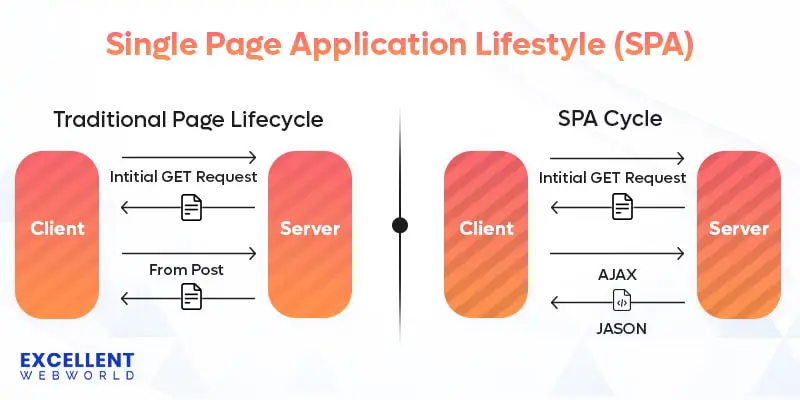
Firstly, let’s talk about how a single-page application works. However, the above-given image makes it much clearer about the single-page application lifecycle.
The working of SPA is mainly divided into four major steps, which are explained below.
Phase 1. Initial Load
When a user visits the SPA, the browser loads a single HTML file that contains the basic structure and initial content of the application.
Phase 2. Client Side Rendering
Frameworks like React, Angular, or Vue.js render the initial UI components and fetch necessary data from backend APIs asynchronously.
Phase 3. Dynamic Updates
As the user starts interacting with the web app, the content updates dynamically without full page reloads. It is possible by manipulating the DOM ( Document Object Model ) directly on the client-side, based on user actions and data received from the server.
Phase 4. Client Side Routing
Here, let’s say you are about to build a React SPA, then it utilizes the client-side routing for handling the navigation among different sections of the application. When a user navigates to a new route (e.g., changing the URL or clicking on a link), the framework updates the URL in the browser’s address bar and loads the corresponding view.
Multi-Page Application (MPA) Development Lifecycle
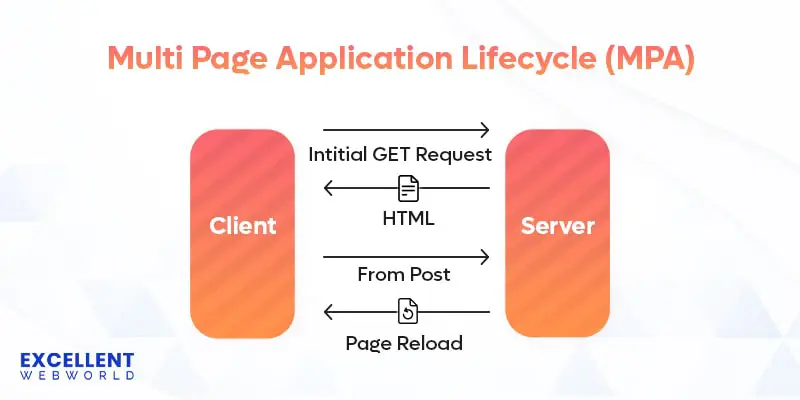
The above image makes it clear how the MPA lifecycle differs from the SPA web development phase. Just like SPA, the MPA lifecycle is divided into four parts as explained below. Let’s get into how multi-page applications work.
Phase 1. Initial Page Load
When the user interacts, the browser requests the initial HTML document from the server. And, the server sends the entire HTML page with CSS and JavaScript required.
Phase 2. Page Navigation
As the user navigates through the application, the server keeps responding by sending all necessary HTML documents requested for the pages.
Phase 3. Full Page Reload
The page reload process involves fetching new HTML, CSS, JavaScript, and other assets from the server, resulting in a complete refresh of the browser window.
Phase 4. Rendering
As a new page loads, the browser renders the content and executes any JavaScript code included in the page.
5 Key Benefits of Single-Page Applications (SPAs)
SPAs are the one that offers a smooth user experience by cutting out the time required to reload a page. This is just one benefit, but when the user interacts with the app, the impact is noticeable in terms of responsiveness, performance, and so on. Check out the list of advantages given below.
1. Cross-Platform Development SPAs
It allows seamless compatibility across various devices like tablets, mobile devices, laptops, desktops, and more. Hence, it eliminates the need to build separate code bases for various devices.
2. Enhanced User Experience
Single-page applications offer a smooth and interactive user experience as they avoid full page reload. Ultimately, it leads to faster navigation.
3. Simplified Development
A separate code base is built for client-side and server-side development, which lets developers focus on creating an interactive interface and features.
4. Enhanced Development Tools and Ecosystem
The best part of SPA is its high-tech ecosystem of libraries, tools, and frameworks designed for client-side development.
5. Offline Support
SPAs support limited offline functionality when integrated with Progressive Web App features like Service Workers and catching strategies. However, this capability is not native to single-page applications and requires proper implementation to work in an effective way.
In short, single-page application web development provides you with a modern and effortless approach to building a web application that is fast and efficient. It improves the overall user experience for your website.
5 Key Benefits of Multi-Page Applications (MPAs)
If we look at how MPA benefits businesses, the scenario is totally different. Multi-page applications are well-suited for content-heavy and structured platforms where each page serves a specific purpose. Moving towards the advantages, check out the list of pointers given below.
1. Faster Initial Load Time
MPAs have faster initial load time as only the necessary resources for each page are loaded, rather than loading the entire application upfront.
2. SEO Friendliness
Multi-page applications are easy for search engine optimization as it allows search engines to index individual pages with proper keywords and potentially improve rankings.
3. Improvised Security
We consider MPA to be more secure as the application logic is executed on a server, which ultimately reduces and prevents malicious code injection in server-side rendering. However, security quality depends more on implementation practices (input validation, authentication, HTTPS, dependency management) than on SPA vs MPA web architecture comparison choice.
4. Better Code Organization
As each page has a separate HTML file, the MPA codebase is more organized and clearer to understand and maintain.
5. Backward Compatibility
MPAs are compatible with a wide range of browsers, including older versions, since they rely less on client-side JavaScript for rendering and functionality.
3 Core Limitations of Single-Page Application (SPA)
The following are the 3 major disadvantages of a single-page application;
1. SEO Challenges
Single-page application faces difficulties with search engine optimization due to client-side rendering. Modern solutions have largely addressed this issue. Googlebot now renders JavaScript effectively. And, meta-frameworks like Next.js, Nuxt.js, and SvelteKit provide built-in SSR/SSG capabilities that make SPAs fully SEO-friendly.
2. Initial Load Time
SPAs have longer initial load times as the browser downloads a larger JavaScript bundle upfront to power the entire application. However, if you opt for techniques like code splitting and lazy loading, then it’s obvious that the impact will be reduced and the first load experience will be improved.
3. JavaScript Dependence
SPAs probably rely on client-side JavaScript, which may cause issues for users with JavaScript disabled or incompatible browsers.
3 Common Limitations of Multi-Page Application (MPA)
The 3 prime disadvantages of MPAs are as follows;
1. Limited Interactivity
Due to frequent page reloading, MPA offers less interactivity, which ultimately affects user experiences.
2. Slower Performance
MPAs generally have slower performance as each page requires a full reload, leading to longer wait times for users
3. Scalability Challenges
Multi-page applications are less responsive compared to SPAs, especially when handling large volumes of concurrent users, as each page request requires server processing.
Now you’ve come halfway to the single-page application vs multipage application. So, what do you think about the web architecture comparison? Which one will you choose for your web app?
When to Choose a Single-Page Application (SPA) over a Multi-Page Application (MPA)?
Best for: Internal tools, authenticated applications, highly interactive web apps (Figma, Notion)
You can consider the following aspects for choosing SPA;
- If you need high-level interaction and responsiveness for your web application, then SPA is a suitable choice. It comes with a flawless user experience, eliminating page reloads and enabling dynamic content updates.
- For complex user interfaces, such as dashboards, data visualization tools, or collaborative platforms, frequent updates are required.
- When performance optimization is important, SPAs reduce server load and improve navigation speed by managing client-side interaction.
When to Choose a Multi-Page Application (MPA) over a Single-Page Application (SPA)?
Best for: Simple informational sites, traditional CMS-based sites, form-heavy applications
Consider the following factors for multi-page app development;
- The first and foremost is SEO friendliness if your web app relies highly on search engine visibility.
- When compatibility with older browsers or devices is essential, MPAs offer better support since they rely less on client-side JavaScript for rendering and functionality.
- MPAs provide a more straightforward development process compared to SPAs, reducing development time and resources.
When to Choose a Meta-Framework (Hybrid Approach)?
Best for: E-commerce, SaaS applications, content platforms, dashboards, marketing sites with interactivity
You can consider these factors for a hybrid approach:
- When your app demands SEO performance and an interactive user experience, your practice choice must be to choose a hybrid approach.
- For platforms that serve both content and dynamic features, and when users expect quick loading with fluid navigation.
- If the priority is towards achieving strong Core Web Vitals, this setup supports faster rendering and better runtime responsiveness.
The Shift From SPA vs MPA Binary to Modern Hybrid Architectures
With the evolving development practices, the gap between SPA and MPA is narrowing. Nowadays, hybrid architectures are in place, used for balancing performance and interactivity.
What Are Meta-Frameworks?
Meta-frameworks are built on top of JavaScript libraries. These consist of React, Vue, and Svelte. These frameworks provide:
- Server-Side Rendering (SSR): Initial page rendered on the server for fast load and SEO
- Incremental Static Regeneration (ISR): Update static pages without full rebuilds
- Client-Side Rendering (CSR): Dynamic, interactive SPAs after initial load
- Static Site Generation (SSG): Pre-render pages at build time
Popular Meta-Frameworks Used for Web Development From 2024 to 2026
| Framework | Based On | Key Strengths | Best For |
|---|---|---|---|
| Next.js | React | Industry standard, Vercel deployment, App Router with React Server Components | Full-stack React apps, eCommerce, content heavy sites |
| Remix | React | Nested routing, progressive enhancement, strong web fundamentals | Data-heavy apps, forms, and traditional web patterns |
| Nuxt.js | Vue | Auto imports, file-based routing, strong developer experience | Vue applications, content sites, and dashboards |
| Astro | Multi framework | Islands architecture, ships minimal JavaScript by default, and content-focused | Content sites, blogs, marketing pages, documentation |
| SvelteKit | Svelte | Minimal JavaScript, high performance, simple syntax | High-performance apps, small bundle size projects |
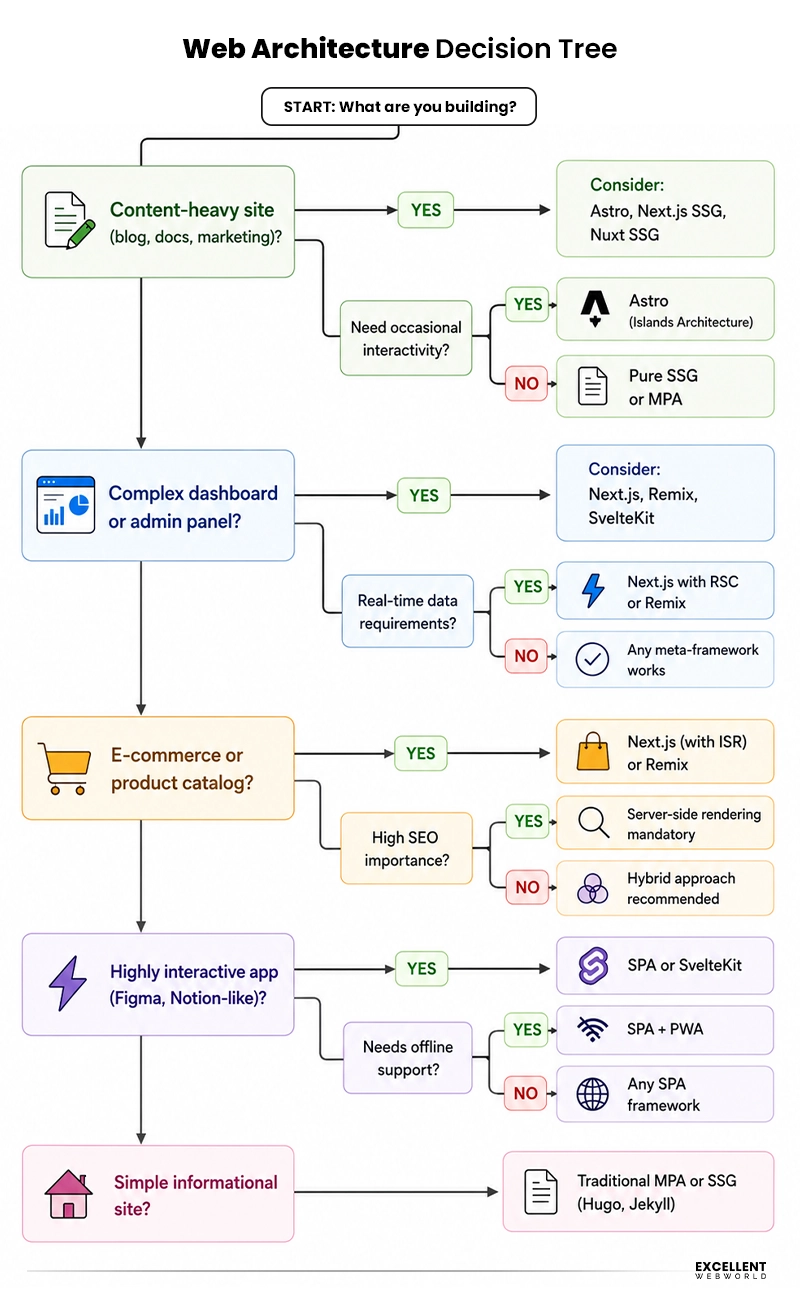
Architecture Decision Tree: Choosing the Right Approach for Your Project
SPA vs MPA – An Ideal Architecture to Build Your Web App
When opting for web development solutions, choosing the right architecture plays a significant role. For SPA vs MPA, there is no one-size-fits-all answer, but the choice becomes clear when you align your goals and expectations. SPA works well for dashboards or live tools, and MPA better suits for content driven platforms.
Though we have shared the entire study of both single-page applications and multi-page applications for you. However, if you’re still stuck on choosing your web architecture, then our team is here to help you.
Being an experienced web app development company, we have a team of experts who can guide and build the best web app for your business/startup.
Get in touch with us! Let’s build your web app together!
FAQs About SPA vs. MPA
A Multi-Page Application (MPA) consists of multiple HTML pages, with each page serving different content or functionality. In contrast, a Single-Page Application (SPA) operates within a single HTML page, dynamically updating content without full page reloads.
Single-page applications are usually used to build websites that need enhanced interactivity and responsiveness; thus, they may not be suitable for all types of websites or applications. They are particularly well-suited for highly interactive applications such as web-based tools, dashboards, or real-time collaboration platforms.
Looking at the present scenario, it’s not a concern anymore. Early SPAs tend to face SEO limitations, but the present ones have reduced that gap.
- Googlebot now renders JavaScript effectively.
- Meta-frameworks (Next.js, Nuxt, SvelteKit) provide built-in SSR/SSG
- React Server Components render on the server by default
Development time depends on project complexity, team expertise, and requirements. It does not depend primarily on architecture choice. However:
- SPAs: It may take longer due to complex client-side routing, state management, and SEO implementation
- MPAs: It can be faster for simple sites but slower for complex interactivity
- Hybrid Apps: Meta-frameworks (Next.js, Nuxt) provide the fastest development for modern apps due to excellent tooling, conventions, and built-in features.
Web applications that use frameworks like Next.js or Nuxt.js for server-side rendering can minimize code while retaining the benefits of both SPAs and MPAs. These frameworks enable developers to write minimal code for server-side rendering, resulting in efficient and performant web applications.
It depends on the framework and optimization:
- Astro with Islands Architecture ships the least JavaScript (only for interactive components)
- Svelte/SvelteKit compiles to minimal vanilla JavaScript
- Qwik uses resumability to deliver zero JavaScript on initial load
- Traditional MPAs send no JavaScript if built with pure server-side languages
If you are starting a new React project in 2024-2026, consider using Next.js App Router with RSC. Benefits include:
- Components render on the server by default (zero client JavaScript for non-interactive parts)
- Seamless data fetching without separate API layers
- Better performance and Core Web Vitals scores

Article By


Paresh Sagar is the CEO of Excellent Webworld. He firmly believes in using technology to solve challenges. His dedication and attention to detail make him an expert in helping startups in different industries digitalize their businesses globally.