AI chatbots are no longer a competitive advantage; they’re the baseline. Businesses are already using AI chatbots as a new tech trend to capture leads, close sales, and handle customer support efficiently. They cut response times, lower operational costs, and provide a customer experience that feels instant and personalized.
But here’s what most “how-to” guides won’t tell you: there is a big difference between just integrating a generic chatbot on your website or app and building one that actually makes a difference. Drives revenue, retains customers, and represents your brand with precision. This guide will explain exactly how to achieve it.
Whether you are a founder trying to scale, a solopreneur drowning in multiple customer queries, or a product builder wanting to integrate conversational AI, you landed on the right page. Let’s explore exactly how to build an AI chatbot from scratch that is aligned with real business goals.
What is an AI Chatbot?
An AI chatbot is a software system developed to understand, analyze, and respond to human conversations through text or video commands. For this, an AI chatbot leverages AI algorithms such as machine learning (ML) and natural language processing (NLP).
AI chatbots are trained enough with datasets and can retain information from conversations that have happened to understand things in the future. Unlike traditional rules-oriented bots, they have the capability to understand user intent, learn from interactions, and serve contextual, real-time responses 24/7.
What Are the Different Types of AI Chatbots?
Based on various tasks and capabilities, there are many types of AI chatbots available in the market. Here’s the list of the 10 most popular chatbot types. Have a look:
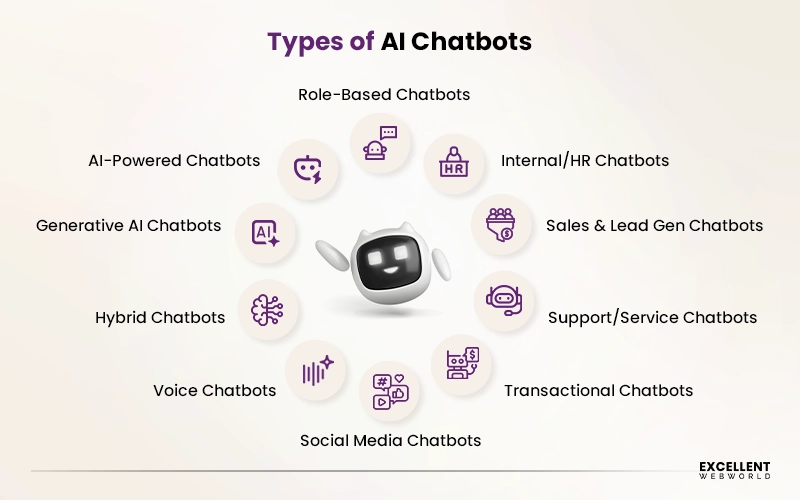
1. Role-Based Chatbots
Developed to follow a fixed script of preset rules and decision trees. They can only reply to some specific commands and break down the second a user goes off-script.
Best For: Basic FAQs, simple workflows
2. AI-Powered Chatbots
Built with ML & NLP to understand user intent, not just keywords. Gets smarter with each & every conversation and handles unpredictable queries easily.
Best For: Customer support, query handling
3. Generative AI Chatbots
These ones are powered by large language models (LLMs) like GPT or Claude. GenAI use cases are meant to generate human-like answers in real-time.
Best For: Advanced CX, advisory interactions
4. Hybrid Chatbots
It’s a combination of rule-based and structured workflows with AI. Best for open-ended conversations. Most modern business chatbots fall into this category.
Best For: End-to-end customer journeys
5. Voice Chatbots
Interact with the help of spoken language instead of text. When you deploy a voice AI agent like Alexa, Siri, or a smart IVR, it’s best for leveraging in hands-free environments.
Best For: IVR, hands-free environments
6. Social Media Chatbots
Live natively integrated in platforms such as WhatsApp, Instagram DMs, or Facebook Messenger. Perfect for entrepreneurs involved in social-first or e-commerce businesses.
Best For: Social commerce, engagement
7. Transactional Chatbots
Specifically developed to complete tasks such as process orders, book appointments, issue refunds, or make payments.
Best For: E-commerce, service automation
8. Support/Service Chatbots
Made to resolve customer issues diligently, functioning much like dedicated AI Customer Service Agents. Manages tickets, answers product questions, and escalates to humans whenever required.
Best For: Customer service operations
9. Sales & Lead Gen Chatbots
Build to identify prospects, nurture leads, and push users to move forward for a purchase or demo booking.
Best For: Sales funnels, lead generation
10. Internal/HR Chatbots
Made to help your team, not your end customers. They manage onboarding, IT helpdesks, leave requests, policy questions, and internal knowledge bases.
Best For: HR, IT operations
Why Businesses and Startups are Investing in AI Chatbot Development [+ Market Overview]
To be honest, AI chatbots are not something that is still in an experimental stage; now they have moved to core business infrastructure. Customer expectations are increased, and people really want quick answers, even at 2 AM.
If you are an enterprise, then you can serve personalized experiences at scale to your precious customers. And if you are a startup, then it’s very simple math. You can not afford to hire a 24/7 support team, a round-the-clock sales rep, and a dedicated onboarding specialist. But you need all three roles and functions for your business to grow. An AI chatbot is your easiest solution to handle the weight of all these responsibilities.
And the market data makes it impossible to ignore. Check what the current number says about the AI chatbot:
AI Chatbot Market Overview
- According to Grand View Research, the chatbot market was valued at over USD 11.8 billion in 2026 and is projected to reach USD 41.2 billion by 2033 with a CAGR of 19.6% (2026-2033).
- AI chatbots have the capability to handle up to 80% of routine customer inquiries without demanding any human involvement, as mentioned in the IBM report.
- Salesforce’s chatbot statistics say 69% of consumers reported that they prefer chatbots for quick communication with brands and to solve their queries.
- As per Gartner’s recent report, conversational AI will reduce contact center labor costs by USD 80 billion in 2026.
How to Build an AI Chatbot? Step-by-Step Process of AI Chatbot Development
Read enough “how to build an AI chatbot” guides, and you will find they all explain the same sequence. But in today’s market, nearly every step on that list has been fundamentally transformed. The weeks of analyst time, months of engineering efforts, and rounds of costly iterations are now covered by AI technology. Still, there are critical decisions to make upfront while building an AI chatbot.
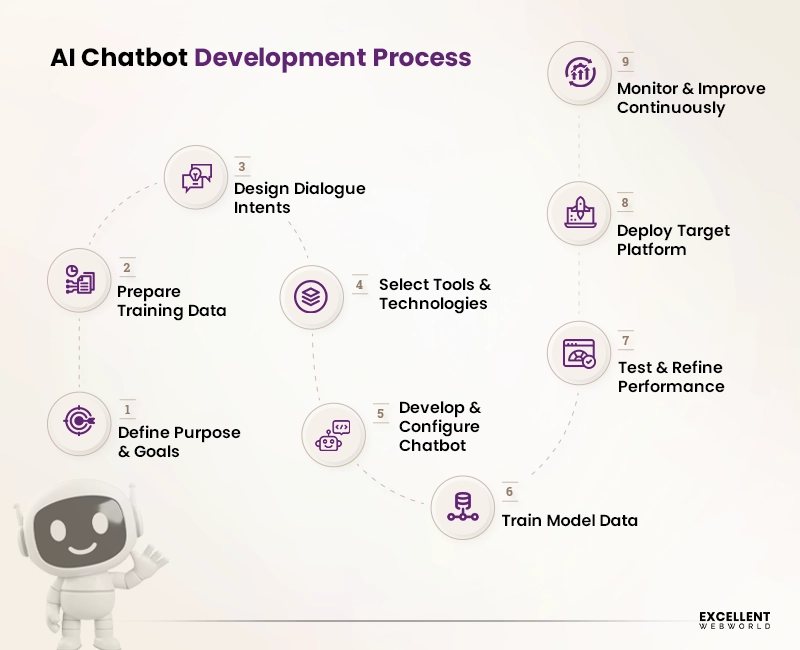
AI clears the path. It doesn’t walk it for you. The judgment call, what your bot is for, who it’s really serving, and when it should hand off to a human still belongs to industry experts. Follow these 9 steps to create an app for an AI chatbot that generates revenue faster than you think.
Step 1: Define Purpose & Goals
Before getting confused regarding tools and platforms, get clarity on why you’re building this chatbot. So, find the answers to these questions before moving forward:
What specific problem does your bot solve?: Support overload? Slow lead response? Poor onboarding?
Who is this chatbot talking to?: New leads, existing customers, or your internal team?
What does a successful conversation look like?: A booked call? A resolved ticket? A completed purchase?
What’s the ONE outcome every interaction should drive?: Pick one primary goal. You can expand later.
What channels will it live on?: Website, WhatsApp, Instagram, mobile app?
Generative AI tools like Claude or ChatGPT can help you understand key elements associated with building conversational AI in minutes. The realistic user personas, surfacing edge cases you haven’t thought of, drafting a conversation scope document, and flagging where your stated goals conflict are explained by AI. But to decide what your business objective actually is: a founder’s call, a product call, or a strategic call. That you can’t expect from AI or any other tool.
Here, a tech partner can help you. AI-native engineers work with you to define the primary goal, the secondary constraints, the channels, and the success metrics. So that everything developed afterward is directed on the right path from day one. A chatbot architect on a clear brief absolutely delivers ROI. The one that is built on assumptions only delivers a support headache.
step 2: Collect and Prepare Training Data
Your chatbot’s smartness is completely dependent on the data you provide. This step is where most entrepreneurs think to save money, but then they have to pay for it later. Instead of frustrating your users, deciding what to serve when building a conversational AI would be better.
Data prep used to take a quarter. In 2026, it takes a week with AI tools. But the quality judgment is still everything, and that’s the human thing for your AI chatbot.
AI tools can now process hundreds of chat transcripts, identify recurring themes, cluster intent categories, and generate training utterances. Feed your data into the right tools like SentiSum, Zonka Feedback, Level AI, or Zendesk AI, and filter your top intent categories, draft sample utterances for each, and flag where user language is wildly inconsistent. All this in days, not weeks.
What data should you collect for your AI chatbot?
- Past customer support ticket history and old chat transcripts.
- Frequently asked questions (FAQs) from your website.
- Product documentation and knowledge base articles.
- Sales call notes and common objections raised by users.
- Email threads with commonly asked customer questions.
But AI can’t decide what’s worth including. A support transcript from an old edge case two years ago might be irrelevant to your motto, or it might be your most important training signal to the AI chatbot.
That means hiring experienced AI engineers who have already worked with products like yours can better understand such things and your product. Your business context, your user base, and your expert tech partner can make that call right, easy, and fast.
How AI engineers prepare your data:
- Clean it: Remove irrelevant, outdated, or duplicate information.
- Categorize it: Group conversations as per the topic or intent category (e.g., billing, returns, product info).
- Label it: Tag each entry of data with the correct intent so your AI chatbot learns what “type” of question it is.
- Standardize it: Make sure to follow consistent formatting across all types of data sources.
- Review it: Have a human double-check verification to maintain accuracy before inserting it into your chatbot.
step 3: Design the Chatbot’s Dialogue and Intents
This step in the journey of “how to create an AI chatbot” decides where your bot gets its personality and logic. Don’t confuse making great conversations with only developing a bot that sounds like a human. Put effort into serving useful, intuitive, and frictionless interactions to users.
AI tools like Claude, ChatGPT, or Voiceflow’s AI assistant will:
- Draft intent chatting trees for your top user journeys.
- Write 8 to 10 sample utterances per intent automatically.
- Suggest fallback responses and graceful error paths.
- Flag conversation anti-patterns before you develop them.
Still, the conversations that actually determine whether a user trusts your brand are precisely the ones AI is worst at designing alone. Collaborating with an AI chatbot development service provider can save the moment where the bot doesn’t understand something.
The moment it needs to transition to a human, the moment it has to say, “I can’t help with that.” Those kinds of micro-moments decide whether you are going to win or lose your customer retention. So, hiring AI engineers who utilize AI tools and give human intelligence to your chatbot is worth it for maintaining your business reputation.
A Conversation Design Checklist for Your Users:
- Make sure an opening message is warm, clear, and action-oriented.
- List out the top 10 most common user intents.
- Build the right decision trees for each intent.
- Write at least 8 to 10 sample statements per intent.
- Design graceful responses for fallback queries.
- Define human handoff triggers: when does a human take over?
step 4: Decide on Tools and Technologies for Building AI Chatbots
Selecting the right tech stack is one of the crucial decisions for AI chatbot development. In 2026, a variety of powerful platforms will be available. From AI-powered no-code builders for fast prototyping to enterprise-level frameworks capable of integrating with large-scale systems, many platforms are available.
You can connect with the leading AI consulting services providers to choose the best and cost-effective tech for custom chatbot development. Here’s a clear breakdown of your options for AI chatbot builders based on technical skill level and use case:
| Platform Type | Best For | Tech Examples |
|---|---|---|
| No-Code Builders | Fast deployment, simple use cases | Tidio, ManyChat, Chatfuel |
| Low-Code Platforms | More customization, moderate complexity | Botpress, Voiceflow, Landbot |
| AI/NLP Frameworks | Advanced bots with deep language understanding | Dialogflow, Rasa, IBM Watson |
| LLM APIs | Fully custom, brand-specific, deeply integrated | OpenAI API, Claude API, Gemini API |
| Agent Frameworks | Complex, custom workflows and multi-actor systems | LangChain, LlamaIndex, AutoGen |
step 5: Develop or Configure the Chatbot Using Chosen Tools
Here, you get to actually build an AI chatbot. You can scaffold a working chatbot in a day. The parts that make it trustworthy take longer. Tools like Cursor, Windsurf, and GitHub Copilot now operate in agent mode. Maybe you have tried them for your chatbot prototype or are planning to try them.
These AI tools can generate code, run it, read error messages, debug, and iterate autonomously. The 70% of the development, including scaffolding, UI components, API boilerplate, and webhook handlers, genuinely reduces it to a fraction of its former timeline.
The other 30% is the whole game. And for that, having support from an experienced AI chatbot development services provider is like a cherry on top. AI engineers help with context window management that doesn’t lose the thread of a conversation halfway through. Integrate guardrails that prevent the bot from confidently going off-brand.
Also, they assist in managing rate limiting and cost controls to not scale in a budget crisis. So, technically, these are engineering decisions, not prompt decisions, and they decide whether your AI chatbot is a product or a liability.
Whether you are using a no-code platform or APIs, the task remains the same; only the method of execution varies. Here’s the checklist for both approaches:
Checklist: If you’re using a no-code/low-code platform:
- Set up your account and select a suitable chatbot template relevant to your use case.
- Insert your AI chatbot intents, entities, and responses using the visual builder.
- Connect your knowledge base or FAQ documents to the AI chatbot data.
- Configure your brand voice, including tone, language, and persona.
- Set up AI integration with your CRM, calendar, or helpdesk.
Checklist: If you want to build a custom AI chatbot using APIs:
- Set up your API access and development environment.
- Write your system prompt like it’s your chatbot’s “instruction manual,” defining its role, tone, and limitations.
- Build the logic for a conversation that manages message history and context.
- Develop the frontend interface, including a web widget, app, or messaging channel.
- Implement safety guardrails. What topics should the bot avoid or escalate to a human?
Pro Tip: Start with MVP development using no-code AI tools, or you can say it is a minimum viable chatbot (MVC) at the initial level. Get one flow working perfectly before building the next. Consider taking help from tech experts to develop and run your final product (AI chatbot) precisely.
step 6: Train the Model Using Sample Data
For AI-powered custom chatbot development, training is something that actually separates a bot from frustrating users and genuinely helping them. This step is meant to bring together your data preparation and conversation design.
AI tools can run the training pipeline, generate additional utterances where your dataset is thin, flag low-confidence intents, and suggest retraining priorities automatically.
What AI cannot catch is the chatbot model that hits 85% confidence and still gives bad advice. Because the training data was biased, the question was semantically ambiguous, or the real answer is “We don’t support that yet.”
That’s why an expert human review of model outputs is not optional. It is the job. If you don’t want to juggle with that, a comprehensive AI chatbot development service provider can do that for you effortlessly and correctly.
The step-by-step training process:
- Upload your prepared dataset.
- Run the initial training.
- Review the confidence scores and try to achieve 80%+ confidence.
- Add more reliable sentences where confidence is low.
- Retain and repeat.
- Test edge cases.
step 7: Test the Chatbot With Real Users and Refine
AI can simulate thousands of test conversations, generate adversarial inputs to probe your guardrails, and auto-generate regression test suites. So, dramatically compressing what used to be weeks of manual QA into days. Use it.
But simulated conversations have a ceiling. Real users don’t communicate the way you expect. They abbreviate mid-sentence, switch topics without any prior warning, ask things that weren’t in any training set, and use slang that no utterance list anticipated. Make sure you test your AI chatbot with real users. Never make the mistake of launching a chatbot that has just been tested internally.
Follow the three stages of testing listed below:
- Stage 1: Internal Testing, your internal team or the team you hired from an experienced Generative AI development company will run hundreds of simulated conversations with the help of smart AI tools.
- Stage 2: Beta Testing, check with a small, trusted group of real users, who could be existing customers, team members, or a private community. Your tech partner can also do this for you.
- Stage 3: A/B Testing, verify with different conversation flows, opening messages, or response styles against each other.
step 8: Deploy the Chatbot on the Desired Platform
Your chatbot is tested, refined, and ready. Now it’s time to launch it for the users. With CI/CD, infrastructure-as-code, and monitoring dashboards, the deployment infrastructure has been largely commoditized. A well-built AI chatbot can go from code to production in hours.
But the strategic question is where your chatbot should actually live. Deploy on the exact channels your customers already use. Consult with your tech partner to deploy correctly. Start with the one channel where your target users already spend their time. Expand from there once you have data.
Popular deployment channels:
- Website Chat Widget
- WhatsApp Business API
- Instagram / Facebook Messenger
- Mobile App (iOS/Android)
- Slack or Microsoft Teams
- SMS
step 9: Monitor Performance and Continuously Improve
The AI chatbots that are considered to deliver real ROI are the ones that get smarter every single week. Set up a performance monitoring system from day one. AI monitoring tools in 2026 handle anomaly detection, automated low-confidence flagging, sentiment analysis across conversations, and weekly performance summaries.
Check if your hired AI development firm is giving maintenance services for your chatbot or not to estimate your further costs. Because AI tools can give you data on errors and the need for necessary improvements, the thing AI doesn’t handle is the decision about what to do with the data. Every improvement you make is good for your chatbot and increases the containment rate, reduces support costs, and improves customer satisfaction simultaneously. The ROI of an AI chatbot doesn’t peak at launch; it compounds over time.
How Much Does It Cost to Build Your Own AI Chatbot?
An AI chatbot development cost varies based on various factors, such as the approach you choose, chatbot complexity, and the tools you use. Here’s a complete breakdown so you can plan your budget smartly.
| Chatbot Type | Estimated Cost | Best For |
|---|---|---|
| Basic Rule-Based Chatbot | USD 5,000 to 10,000 | Solopreneurs, early-stage startups |
| Standard AI Chatbot (NLP/NLU) | USD 15,000 to 40,000 | Small to mid-sized businesses |
| Advanced AI Chatbot (LLM-powered) | USD 50,000 to 150,000+ | Growing startups, e-commerce brands |
| Enterprise AI Chatbot | USD 50,000 to 200,000+ | Enterprises, funded startups |
| Fully Custom AI Chatbot (Agentic) | USD 150,000 to 1,000,000+ | Large enterprises, SaaS platforms |
What Are the Popular Real-Life Uses of AI Chatbots?
AI chatbot development is not for any one industry. From hospitals to hotel bookings, here’s exactly how the world’s smartest businesses are leveraging AI chatbots and making them work.
| Industry | Example |
|---|---|
| eCommerce | Shopify stores use chatbots to recover the data of abandoned carts and guide purchase decisions 24/7. |
| Healthcare | Babylon Health leverages the best chatbot in the healthcare sector for symptom checking and appointment booking. |
| Banking & Finance | Bank of America’s “Erica” is made to handle millions of customer queries on a monthly basis. |
| Real Estate | Zillow is popular for using chatbots to qualify leads and schedule property viewings automatically. |
| SaaS & Tech | Intercom deploys AI chatbots to onboard new users and ultimately reduces support ticket volume. |
| Education & EdTech | Duolingo uses an AI chatbot to simulate real language conversations for its learners in the app. |
| Travel & Hospitality | KLM Royal Dutch Airlines‘ chatbot manages flight updates, boarding passes, and booking changes, mostly in real-time. |
What Are the AI Chatbot Development Challenges? How to Overcome Them
Building an AI chatbot is not going without any hurdles. However, if you hire a ChatGPT developer who is an expert in building various kinds of chatbots, then difficulties would be lower than assumed. Here’s what to expect and exactly how to handle it.
| Challenge | How to Overcome It |
|---|---|
| Poor Understanding of User Intent | Write 10 to 15 different types of utterances per intent. Try to set confidence thresholds at 80% and then follow the review and retrain habit on a monthly basis. |
| Lack of Personalization | Integrate with your CRM. Use dynamic variables such as name and order history for personalization. Consider segment flows by user type. |
| Integration Failures | Choose platforms with native integrations and make sure your team does AI integration in the app or software efficiently. Test every integration in staging before going live. Use middleware tools like Zapier or Make for complex connections. |
| User Frustration From Repetitive Loops | Ensure you set a maximum of 2 loops per intent. After those 2 failed attempts, ask your users to connect with a human agent or a different resolution path. |
Wrapping Up!
Overall, AI chatbot development is not something that is still meant for a futuristic concept, but it has now become a practical necessity. That’s why understanding how to build an AI chatbot with the right guidance and the right experts matters a lot.
Businesses that want to enhance customer engagement, streamline operations, and deliver personalized experiences can use AI chatbots as the solution. With technologies like NLP and AI/ML, chatbots are becoming smarter, more intuitive, and capable of handling increasingly complex interactions. To stay competitive, adopting an AI chatbot is one of the best strategy ideas.
If you are looking to build an AI chatbot solution, Excellent Webworld stands out as a leading AI chatbot development company. With deep expertise in cutting-edge AI technologies and a strong track record of delivering customized solutions.
Our experts help businesses transform ideas into impactful digital experiences. Partnering with the right development team can make all the difference, and Excellent Webworld is well-equipped to guide you every step of your development journey.
Frequently Asked Questions
An AI chatbot is a software application that is operated by technologies such as natural language processing (NLP) and machine learning. With this technology, chatbots can simulate human-like conversations. It can understand user queries, provide relevant responses, and continuously improve through interactions.
If your business manages frequent customer inquiries, needs 24/7 customer support, or wants to automate common repetitive tasks like lead generation or bookings, an AI chatbot can be highly beneficial for your business. It’s especially useful for improving response time and enhancing customer experience.
The cost to create an AI chatbot varies depending on various factors, including complexity, features, integrations, and platform. A basic chatbot can cost from USD 5,000 to 10,000, while advanced, AI-driven solutions with custom chatbot functionalities may require a significantly higher investment that can range from USD 50,000 to 200,000+.
To make your own chatbot, start by defining your goals and use cases for the chatbots you want to create, identifying your target audience, and choosing the right platform and technology. Then design conversation flows, develop and test the chatbot, and continuously monitor performance to optimize and improve it over time.
Some of the latest trends in AI chatbot development include generative AI-powered chatbots, voice-enabled assistants, multilingual support, hyper-personalization, and seamless integration with existing and additional business tools. These advancements are making chatbots more intelligent, conversational, and user-friendly for customers, which ultimately leads to higher customer satisfaction.

Article By


Paresh Sagar is the CEO of Excellent Webworld. He firmly believes in using technology to solve challenges. His dedication and attention to detail make him an expert in helping startups in different industries digitalize their businesses globally.