What Matters Before Giving an AI Agent Write Access?
- Understand the risk: Write access can change business data, trigger workflows, move money, and create consequences that may be difficult to reverse.
- Define the scope: Identify which systems, records, fields, and actions the agent is allowed to modify, and why each permission is necessary.
- Enforce authorization: Apply permissions and critical business rules outside the AI prompt, with human approval for high-risk actions.
- Prepare for failures: Account for incorrect decisions, API timeouts, repeated requests, and unintended changes.
- Maintain accountability: Keep consequential actions traceable so teams can investigate what happened and why.
- Plan for recovery: Ensure the system can contain failures, recover from bad writes where possible, and revoke write access quickly.
Giving an AI agent read access is one thing, and giving it permission to change your business systems is totally different.
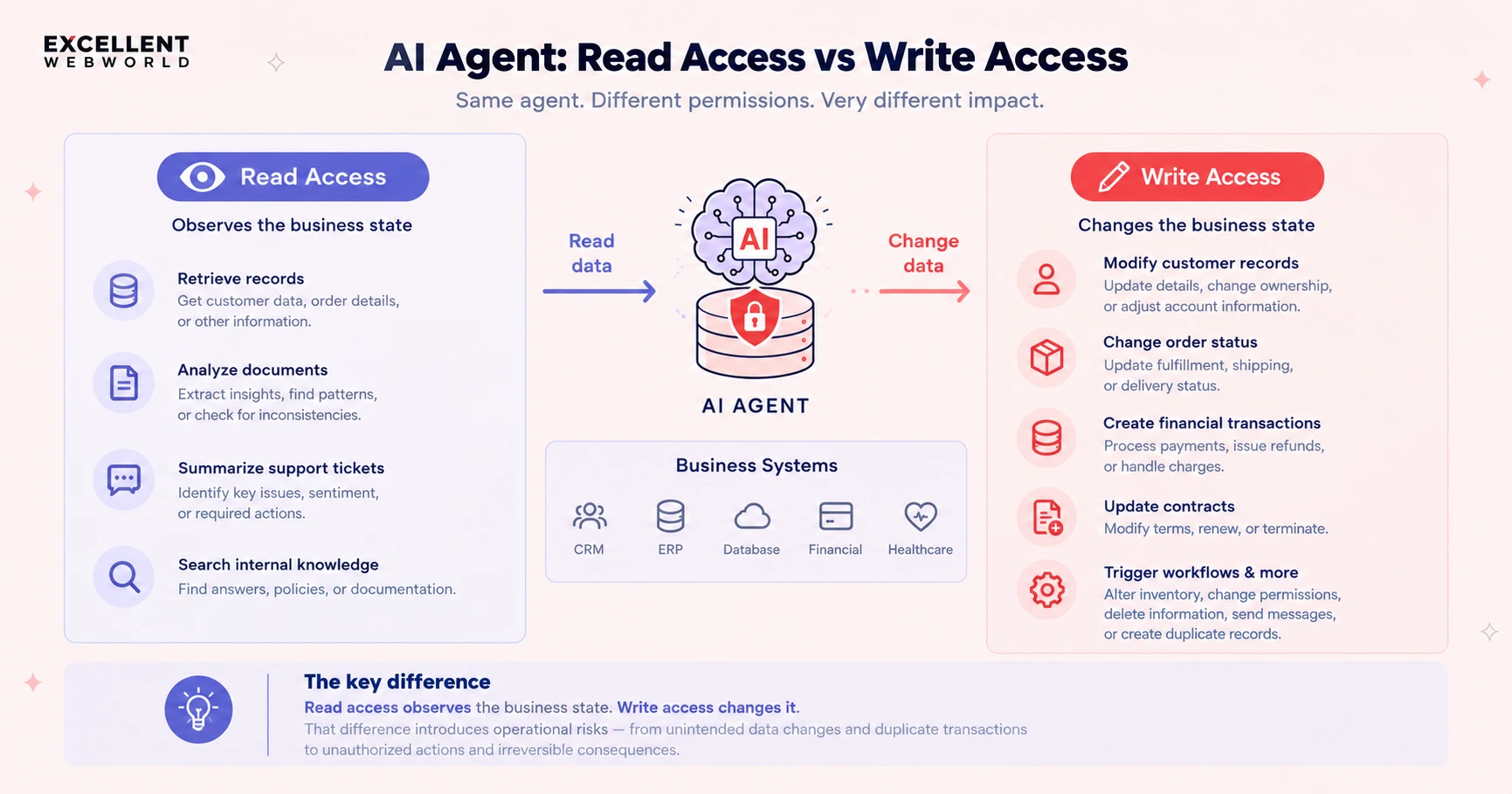
An agent with read access can retrieve the customer records, analyze documents, summarize support tickets, or search internal knowledge. An agent with write access can also modify customer records, change order status, create financial transactions, update contracts, alter inventory, trigger workflows, change permissions, delete information, send messages or create duplicate record sets.
The concept is simple: read access observes the business state, while write access changes it. That difference introduces operational risks starting from unintended data changes & duplicate transactions to unauthorized actions & irreversible consequences.
This is why AI agent write access should be treated as a production architectural decision, not like an AI configuration setting. So, before connecting an agent to a CRM, ERP system, database, financial platform, healthcare system or any other record system, CTOs must establish what the agent can change, why it needs any authority, how each action is authorized & what happens when something actually goes wrong. Well-designed AI integration services can help to connect AI capabilities with business systems while accounting for the workflows & controls those integrations.
The checklist below will cover 14 critical questions to answer before you grant access to an AI agent to write access in production. If the answer to a critical safety question is like “the prompt tells the agent not to do that”, then the agent probably isn’t ready for production write access.
AI Agent Write-Access Checklist
1. What Exactly Can the Agent Change?
Do not start with “The Agent has to access the CRM system”, as it is too broad. You should define the agent’s exact write surface.
You should document whether the agent can;
- Create or update records.
- Delete records or change specific fields.
- Change statuses or trigger workflows.
- Send communications or create financial transactions.
- Modify permissions or access settings.
CTO Check
- Every writable system is documented.
- Every writable object is documented.
- Every writable field or action is documented.
- Destructive actions are explicitly identified.
2. Why Does the Agent Need Write Access?
The fact is like; if an agent can write, it doesn’t mean it needs to be. For each and every capability, ask;
- What business outcome requires autonomous modification?
- Could the same outcome be achieved through a recommendation, draft, or approval request?
- Does the workflow genuinely require the agent to execute the action?
For example, instead of allowing an agent to issue a refund directly, consider this;
- Agent
- Prepare refund
- Policy validation
- Approval
- Issue refund
This actually separates the agent’s ability to recommend an action from the system’s authority to execute it.
CTO check
- Every write permission has a documented business justification.
- Read-only or recommendation-based execution was considered first.
3. What Is the Smallest Permission the Agent Needs?
You must apply the principle of least privilege. So, if an agent needs to update a customer's phone number, it shouldn’t automatically have permissions to modify any payment details, credit limits, account ownership, contract, security settings and customer needs.
Prefer narrowly scoped capabilities.
|
Avoid |
Prefer |
|---|---|
| update_customer() | update_customer_phone() |
| Unrestricted database access | Scoped API access |
| Broad write permissions | Permissions limited to specific fields and actions |
These restrictions are also central to agentic AI security, where excessive tool permissions can allow agents to perform actions beyond their intended scope.
CTO check
- Permissions are limited to the agent's actual responsibilities.
- Read and write permissions are separated.
- Sensitive fields have additional restrictions.
- Delete permissions are disabled unless absolutely necessary.
4. Who Authorizes the Write?
Here, the model shouldn’t decide about its own authority. An agent may determine that a customer may qualify for a refund; that seems to be a reasoning decision. But the condition, like whether the agent is actually authorized to issue the refund, is a separate decision-making situation.
The authorization process should be enforced through the application logic, policy controls, permissions or other deterministic mechanisms.
You can consider a relevant example like ours, GDRFA Sports Government Intelligence Platform, that we worked on, where there is utilization of rule-bound agentic workflows for eligibility validation, traceable decisions & human escalations that occur when the cases fall outside defined rules.
Sports Governance Intelligence Platform
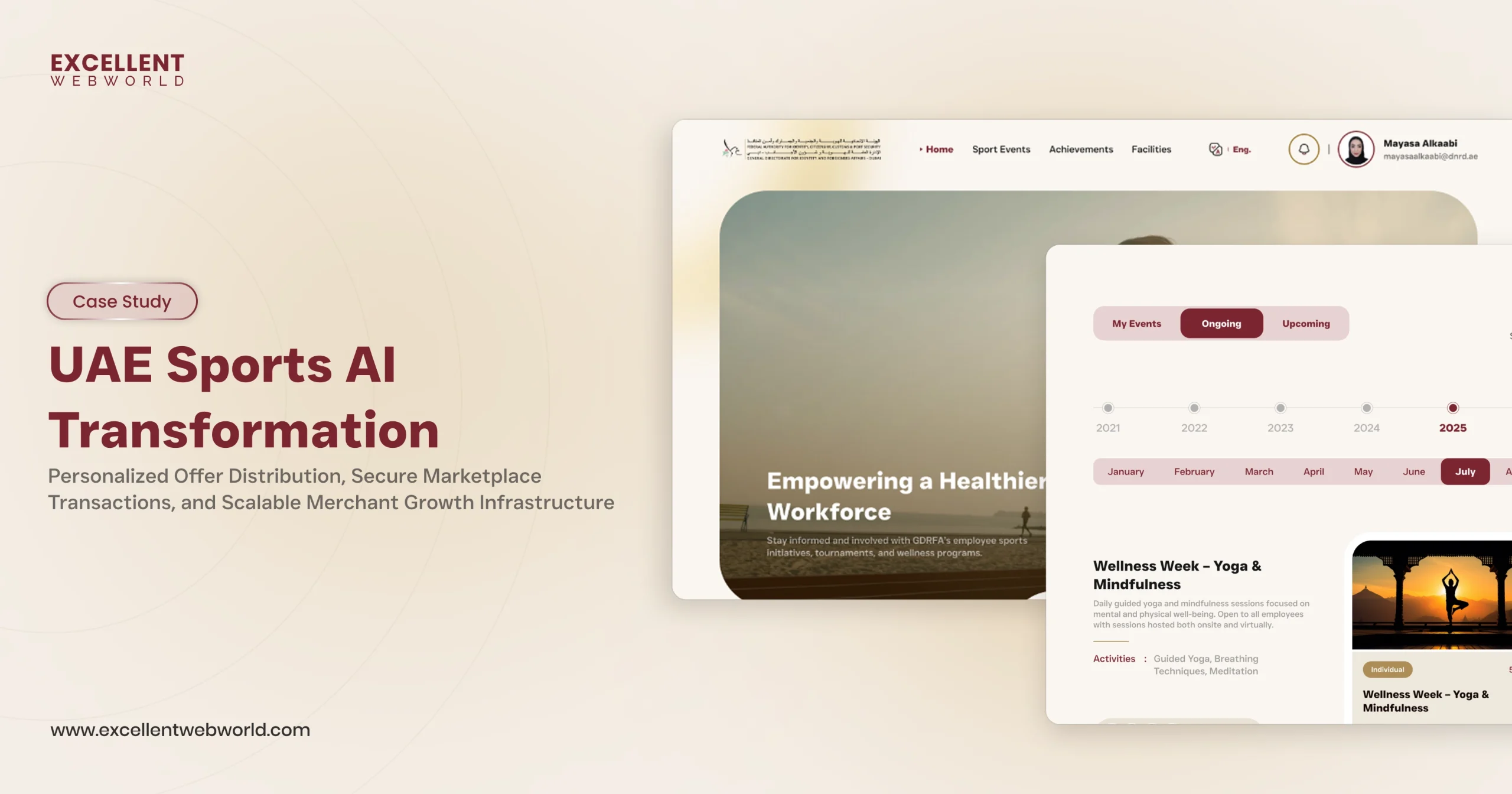
GDRFA is a Sports Governance Intelligence Platform that combines AI, athlete talent intelligence, and agentic automation to streamline governance, licensing,...
CTO check
- Authorization exists outside the model.
- The agent cannot grant itself additional permissions.
- High-impact actions have explicit authorization rules.
5. Are Critical Business Rules Enforced Outside the Prompt?
This is one of the most critical & important questions.
Suppose the prompt says, “Never issue a refund above $5,000.”
What happens if the model ignores the instruction?
Like, if the answer is “The prompt prevents it”, you have a control problem.
A production architecture should enforce the rule independently, like;
“Agent → Refund request → Policy check → Approved / Rejected”
- “Agent
- Refund request
- Policy check
- Approved / Rejected”
Here, the prompt can actually guide behaviour, and the application should enforce critical constraints, like financial limits, approval thresholds & access restrictions. These controls should be part of a broader enterprise AI governance strategy, not left to model instructions alone.
CTO check
- Financial limits are system-enforced.
- Business rules are not prompt-only controls.
- Regulatory or security constraints are enforced deterministically.
6. What Happens If the Agent Makes the Wrong Decision?
Assume that an incorrect decision will eventually happen. This question is the one that happens next.
Determine whether the action can be;
- Reversed or rolled back.
- Corrected or quarantined.
- Flagged for human review.
- Reconciled automatically.
The risk of writing is closely related to its blast radius. Changing one low-risk field is different from, like, deleting 10,000 records or initiating multiple financial transactions.
For production AI agents, defining recovery paths, execution limits, and fallback behavior is part of engineering AI agents for reliable production use.
CTO Check
- Every consequential write has a defined failure response.
- High-impact actions have containment mechanisms.
- Recovery procedures have been tested.
7. What Happens If the Agent Retries?
With retries, real incidents can occur when the API times out & agent cannot determine whether an operation succeeded.
You can consider this scenario like;
- Agent
- Create payment
- API timeout
- Agent retries
- Potential duplicate payment
The original request may have succeeded even though the response never reached the agent. So, retrying without checking the transaction state can create a duplicate operation.
You can design autonomous writes to manage the retries safely using mechanisms like;
- Idempotency keys.
- Transaction IDs.
- Duplicate detection.
- Retry limits.
- Transaction-state checks.
- Reconciliation.
CTO check
- Critical writes are retry-safe.
- Idempotency is implemented where required.
- Retry behavior is explicitly tested.
8. What Happens If the API Succeeds but the Business Outcome Is Wrong?
A successful HTTP response does not necessarily mean a successful business transaction process. An API might return “200 OK” while triggering an unexpected workflow, overwriting information or even changing related datasets.
You should test the business state, not simply whether the API returned success.
- Document downstream side effects.
- Verify related record changes.
- Test cascading workflows.
- Confirm that the final state matches the intended outcome.
CTO check
- Downstream side effects are documented.
- Integration tests verify the final business state.
- Cascading workflows are understood.
9. Can the agent write to the system of record directly?
Your CRM, ERP system, financial system, healthcare platform or operational database should remain authoritative. And you should avoid architectures where the agent bypasses application business logic & writes directly to the underlying database until there is a strong technical reason & equally strong control setups.
Prefer:
- Agent
- Controlled API
- Business logic
- Authorization
- System of record
Rather than:
- Agent
- Database
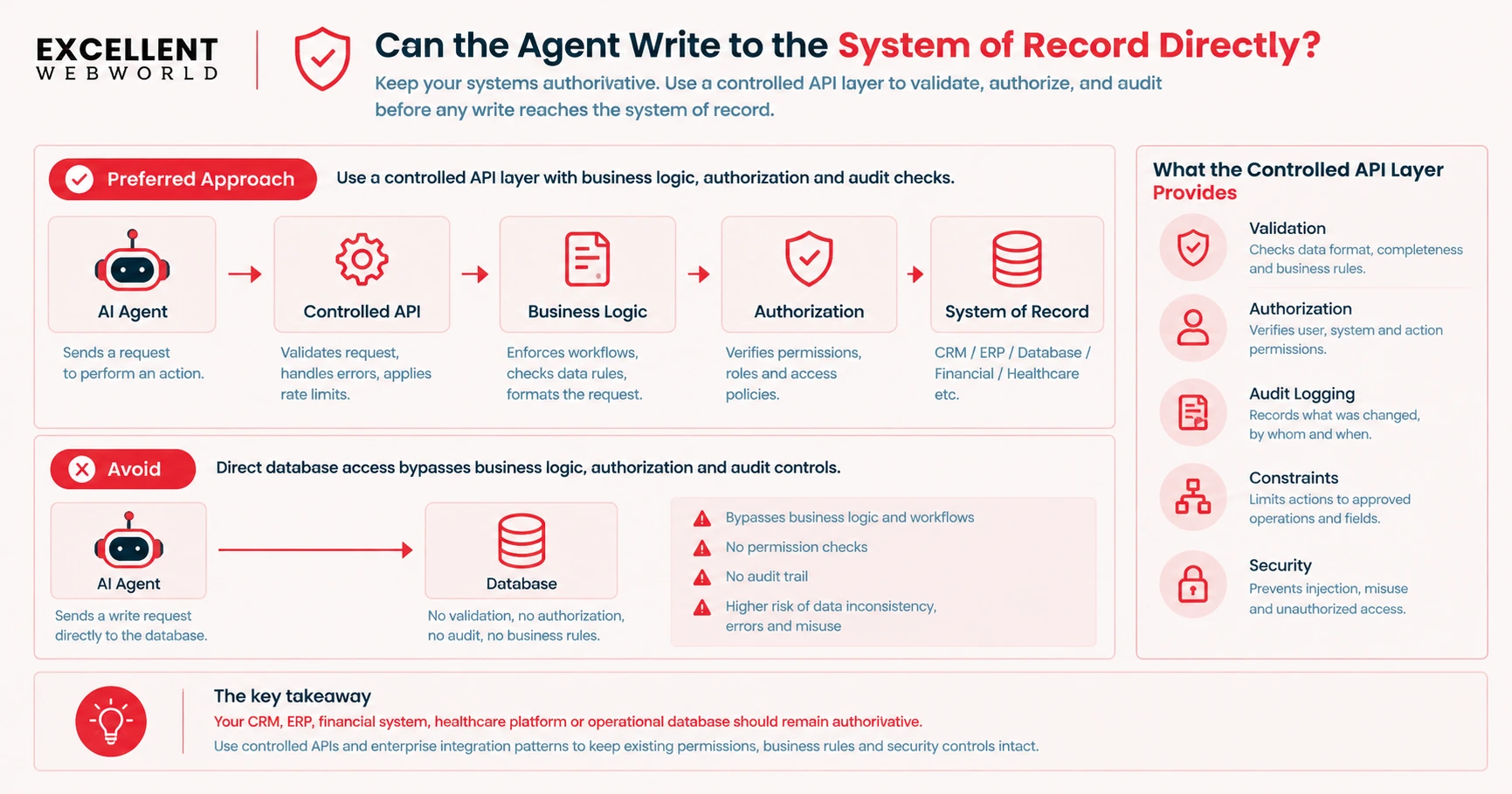
With a controlled API layer, it provides an opportunity to validate, authorize, audit & also constrain each action prior to it reaching the system of record.
This is also an important consideration while designing AI integration services for enterprise applications, where connected systems should preserve the existing permissions & business rules.
CTO check
- The system of record remains authoritative.
- Agent writes pass through appropriate business logic.
- Avoid direct database access or tightly control it.
10. Does Every Write Have an Audit Trail?
If the agent changes something important, your team should answer:
| Audit question | What to capture |
|---|---|
| What changed? | Action and affected resource |
| When did it happen? | Attempt and completion timestamps |
| Which agent and tool were involved? | Agent identity and tool call |
| What initiated the action? | User request or workflow reference |
| What authorized it? | Permission, policy decision, or approval |
| Was the action retried? | Retry history and transaction status |
| What was the outcome? | Resulting state or failure details |
This doesn't need to store a private chain of thought; it needs operational traceability. For example, the HJM AI Freight Forwarding Platform describes how the audit trails & human oversight can actually support accountability for the AI-generated outputs in an operational workflow.
HJM

A freight forwarding platform connecting truckers and shippers. Load matching, documentation, and tracking automate operations and improve fulfillment.
CTO check
- Consequential writes are logged.
- Tool calls are traceable.
- Authorization decisions are recorded.
- Human approvals are recorded.
- Final outcomes are observable.
11. Which Actions Require Human Approval?
You need to avoid both extremes, like approving everything or approving nothing. Utilize risk-based escalation to determine when an agent can execute in an independent manner or when human approval is required.
| Risk Level | Agent Authority | Examples |
|---|---|---|
| Low risk | Execute within defined limits | Update a non-sensitive preference, categorize a ticket, add an internal tag |
| Medium risk | Prepare the action for review or approval | Modify an account, change an order, create a purchase request |
| High risk | Recommend the action; require human approval | Large financial transactions, contract modifications, security changes, irreversible deletion, regulatory decisions |
Define the approval threshold levels in advance, and the approval requirements must be enforced by the system & must not be bypassed by the agent.
CTO check
- High-impact actions have explicit approval thresholds.
- Approval cannot be bypassed by the agent.
- Approval requirements are enforced by the system.
12. What Happens When the Agent Is Uncertain?
A production agent needs a safe response to uncertainty and should be able to stop & escalate rather than guess, since the workflow expects an answer.
Define the conditions like;
- Missing required information.
- Conflicting records.
- Unclear user intent.
- Failed validation.
- Insufficient permissions.
- Unexpected tool responses.
- Policy violations.
The agent should not proceed with a consequential write when required information is missing or the action is unauthorized.
CTO check
- Uncertainty thresholds are clearly defined.
- Escalation paths are established for uncertain or high-risk decisions.
- Unauthorized execution is blocked when confidence is insufficient or required information is missing.
13. Have You Tested the Agent Against Unexpected Inputs?
Do not test only the normal requests; test whether the agent remains within the authority level when inputs, data or tool responses occur unexpectedly.
These include scenarios involving;
- Ambiguous or conflicting instructions.
- Unexpected data, missing fields, or stale records.
- Malformed tool responses.
- Prompt injection and unauthorized requests.
- Boundary values and repeated requests.
- Attempts to bypass permissions or misuse tools.
Above all are important AI agent security risks, particularly when an agent can actually assess sensitive information or modify production systems.
AI red teaming offers a structured approach for testing adversarial inputs, prompt injection, and attempts to bypass security controls prior to deployment.
CTO Check
- Adversarial scenarios have been tested.
- Permission boundaries have been validated.
- Potential tool misuse scenarios have been tested.
- Failure handling and recovery behavior have been tested.
14. Can You Turn Write Access Off Immediately?
If an agent starts behaving unexpectedly, the engineering process should be able to disable its write capabilities without taking down or impacting the entire application.
- Use mechanisms like;
- Feature flags.
- Permission revocation.
- Kill switches.
- Tool disabling.
- Rate limits.
- Circuit breakers.
And the shutdown mechanism should restrict the agent’s ability to make further changes, while allowing the wider application to continue operating wherever possible.
CTO check
- Agent write access can be revoked quickly.
- Individual tools can be disabled.
- Emergency controls have been tested.
The Final CTO Go/No-Go Checklist
Before granting an AI agent production write access, you should confirm that every critical control is in place.
- We know exactly what the agent can change.
- Every write permission has a clear business justification.
- The agent has only the minimum authority required.
- Critical business rules are enforced outside the prompt.
- Authorization is enforced by the application or downstream systems.
- High-impact actions have additional safeguards.
- Failure scenarios have been tested.
- Critical writes are safe to retry.
- Downstream side effects are understood.
- The system of record remains authoritative.
- Consequential actions are auditable.
- Human approval thresholds are defined and enforced.
- The agent has a safe failure and escalation path.
- Adversarial and unexpected inputs have been tested.
- Write access can be revoked quickly.
If several checks remain incomplete, the answer isn’t necessarily “don’t use the agent”. It may simply mean “don’t give it write access yet.”
You should start with read access, then move to recommendations, drafts & controlled writes. Additionally, introduce autonomous execution only when the risk profile, testing and safeguards justify it.
Excellent Webworld's Perspective on Production AI Agents
AI agent autonomy should be treated as an engineering progression, not a binary switch.
A production-ready approach moves through increasingly privileged steps like;
- Read
- Recommend
- Prepare
- Execute
- Autonomous Execution
Each step should have greater authority through testing, enforced controls, observability & demonstrated reliability.
At Excellent Webworld, we approach the production AI agents as software systems with AI integrated inside them. That means engineering the complete execution path:
- AI Reasoning
- Context
- Business Rules
- Authorization
- Tools
- Systems of Record
- Observability
- Recovery
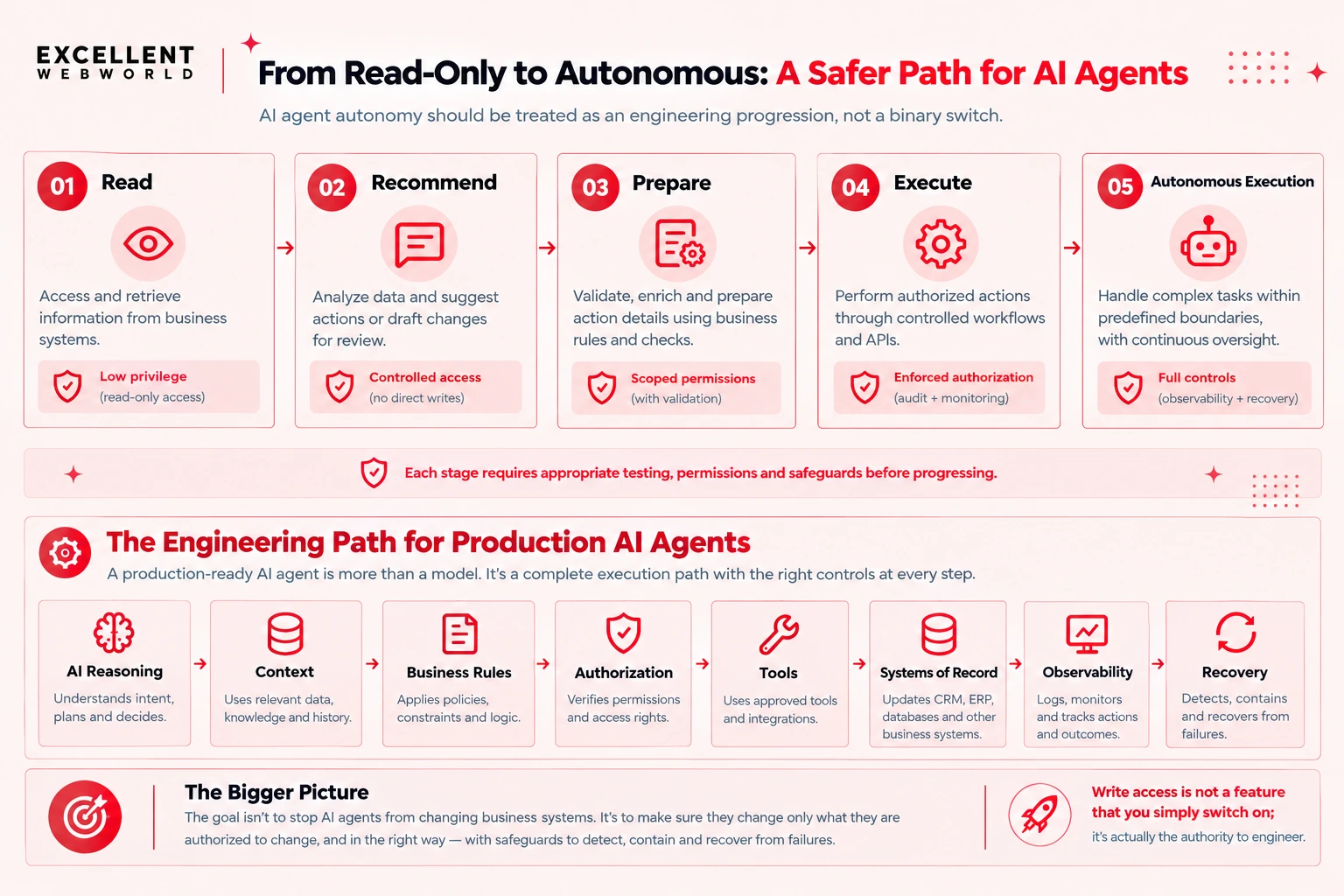
The objective isn’t about preventing AI agents from changing business systems. It’s mainly to ensure they can change only what they are authorized to change and the way they are supposed to change it, with safeguards to detect, contain & recover from failures.
Write access is not a feature that you simply switch on; it’s actually the authority to engineer.
Key Takeaways
- Start with read-only access: Expand an AI agent’s permissions gradually as its reliability and readiness are demonstrated.
- Enforce least privilege: Grant only the permissions required for each action, with business rules and authorization enforced outside the prompt.
- Protect systems of record: Route write operations through controlled APIs that validate requests and preserve existing business rules.
- Make every action traceable and recoverable: Use audit trails, idempotency, human approval, and recovery mechanisms to manage failures and unintended changes.
- Earn autonomous execution: Allow greater autonomy only when testing demonstrates reliable behavior within defined permissions, safeguards, and operational boundaries.
Frequently Asked Questions
AI agent write access allows an AI agent to create, modify, or delete data and execute actions in connected business systems.
Apply least-privilege permissions, enforce authorization and business rules outside the prompt, and establish audit trails and recovery mechanisms.
Generally, agents should write through controlled APIs that enforce business logic, authorization, and validation.
Require human approval for high-impact actions such as large financial transactions, contract modifications, security changes, and irreversible deletions.
Yes. Start with read-only access, then progress to controlled writes and autonomous execution as safeguards and testing demonstrate readiness.

Article By


Mahil Jasani began his career as a developer and progressed to become the COO of Excellent Webworld. He uses his technical experience to tackle any challenge that arises in any department, be it development, management, operations, or finance.