Making the right choice in NativeScript vs Flutter can be overwhelming! This is because dozens of technology frameworks have made their mark in the coding industry. Anyway, when we are given choices that we can’t count on our fingers, making a choice is as difficult as it is.
Read this very carefully and understand it! – An entrepreneur, after mobile app development and deployment, wants to make money. To make more money, he needs more downloads on his app. And to get more downloads, he has to target a larger number of users. To do so, one needs to launch their app for both user platforms — Android and iOS! For this, a cross-platform application is his best bet!
When choosing a framework for an application, our clients usually ask us to use one they are familiar with. But we cannot make a choice based on their desires, whims, and fancies.
We recommend that our clients go with the framework based on its technical merits. To name a few bases for comparison, we consider timeline vs budget, restrictions vs structural freedom, client expectations vs our team’s abilities — everything!
This blog will help you understand Flutter and NativeScript and guide you on how to choose one for building a mobile app in 2026. Let’s first dig into the similarities between NativeScript and Flutter before seeing them as opponents in the NativeScript vs Flutter battle.
Comparison Between Flutter vs NativeScript – What to choose in 2026?
Few Similarities – NativeScript vs Flutter
You can expand your app business on similar scales using Flutter and NativeScript. It is because, despite their differences, there are many standpoints where they stand on the same pedestal.
- Both Flutter and NativeScript are open-source frameworks.
- These frameworks are equipped to use CLIs (Command Line Interfaces).
- Both provide access to native device APIs for a genuine native user experience.
CLI – Command Line Interface
How convenient is it to type a command and see the computer processor do the task for you? But what makes this possible? Both Flutter and NativeScript support CLI, making it easier for developers to build, test, and deploy apps from the terminal.
Points of Difference – NativeScript vs Flutter
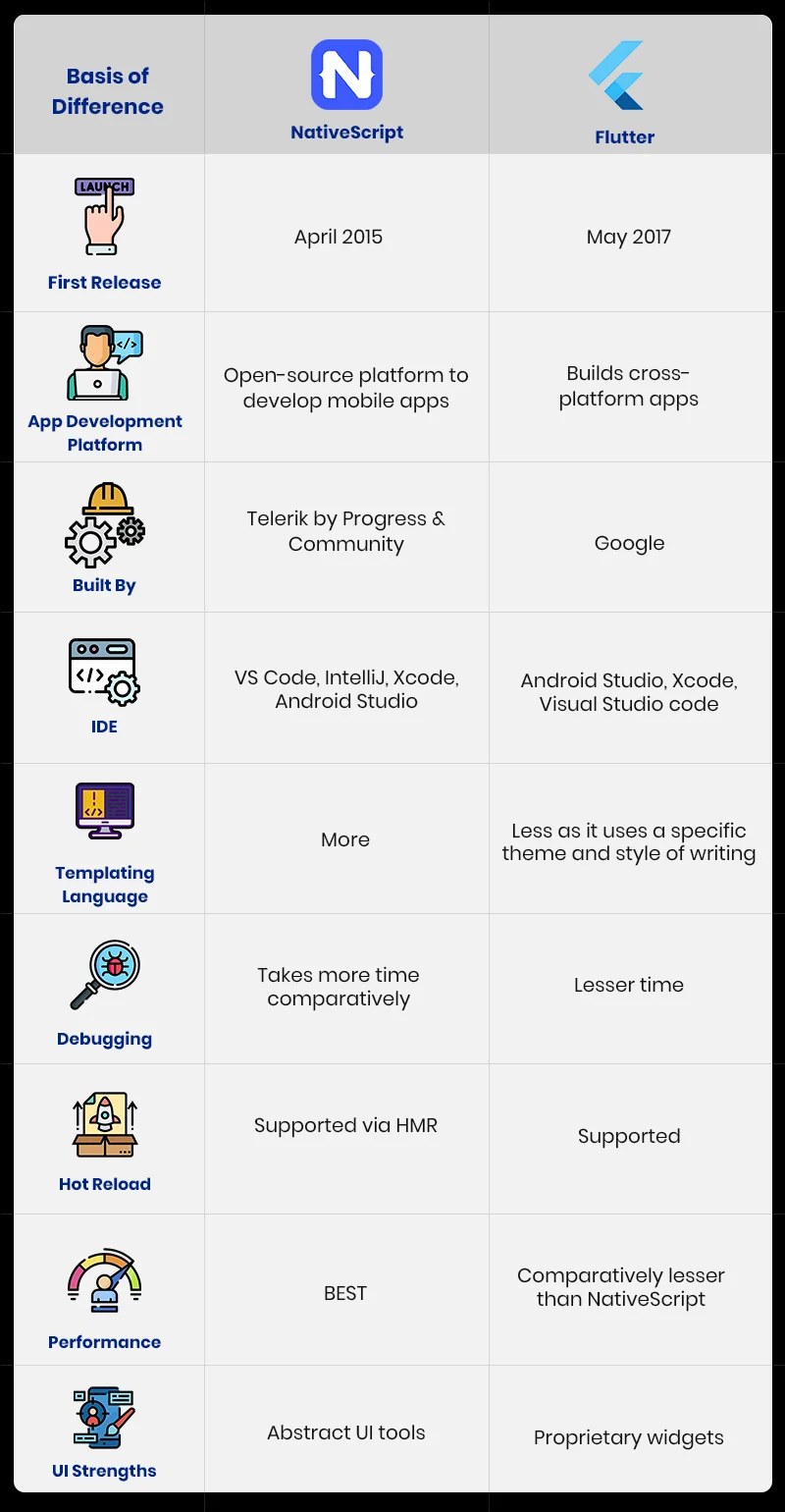
You can use this table of differences to briefly compare Flutter and NativeScript. Note – This will help you quickly screen through the framework comparison.
| Sr. No. | Point of Difference | NativeScript | Flutter |
|---|---|---|---|
| 1. | First Release | April 28, 2015 | December 2018 (stable v1.0) |
| 2. | App development platform | Open-source framework for native mobile apps | Builds cross-platform apps for mobile, web, and desktop |
| 3. | Pre-configured Items | Components | Widgets |
| 4. | Built By | Telerik | |
| 5. | Coding Languages | JavaScript, TypeScript (with Angular, React, Vue, Svelte support) | Dart |
| 6. | IDE | VS Code, IntelliJ, Xcode, Android Studio | Android Studio, Xcode, Visual Studio Code |
| 7. | GitHub Stars (2026) | 25.5K stars | 176K+ stars |
| 8. | Difficulty Level | Accessible for JavaScript/TypeScript developers; smaller community & fewer resources | High satisfaction; excellent docs, tooling, and community support |
| 9. | Coding Patterns | Supports MVVM and clean architecture | Top-level root interaction with layers rendered via the widget tree |
| 10. | Hot Reload | Supported via HMR | Supported (fast & reliable) |
| 11. | UI Strengths | Direct native UI components | Proprietary Impeller-rendered widgets, pixel-perfect across platforms |
| 12. | Speed | Fast | Faster – Impeller engine eliminates shader jank |
| 13. | Performance | Good for native UI fidelity | Excellent; matches or exceeds NativeScript via Impeller renderer |
| 14. | Platform Support | iOS, Android | iOS, Android, Web, Windows, macOS, Linux |
| 15. | Popular Apps | Aura CO2, Breethe, OSS Weather | Google Pay, eBay Motors, BMW App, Alibaba Xianyu, Dream11, Groupon |
To surge your revenue, hire app developers for a startup or an enterprise. From a web developer’s perspective, factors such as system components, architecture, size, and development costs matter greatly when choosing between these frameworks.
Let the in-depth battle between NativeScript vs Flutter begin!!! 🤜👊🤛
1. Nature
Flutter is both an SDK and an open-source coding framework developed by Google. It supports mobile, web, Windows, macOS, and Linux from a single codebase. NativeScript, on the other hand, is an open-source framework for building native mobile applications using JavaScript or TypeScript.
2. Architecture Components – NativeScript vs Flutter USP!!!
It’s the logical and physical interrelationships among the components that determine the architecture of your technology. Understanding the architecture of both NativeScript and Flutter will help you understand how applications function for these frameworks.
In NativeScript, the architecture provides direct access to native APIs without a bridge, enabling native UI components to be used in JavaScript and TypeScript. Flutter, on the other hand, uses its own rendering engine, now Impeller (formerly Skia), to render every element itself, thereby ensuring pixel-perfect consistency across platforms and eliminating shader compilation jank.
3. Popularity & Community
Every framework is popular for its strengths and uses. So, popularity is an important factor developers consider when choosing a framework.
If you talk about popularity, Flutter has 176K+ GitHub stars, while NativeScript has 25.5K+ GitHub stars. So, you can clearly see that Flutter is highly popular and consistently ranks at the top in industry and developer surveys. NativeScript, on the other hand, has a loyal niche following, but the ecosystem, plugins, and job market are significantly smaller than those of Flutter.
Flutter’s Google backing, massive community, and rich pub.dev package ecosystem make hiring Flutter developers considerably easier than hiring NativeScript developers.
If you want to develop a world-class application in Flutter or NativeScript, you can hire dedicated developers from Excellent Webworld. Our developers will understand your unique requirements and create an application that helps your business grow.
4. Cost of Development
Usually, the below-mentioned cost formula helps assess Flutter app development cost or NativeScript app development cost:
Try replacing the formula with real-time values for a value ($).
Total Development Cost ($) = Number of hours needed for SDLC process * Hourly charges of the required sources
Hence, feed the total number of hours and the hourly charges in the above formula to compare the cost of app development in NativeScript and Flutter.
In 2026, Flutter’s larger talent pool often makes it more cost-competitive. NativeScript development may carry a premium due to the limited number of specialists.
5. Difficulty Level
“Any fool can write code that a computer can understand. Good programmers write code that humans can understand.” – Martin Fowler.
As of 2026, as a developer, you should use NativeScript if you already have experience working with JavaScript or TypeScript. You can leverage those web skills and easily work with NativeScript.
On the other hand, Flutter uses Dart, which is easy to learn for a newbie but requires a change in mindset. However, Flutter has improved documentation, tooling, error messages, and community ecosystem, thereby making it highly beginner-friendly.
Excellent Webworld, the best Flutter app development company, firmly believes that error-free coding is an art.
6. Debugging – Solving the Lags
“First, solve the problem. Then, write the code.” – John Johnson.
As for debugging, Flutter’s DevTools has matured significantly. So, as a developer, you can debug faster with features such as the widget inspector, performance profiler, and memory viewer. On the other hand, NativeScript has also improved debugging with the ns CLI, but Flutter’s toolchain offers a more streamlined experience overall.
7. Flutter vs NativeScript Performance
Be it an artist or an application, both need to perform very well.
As of 2026, in the Flutter vs NativeScript performance comparison, Flutter holds an edge. The reason is that Flutter’s Impeller rendering engine (now the default on iOS and Android) draws its own UI components. It doesn’t rely on native UI bridges, eliminating shader compilation jank that plagued earlier versions. On the other hand, NativeScript accesses native components directly, which provides great native UI fidelity, but Flutter often exceeds it in real-world rendering benchmarks.
8. Code Structure Between NativeScript and Flutter
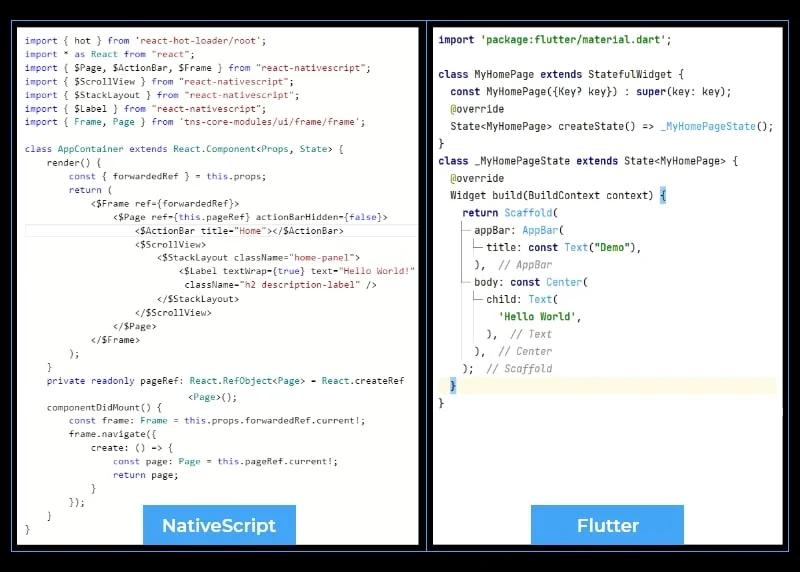
Both NativeScript and Flutter have different coding styles. While NativeScript uses familiar JavaScript/TypeScript patterns, Flutter uses a Dart widget tree style that may look unfamiliar at first, but is highly structured and readable once you get familiar with it.
Here are the code samples from both frameworks. Just observe the coding style on both sides.
9. Deployment Time
“Make it work, make it right, make it fast.” – Kent Beck.
As far as NativeScript goes, it uses standard platform deployment practices followed by Android and iOS via the ns CLI. On the other hand, Flutter uses the Flutter build command in combination with CI/CD integrations like Codemagic or fastlane, thereby making deployment to the Google Play Store and App Store well-documented and streamlined.
10. AI/ML Integration Capabilities
If you talk about AI and Machine Learning, Flutter has strong ML support through TensorFlow Lite plugins, Firebase ML, and Google ML Kit, with growing community packages for on-device inference. On the other hand, NativeScript can access native iOS (Core ML) and Android (ML Kit) ML frameworks via a native API bridge. Overall, Flutter’s extensive AI/ML plugin ecosystem and Google’s backing give it an edge in AI/ML integration.
Kotlin Multiplatform & Compose Multiplatform: A Strong Alternative Worth Considering
If you’re evaluating cross-platform frameworks in 2026, then you need to have a fair idea about Kotlin Multiplatform (KMP) and Compose Multiplatform, which have emerged as strong alternatives for teams that have Kotlin/Android experience.
KMP allows you to share business logic across iOS and Android while keeping native UIs. On the other hand, Compose Multiplatform extends Jetpack Compose to iOS, web, and desktop. These frameworks are not direct replacements for Flutter or NativeScript, but they represent a good alternative for enterprise-level projects.
Concluding the Battle – NativeScript vs Flutter – Peace Out!!
Both Flutter and NativeScript have their pros and cons. However, for 2026, Flutter has emerged as the leader in mainstream cross-platform app development, backed by Google, a massive developer community, and multi-platform support (mobile, web, and desktop). On the other hand, NativeScript remains a good choice for teams with deep JavaScript/TypeScript expertise.
If you’re unsure which path to take, our developers at Excellent Webworld are well-versed in both frameworks and can guide you based on your project’s specific requirements.
Hire NativeScript developers or hire Flutter developers and get result-driven applications within the stipulated timeline.
Frequently Asked Questions – NativeScript vs Flutter
Basically, Flutter and NativeScript differ in architecture, language, and scope. While Flutter uses Dart and its own Impeller rendering engine to create applications for web, desktop, and mobile from a single codebase, NativeScript uses JavaScript/TypeScript to access native mobile APIs directly. Between these two frameworks, Flutter offers more plugins, broader platform support, and a larger community, giving it an edge.
No, for most mainstream projects, Flutter is a stronger alternative because of its ecosystem, multi-platform support, performance, and hiring pool. However, if you have a team that is already skilled in JavaScript/TypeScript and needs direct native API access without learning Dart, then NativeScript is a better choice.
Oh, YES. Flutter uses the Impeller rendering engine, which draws its own UI components without relying on native bridges. It consistently delivers 60 fps in real-world benchmarks. Flutter has better rendering performance than NativeScript.
YES, Flutter is highly suitable for large-scale, feature-heavy, production-grade apps. In fact, it powers some of the world’s leading and high-traffic apps, including Google Pay, eBay Motors, BMW App, and Alibaba’s Xianyu.
Yes, NativeScript can handle complex mobile apps when direct native API access is required. However, due to its smaller community and plugin ecosystem, you have fewer ready-made solutions, thereby increasing development time for complex feature sets.
Yes, both frameworks provide support for device-specific API access. For Flutter, you can access native APIs via platform channels or a plugin. For NativeScript, you have access to native iOS and Android APIs directly via its JavaScript/TypeScript bridge. Both can integrate with camera, GPS, Bluetooth, and other hardware, though NativeScript’s direct bridge often requires less boilerplate for low-level native interactions.
For complex enterprise apps in 2026, Flutter is generally the better choice. It offers a mature plugin ecosystem, strong CI/CD integrations, multi-platform support, and a large talent pool. NativeScript is viable for mobile-only enterprise apps where teams have strong JavaScript/TypeScript expertise and require deep native API access.

Article By


Paresh Sagar is the CEO of Excellent Webworld. He firmly believes in using technology to solve challenges. His dedication and attention to detail make him an expert in helping startups in different industries digitalize their businesses globally.