Cloud-native application development has transformed how businesses build and deploy software at unprecedented speed and scale.
Cloud-native application development is essential for three reasons:
59% of organizations report that much or nearly all of their development and deployment is cloud-native. In our consulting work with fast-scaling SaaS, FinTech, and HealthTech companies, we recommend cloud-native application development services because they restore control, speed, and confidence for engineering teams.
Read this blog to learn what truly works, what to avoid, and how to scale without fear.
What is Cloud-Native Application Development?
Cloud native application development is an approach that involves developing and running apps that leverage cloud computing as their core, using technologies like orchestration (for example, Kubernetes), microservices, and containers (for example, Docker).
Moreover, they are built with practices like CI/CD and DevOps to create rapidly updateable, scalable, and resilient software that can run on public, private, or hybrid clouds. Simply put, if you’re developing a cloud native app, it means you’re designing and developing an app that can be independent and loosely coupled, enabling efficient scaling, faster innovation, and reliable releases.
What is the Difference Between Cloud-Native, Cloud-Hosted, Cloud-Ready, and Cloud-Based Apps?
Cloud application development in a cloud-native model lowers long-term costs while delivering the speed and agility modern businesses need. But how is cloud-native different from cloud-hosted, cloud-ready, and cloud-based apps?
Let’s understand the key differences between cloud-native, cloud-hosted, cloud-ready, and cloud-based apps in a nutshell:
| Term | What It Means | How It’s Built | Best For |
|---|---|---|---|
| Cloud-Hosted | A traditional app moved to the cloud | Same old app, just running on cloud servers | Businesses that want to move existing apps to the cloud quickly |
| Cloud-Ready | An app prepared to move to the cloud | Minor changes were made to work better on the cloud | Companies planning cloud migration in phases |
| Cloud-Based | An app designed to use cloud services | Uses cloud storage, APIs, and managed services | SaaS products and modern web/mobile apps |
| Cloud-Native | An app born and optimized for the cloud | Built with microservices, containers, and auto-scaling | Startups & enterprises building for speed, scale, and resilience |
What are the Core Benefits of Cloud Native Applications for Businesses?
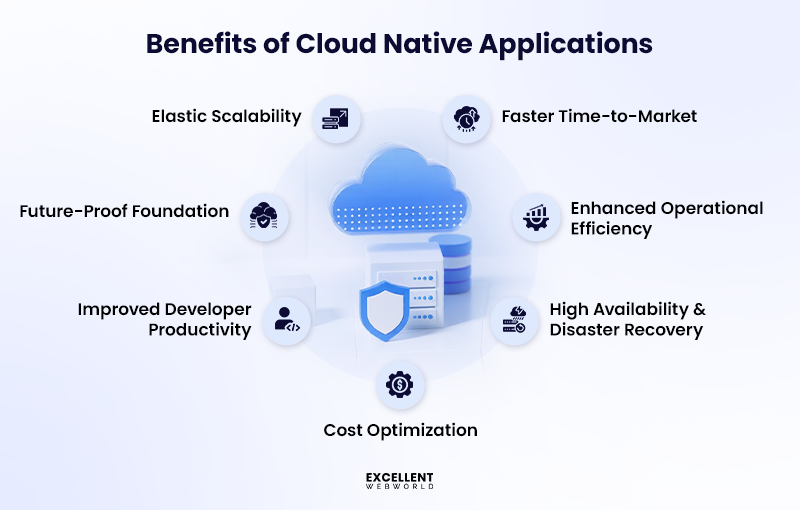
Your current issues are resolved by switching to cloud-native. If releases take weeks, cloud bills are unpredictable, or infrastructure fails during traffic spikes, the advantages of cloud-native application development address these pain points directly.
1. Elastic Scalability Without Re-Architecture
Your system struggles during traffic surges. You overprovision resources or risk downtime.
Cloud-native applications scale automatically based on demand. Traffic increases and resources scale in seconds. Traffic drops and costs fall at the same time. Growth no longer forces structural changes.
2. Faster Time-to-Market
Slow releases block revenue and learning.
Cloud native architectures support continuous deployment. Teams releases features daily instead of quarterly. Microservices allow parallel work without dependency conflicts. You validate features faster and react to user behavior in real time.
3. Enhanced Operational Efficiency
Infrastructure management drains engineering focus.
Operations are automated via cloud-native apps. Without human intervention, self-healing systems recover from malfunctions. Containers provide uniform surroundings throughout the phases.
When paired with AI development services, teams can also automate anomaly detection, capacity forecasting, and performance optimization, enabling engineers to focus on shipping features rather than managing infrastructure.
4. High Availability & Disaster Recovery
Downtime damages trust and revenue.
Cloud-native applications run across multiple availability zones. When one zone fails, traffic reroutes instantly. Recovery happens in seconds. You avoid paying for idle backup environments.
5. Cost Optimization Through Autoscaling
Cloud native applications scale resources automatically based on real demand, reducing overprovisioning and wasted spend. You pay only for what your application actually uses.
Understanding SaaS, IaaS, and PaaS is essential here. PaaS and SaaS are best suited for cloud-native models due to built-in autoscaling, while IaaS often requires manual capacity planning and tighter cost control.
6. Improved Developer Productivity
Legacy systems slow progress and increase risk.
Cloud-native practices standardize workflows. Developers work in consistent environments from local to production. CI/CD pipelines manage testing and deployment. Friction is decreased with Infrastructure as Code (IaC).
7. Future-Proof Foundation for AI, ML & IoT
AI, ML, and IoT app development workloads demand elastic infrastructure.
The benefits of cloud native applications support rapid experimentation. You adopt new capabilities without heavy upfront spend. Your architecture stays ready for future demands.
Cloud-Native vs Traditional Applications: A Practical Comparison
It’s essential to compare traditional applications with cloud-native app development. This will help you decide what is best for your business.
| Parameter | Cloud-Native Applications | Traditional Applications |
|---|---|---|
| Architecture | Microservices, modular design, flexible | Monolithic, tightly integrated, harder to scale |
| Scalability & Performance | Auto-scaling, adapts to demand | Limited scalability, manual adjustments needed |
| Cost Efficiency | Pay-per-use, optimized resources | Over-provisioning, high waste |
| Deployment Speed | Fast deployments with CI/CD pipelines | Slower updates, manual processes |
| Maintenance & Upgrades | Continuous, small updates, no downtime | Large updates, potential downtime |
| Security & Resilience | Distributed, built-in resilience | Centralized, harder to scale and secure |
| Innovation & Time-to-Market | Fast iterations, flexible tools | Slower innovation, rigid structure |
What are the Real-World Examples of Cloud Native Applications?
Stop reading theory. Look at companies doing this right now. These cloud-native development success stories prove the ROI you’re questioning exists.
1. SaaS Platforms
Because they have removed deployment obstacles, your SaaS rivals ship more quickly. Cloud-native systems push updates without interruption and scale automatically during user spikes.
2. Fintech & Digital Payments
Financial platforms need zero downtime and instant scalability during transaction surges. Cloud-native architectures let fintech companies handle millions of payments simultaneously while maintaining security standards.
3. Healthcare & Patient Data Platforms
Healthcare applications need real-time data access with strict compliance requirements. Cloud computing in the healthcare sector enables the expansion of patient portals and diagnostic tools while complying with GDPR and HIPAA standards.
4. E-Commerce & On-Demand Delivery
These cloud native applications examples demonstrate how platforms handle flash sales by scaling specific services independently.
What are the Key Features of Cloud Native Applications?
Cloud-native applications remove constraints caused by legacy systems. You gain speed, control, and predictability across delivery, scale, and cost.
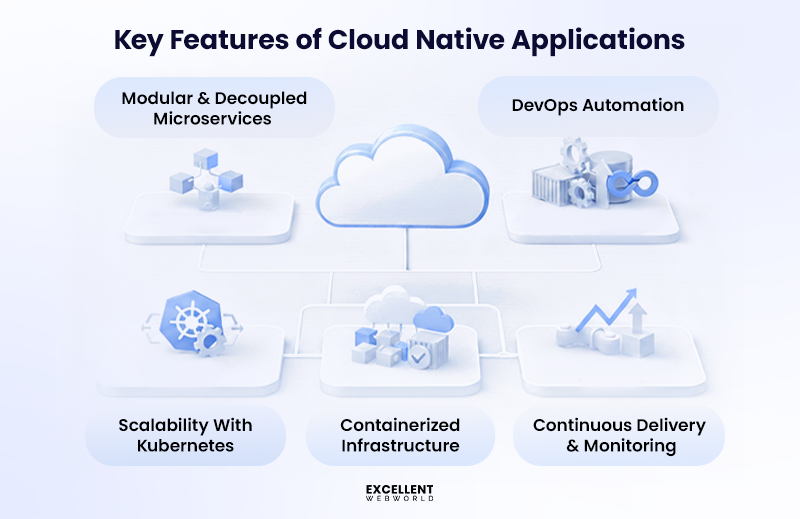
1. Modular and Decoupled Microservices
You split large systems into small services owned by focused teams. Each service deploys independently. Failures stay contained. Release cycles shrink from weeks to days. When you develop cloud native applications, this structure lowers modernization risk and protects revenue during change.
2. Containerized Infrastructure
Containers standardize runtime behavior across environments. Deployment issues drop. Resource usage becomes visible. This matters when managing applications in cloud computing at scale and under cost pressure.
3. DevOps Automation
Automation removes manual steps from build, test, and release workflows. Teams ship updates frequently without adding risk. Delivery speed improves without expanding headcount.
4. Scalability With Kubernetes
Kubernetes scales workloads based on demand. Traffic spikes stop breaking systems. You avoid paying for idle capacity.
5. Continuous Delivery and Monitoring
Monitoring gives visibility across services, costs, and failures inside your cloud computing architecture. You detect issues early and act before customers feel the impact.
What are the Top Industry Use Cases of a Cloud-Native Application?
Cloud-native applications solve scale, cost, and release delays across industries where legacy systems block growth. You adopt them to modernize safely while maintaining business continuity.
1. Healthcare
You can modernize patient systems without risking uptime or compliance. You release digital care features faster while keeping data protected as you move toward developing cloud native applications with a trusted healthcare app development company.
2. Fintech
You support real-time transactions without service degradation. You ship compliance updates faster while controlling operational risk, often by partnering with a specialized fintech app development company to maintain high standards.
3. E-Commerce
You manage unpredictable traffic without overprovisioning infrastructure. As a leading eCommerce app development company, we help you protect conversion rates during peak demand.
4. Automotive
By utilizing advanced automotive software solutions, you scale connected services without rewriting core platforms. Cloud-native organizations improve software delivery speed.
5. Logistics
You gain visibility across distributed operations inside a cloud-native environment. You react faster to demand changes, especially when partnering with a specialized logistics app development company to streamline your digital infrastructure.
6. Education
You support remote learning at scale without outages, ensuring a stable experience for students worldwide. By collaborating with an expert educational app development company, you can release content updates continuously to keep your curriculum agile and engaging.
7. Real Estate
You modernize platforms without disrupting active users, ensuring a seamless transition during complex upgrades. As an experienced real estate app development company, you improve speed across digital journeys to keep buyers and agents engaged.
What are the Key Components for Building Cloud Native Applications?
You adopt cloud-native to remove scaling friction, reduce release risk, and control cloud spend. Each component below solves a real business bottleneck you face during modernization.
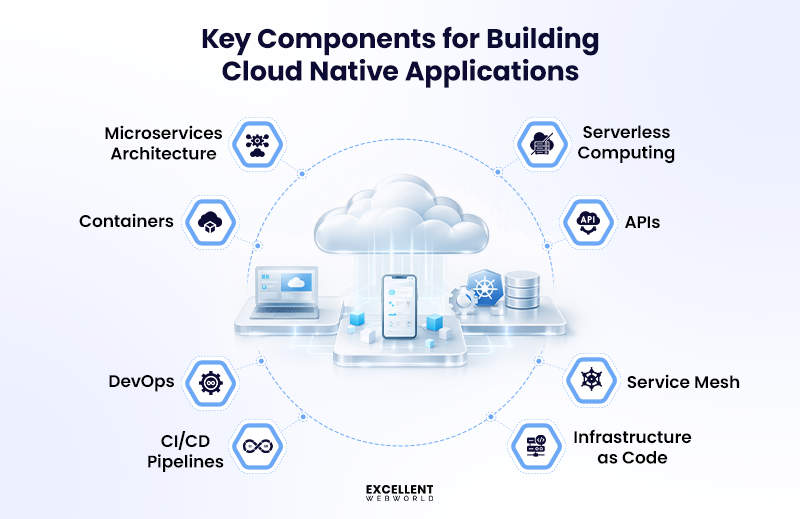
1. Microservices Architecture
You split large applications into smaller services aligned with business domains. You reduce release risk and speed delivery within a cloud native architecture.
2. Containers
You package applications with all dependencies into standard units. You remove environment drift across development, testing, and production.
3. Container Orchestration
You automate deployment, scaling, and recovery for containers. You handle traffic spikes without manual intervention.
4. CI/CD Pipelines
You automate build, test, and release workflows using Continuous Integration and Continuous Deployment (CI/CD). You shorten release cycles without increasing risk.
5. DevOps
You align development and operations around shared ownership. You remove silos, slowing delivery and reliability.
6. Serverless Computing
You run event-driven workloads without managing servers. You align infrastructure costs with actual usage.
7. APIs and Event-Driven Systems
You connect services through API development and events. You enable independent scaling and real-time processing.
8. Service Mesh and Observability
You gain visibility and control across distributed services. You improve reliability, security, and troubleshooting speed.
9. Infrastructure as Code
You define infrastructure through version-controlled templates. You standardize environments using a cloud native application development framework.
How do Cloud-Native Applications Work?
Cloud-native apps break monoliths into separate services. In dynamic cloud systems, they manage problems, scale automatically, and maximize resources.
What are the Core Cloud-Native Architecture Principles?
Your monolithic system crashes during traffic spikes. You need architecture that scales without breaking your budget. Cloud-native architecture principles solve this through six core approaches.
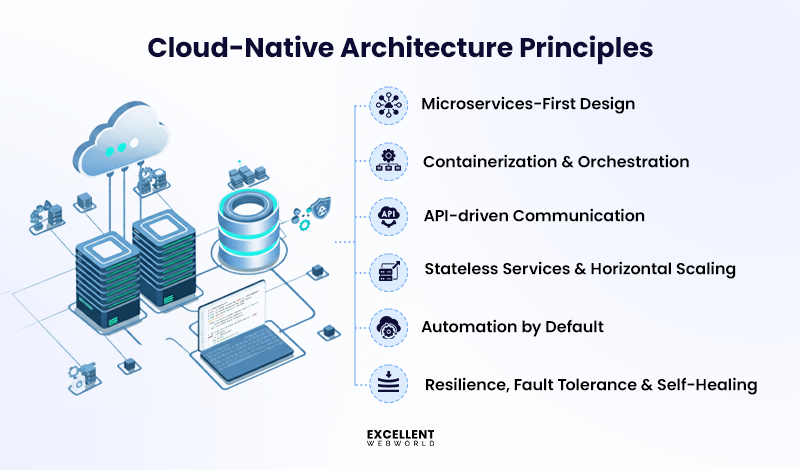
1. Microservices-First Design
Split your application into independent services. Each service handles one business function. Deploy them separately. When one fails, others keep running. Your team ships features without coordinating massive releases.
2. Containerization & Orchestration
Package applications with dependencies in containers. Kubernetes manages these containers across servers. You get consistent behavior from development to production. No more environment-specific bugs that delay launches.
3. API-Driven Communication
Services communicate via APIs, forming the backbone of modern mobile app development. This approach keeps frontend and backend independent, so updates or scaling in one layer don’t disrupt the rest of the system.
4. Stateless Services & Horizontal Scaling
Remove session data from application servers. Add instances during peak hours. Remove them when traffic drops. You pay only for what you use.
5. Automation by Default
CI/CD pipelines automatically deploy code. Infrastructure-as-Code provisions resources through templates.
Organizations adopting Gen AI development services extend automation further by using AI to recommend architectural improvements, optimize deployment strategies, and proactively identify scaling or cost risks before they impact users.
6. Resilience & Self-Healing
Systems detect failures and restart components automatically. One service crashes while others continue working. You spend less time fixing outages.
How to Build Cloud Native Applications: 6 Key Steps
It takes more than merely starting a few containers to build a cloud native application. To control growth, keep expenses under control, and get your staff ready for the future, you need a clear plan.
Here’s the process we’ve seen work for teams making this transition.
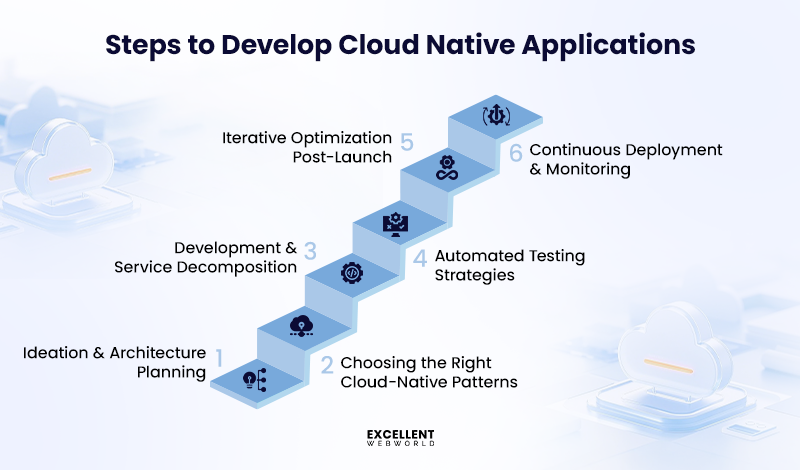
Step 1: Ideation & Architecture Planning
Map your business needs to technical choices before you write any code. Figure out which parts of your application get hit hardest during peak hours and need independent scaling.
Start with these foundations:
Your cloud-native application development strategy guides everything else. Rushing this stage will cost you months of rework.
Step 2: Choosing the Right Cloud-Native Patterns
Pick patterns based on the problems you’re solving right now. Don’t copy what other companies do without understanding why.
These patterns solve real issues:
Match cloud-native development methodologies to what your team knows today. Complex patterns need experienced people to maintain them.
Step 3: Development & Service Decomposition
Split your monolith by business domain, not technical layers. Each service handles one thing and manages its own database.
Work through this order:
Give your developers time to learn containers before production. Theory and practice are different things.
Step 4: Automated Testing Strategies
Manual testing falls apart when you deploy ten times a day. Automate the checks blocking your releases.
Cover these test types:
Find bugs before customers do. Production isn’t the place to discover issues.
Step 5: Continuous Deployment & Monitoring
Build pipelines where code deploys itself after passing tests. Watch what’s running so you spot trouble before support tickets pile up.
Put these practices in place:
Monitor what affects revenue. Slow response times lose customers.
Step 6: Iterative Optimization Post-Launch
Going live starts the real work. Use production data to cut waste and improve performance.
Keep improving these areas:
Look at infrastructure spending every month. Minor fixes add up to significant savings.
How to Secure Your Cloud Native Applications?
Cloud-native applications increase your attack surface. Every service, container, and API is a potential entry point. Use these steps to secure your systems.
1. Shared Responsibility Model
You manage application security, and the cloud provider manages infrastructure.
2. DevSecOps Approach
Include security in your pipeline for continuous integration and deployment. Catch issues early.
3. API Security & Zero-Trust Architecture
Assume no request is safe. Verify everything.
4. Container & Kubernetes Security
Misconfigured containers expose your system. Lock down your environment.
5. Compliance Considerations
Distributed architectures complicate compliance. Stay on top of regulations.
What are the Tools and Technologies Required For Managing Cloud-Native Applications?
You manage complexity, scale, and risk by choosing tools that reduce friction, not add to it. In cloud native enterprise app development, the right stack directly impacts release speed, cloud costs, and system stability. We recommend these categories based on real modernization programs across SaaS, Fintech, and enterprise platforms.
| Category | What You Should Use |
|---|---|
| Frontend Frameworks | React, Angular, Vue.js, Next.js, Svelte |
| Backend Technologies | Node.js, Java Spring Boot, .NET Core, Go, Python FastAPI |
| Databases | PostgreSQL, MySQL, MongoDB, Cassandra, Amazon Aurora |
| Cloud Platforms | AWS, Microsoft Azure, Google Cloud Platform, Oracle Cloud, IBM Cloud |
| DevOps and CI/CD | GitHub Actions, GitLab CI/CD, Jenkins, Azure DevOps, Argo CD |
| Monitoring and Observability | Prometheus, Grafana, Datadog, New Relic, ELK Stack |
| AI and ML Integration Stack | Azure AI Services, AWS SageMaker, Google Vertex AI, OpenAI APIs, TensorFlow |
What are the Common Challenges in Cloud-Native App Development?
You face these challenges because cloud-native application development shifts how architecture, teams, and costs work together. Based on years of cloud, AI, and consulting engagements, these are the real blockers we see across scaling businesses.
1. Complexity of Distributed Systems
You deal with many moving parts instead of one system. Failures become harder to trace and fix.
2. Skill Gaps in Teams
You cannot go cloud-native without new skills. This slows adoption and increases dependency risks.
3. Observability and Debugging Challenges
You struggle to see what is really happening in production. This delays incident response.
4. Cost Visibility Issues
You pay more without clear accountability. This creates pressure on margins.
5. Vendor Lock-In Concerns
You fear losing flexibility as you scale. Strategic choices become harder to reverse.
6. Security Risks
You protect more surfaces with the same teams. Risk exposure grows fast.
7. Ensuring Consistent Performance
You must scale without hurting user experience. This directly affects growth.
What are the Best Practices for Cloud-Native App Development?
When creating a cloud-native application, you should adhere to the following best practices:
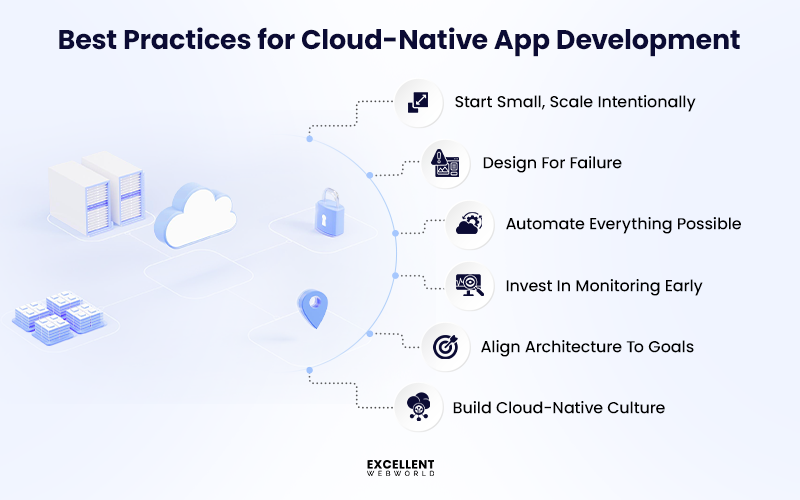
1. Start Small, Scale Intentionally
You should modernize in phases instead of changing everything at once. This approach limits disruption and protects business continuity.
2. Design For Failure
You must expect failures in distributed systems. Planning for them keeps your platform reliable.
3. Automate Everything Possible
You need automation to scale delivery without adding operational risk. Manual processes slow teams down.
4. Invest In Monitoring Early
You gain control when you detect issues before customers feel them. Visibility drives stability.
5. Align Architecture With Business Goals
You should build systems that support revenue and growth, not just technical elegance.
6. Build Cloud-Native Culture, Not Just Apps
You succeed when teams change how they work, not just what they deploy. Tools alone do not deliver results.
How Much Does It Cost To Build A Cloud-Native Application?
On average, building a cloud-native application today typically ranges from $10,000 at the low end for simple MVPs to $400,000+ for enterprise-grade, highly scalable solutions – depending on features, integrations, security needs, and team expertise.
| Project Type | Typical Cost Range (USD) | What You’ll Get |
|---|---|---|
| MVP (Minimum Viable Product) | $10,000 – $60,000 | Core features, basic backend, quick validation stage, rapid CI/CD setup |
| Mid-Level Cloud-Native App | $60,000 – $150,000 | APIs, integrations, dashboards, moderate scale readiness |
| Enterprise-Grade Application | $150,000 – $400,000+ | Microservices, high security, compliance, real-time data, and AI features |
What are the Future Trends of Cloud-Native App Development?
Here are the trends that will drive the future of cloud native app development:
Is Cloud-Native App Development Right for Your Business?
Cloud-native should be assessed in light of your growth objectives and present difficulties. It eliminates constraints related to modernization, scalability, and performance, but it needs money and experience.
When to adopt cloud-native:
When not to adopt cloud-native:
Why Choose Excellent Webworld for Cloud-Native Application Development?
Choosing Excellent Webworld for cloud-native application development gives you a clear path to solving core business challenges. You eliminate legacy application bottlenecks and speed up scaling. Your releases take days, not weeks.
You reduce high cloud costs and gain control over resource usage. Your teams adopt the right cloud-native tools without confusion. We provide AI-powered app development and guide your teams on security, compliance, and microservice management.
You get a phased, risk-aware roadmap for cloud adoption. Your applications perform under peak load. Innovation accelerates. You make faster decisions with confidence.
Are you prepared to confidently scale and update your applications? Connect with our cloud-native experts today.
FAQs About Cloud-Native Application Development
Netflix is a cloud-native app. It runs on cloud servers, scales automatically when millions watch simultaneously, updates without downtime, uses microservices and containers for flexibility, and handles global traffic efficiently across multiple regions.
Break your app into small, independent services called microservices. Package them in containers like Docker. Use orchestration tools like Kubernetes. Automate deployments with CI/CD pipelines. Design for cloud platforms like AWS or Azure.
Cloud-native apps use built-in security tools, encryption, automated monitoring, and compliance checks. However, you remain responsible for proper configuration, access controls, data protection, and ensuring your application meets industry regulations and data standards.
Yes, cloud-native is often more affordable for small businesses. You pay only for resources you actually use, avoiding expensive physical servers and maintenance costs. Many cloud providers offer free tiers and affordable pay-as-you-go pricing.
Cloud-native apps are built from scratch for cloud environments, using microservices, containers, and modern architectures. Cloud-ready apps are older, traditional applications that have been modified, adapted, or migrated to run on cloud infrastructure.
Security is integrated throughout the entire development process using a DevSecOps approach. This includes automated vulnerability testing, access controls, data encryption, continuous monitoring, threat detection, and protecting apps/sensitive data from security breaches.

Article By


Paresh Sagar is the CEO of Excellent Webworld. He firmly believes in using technology to solve challenges. His dedication and attention to detail make him an expert in helping startups in different industries digitalize their businesses globally.