“AI-native” isn’t just another tech buzzword; it’s the next significant business advantage. Unlike traditional apps that use AI as an add-on, AI-native apps are built around intelligence from the ground up.
They learn, adapt, and make smarter decisions; unlocking new levels of efficiency, personalization, and scalability for modern businesses. Whether you’re a startup aiming to disrupt or an enterprise looking to innovate faster, mastering this shift can redefine your competitive edge.
In this guide, we’ll unpack what AI-native really means and walk you through the essentials of AI native app development—from strategy to successful launch.
What does “AI-native” Mean?
AI-native means that artificial intelligence is deeply embedded and foundational to a product or company’s core architecture, not just an added feature. This allows the system to be more adaptable, continuously learn, and function with a new mindset where AI drives decision-making, workflows, and user experiences from the ground up.
Unlike traditional systems in which AI is integrated as a separate feature, AI-native systems are designed to leverage AI capabilities right through the entire operation.
Artificial intelligence in app development becomes woven into every element of how your product works. Your system thinks and responds intelligently at every level.
What is an AI Native App?
An AI-native app is a software application built from the ground up with AI as a core, foundational component, not a retrofitted feature.
These apps are designed to continuously learn, adapt, and automate tasks by leveraging AI-driven principles to handle data, make decisions, and provide new capabilities that would be impossible or inefficient otherwise.
Examples include a personalized email system that prioritizes messages automatically and an e-commerce experience that anticipates a user’s needs.
AI-Native App vs AI-Enabled App
An AI-native app is built from the ground up with AI at its core, making the AI integral to its entire function and business model. An AI-enabled app is a traditional application that has AI features added onto it, like a plug-in, to enhance existing functionality.
The key difference is the role of AI: in AI-native apps, the AI cannot be removed without destroying the app, while in AI-enabled apps, removing the AI feature simply eliminates that specific function.
Let’s understand parameter-based differences in the table below:
| Parameter | AI-Native Apps | AI-Enabled Apps |
|---|---|---|
| Architecture | Built with AI at the core from the ground up | Traditional architecture with AI add-ons |
| Data Processing | Real-time AI-driven decisions | Batch processing with limited AI insights |
| User Experience | Fully personalized and adaptive | Standard UX with some smart features |
| Scalability | Scales intelligently based on AI predictions | Manual scaling with basic automation |
| Development Approach | Built with specialized AI frameworks from the start | Retrofitting existing systems |
| Decision Making | Autonomous AI-powered choices | Rule-based logic with AI assistance |
| Learning Capability | Continuous learning and improvement | Limited learning from user data |
| Cost Structure | Higher initial investment, lower long-term costs | Lower upfront costs, higher maintenance |
What are the Key Characteristics of AI-Native Apps?
AI-native applications represent a fundamental shift from traditional software architecture, leveraging artificial intelligence as their core foundation rather than an add-on feature. Here are the key traits of AI-native apps that help them stand out:
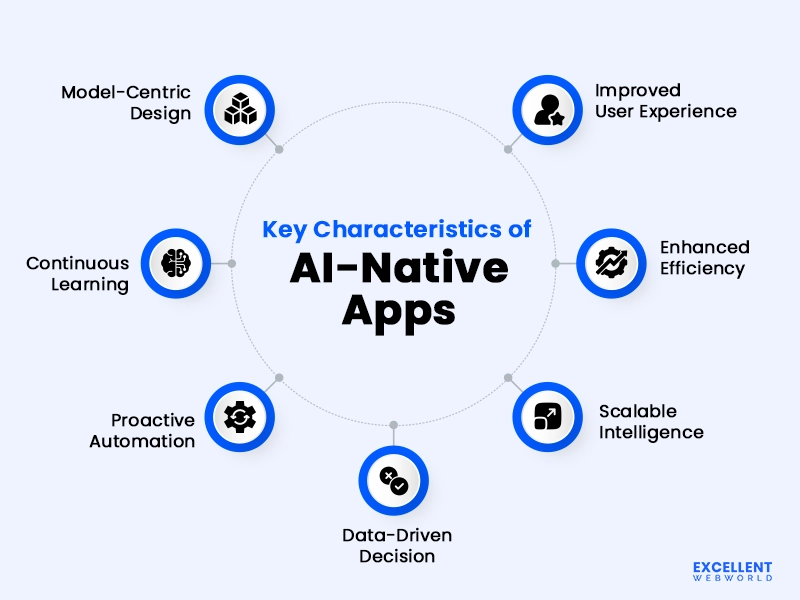
1. Model-Centric Design
Your app’s foundation is built on AI models, not traditional databases. AI-native interfaces process and learn simultaneously, creating smart functionality that adapts from day one.
2. Continuous Learning
Your app becomes smarter with every user interaction. Every click and action teaches the system something new, helping it to craft more and more personalized experiences over time.
3. Proactive Automation
Your app anticipates user needs instead of waiting for commands. Like Spotify crafting personalized playlists or Google Maps suggesting faster routes, it predicts moves and saves time.
4. Data-Driven Decision Making
Every app decision is based on real-time records analysis instead of preset guidelines. Your app processes multiple variables simultaneously, creating nuanced responses to complex user situations.
5. Scalable Intelligence
Your app’s intelligence grows stronger as more users join. More users generate better learning data for everyone. A professional AI development services provider like us can help you architect these scalable systems.
6. Enhanced Efficiency
Intelligent automation eliminates repetitive tasks right through your application. Smart workflows, predictive text, and automatic categorization constitute key features of AI-native apps that boost productivity appreciably.
7. Improved User Experience
Personalization takes place immediately based on current context and behavior patterns. Your application understands user preferences in real-time, creating interfaces that are custom-built for every consumer.
What are Some of the Popular Examples of AI Native Applications?
You’re probably wondering what real AI-native enterprise apps look like in action and how they differ from regular apps.
Here are some popular AI-native applications that show off accurate intelligence:
What are the Common Models that Powers AI Native Apps?
AI-native apps leverage various specialized models tailored to their core functions. These range from large language models for conversational AI to computer vision models for image processing, each optimized for specific tasks and user experiences.
What are the Key Advantages of AI-Native Apps?
AI-native apps offer key advantages like enhanced efficiency through automation and optimization, superior user experiences due to personalization and real-time processing, and a more adaptable and future-proof architecture.
Let’s decode these benefits in detail:
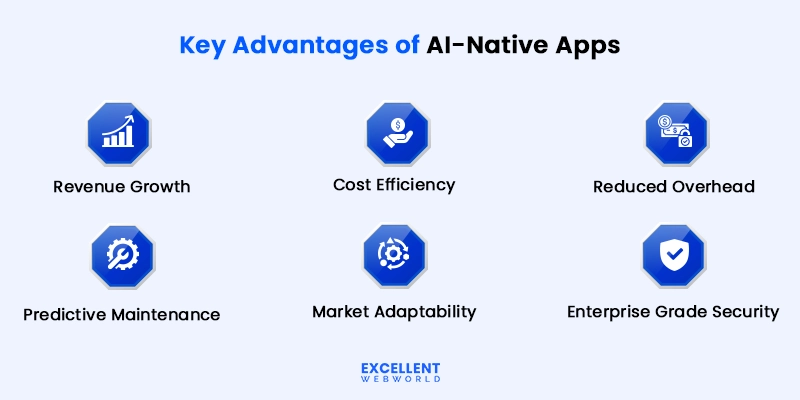
1. Revenue Growth Through Smart Insights
Your app identifies revenue opportunities automatically. It spots users’ shopping patterns and suggests upsells at an appropriate moment.
Sales teams close extra deals due to the fact that the app predicts which leads are most likely to convert. Marketing campaigns perform better with AI-driven user segmentation.
2. Cost-Effective Approach
Building AI-native from the start reduces your AI development cost in comparison to including AI features later. You can avoid the pricey rebuilds and complex integrations.
Your ai native development team works faster because AI handles routine tasks. Less manual coding means shorter release cycles.
3. Reduced Operational Overhead
Your team spends much less time on manual obligations like data entry and report generation. The app handles day-to-day operations while your staff can focus on the strategic work.
Customer service costs drop because the AI chatbot development service resolves most of the queries instantly. You require fewer support agents to keep up the same service quality.
4. Predictive Maintenance
The benefits of AI-native apps include automatic problem detection before they happen. Your app warns you about issues that could hurt your business.
Customer support requests decrease because issues get resolved proactively. Your team focuses on growth instead of firefighting.
5. Market Adaptability
Your app adjusts to market changes without requiring manual updates. It recognizes shifts in user behavior and modifies features accordingly.
Competitor analysis happens automatically as the app monitors industry trends. You get early warnings about market disruptions that could affect your business.
6. Enterprise-Grade Security
One of the AI-native advantages is that AI continuously monitors your app for security threats. It detects unusual styles and blocks attacks before they cause any damage.
Compliance requirements get handled automatically through intelligent document processing. Your business meets regulatory standards without manual oversight.
How to Build an AI Native App? Key Steps to Follow
To build an AI-native app, you need to seamlessly integrate artificial intelligence into both its core functionality and user experience. This requires thoughtful planning and the right selection of technologies to ensure that AI isn’t just an add-on but a driving force behind your app’s intelligence and adaptability.
By following a step-by-step approach, you can enhance your app’s capabilities and make it truly responsive to users’ needs. These key steps will guide you through designing, developing, and deploying an AI-powered application that stands out in today’s competitive market.
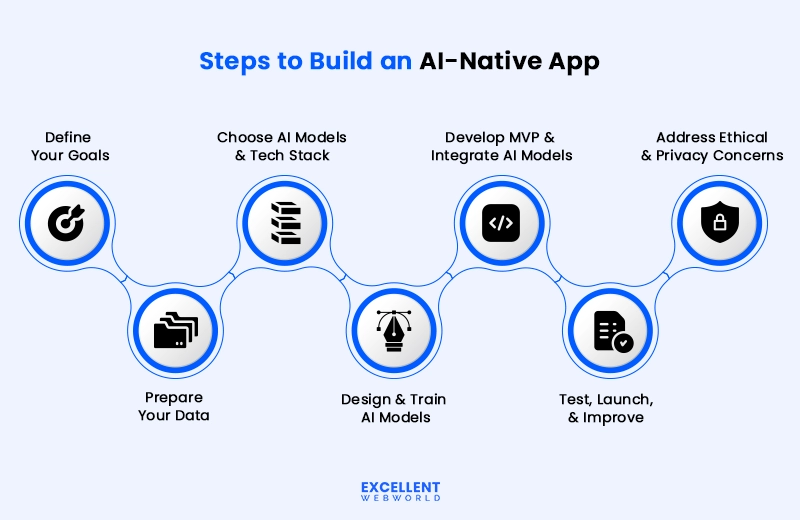
Step 1: Define Your Goals and Conduct Your Research
Start by asking yourself: “What specific enterprise problem will AI solve for your users?”
Don’t leap into AI because it’s a modern-day maverick. Instead, discover clear use cases in which AI provides real value. You need to constantly have a specific answer to: “Why build an AI-native app?”
Maybe you need to predict client behavior on your e-commerce app. Or perhaps you want real-time fraud detection for your fintech platform.
Write down your objectives in simple terms. “I want my fashion application to suggest merchandise to customers primarily based on user behavior” is better than “I want to use machine learning.”
Research your competition and study how other companies in your vertical use AI.
Look at successful AI native applications like Netflix’s recommendation engine or Uber’s dynamic pricing system.
Document what works and what doesn’t. This research will guide your entire AI development process.
Step 2: Prepare Your Data
Your AI is as smart as the information you feed it.
Start collecting and organizing your data now; by good data we mean clean, relevant, and properly labeled information.
Remove replica entries, fix mistakes, and fill in missing pieces. Think of data preparation like cooking – you need fresh ingredients for a high-quality meal.
Set up systems to collect data continuously as your app needs fresh information to stay intelligent.
Store your data securely in the cloud by using services like AWS S3 or Google Cloud Storage for scalability.
Create data pipelines that automatically clean and process new information. This keeps your AI models updated and accurate.
Step 3: Choose Your AI Models, Technologies, and Tools
Pick technologies that match your team’s capabilities and your app’s needs.
For newbies, begin with pre-built AI offerings like OpenAI’s API or Google’s Vision AI. These are like ready-made building blocks.
If you need custom solutions, consider best AI frameworks like TensorFlow or PyTorch. But remember – complexity increases development time and costs.
Choose cloud platforms that support AI workloads. Select programming languages your team knows well. Python works great for AI development, but you can use JavaScript, Java, or Swift, too.
Step 4: Design and Train Your AI Model
Design your AI model to solve your particular use case.
If you’re creating a recommendation system, you will need collaborative filtering algorithms. For image recognition, you may use computer vision models.
Begin with small datasets to test your desired approach. It’s faster and cheaper than training on massive amounts of data right away.
Train your model using clean, relevant data from Step 2. Monitor its performance closely during training.
A/B test different approaches and carry out a detailed comparison to find out the best option validated by data.
Remember that training AI models requires you to invest time and resources. So, budget for cloud resources accordingly.
If you’re confused about which cloud platform is appropriate for you, connect with us for AWS cloud consulting, Google Cloud consulting, and Azure consulting services.
Step 5: Develop an MVP and Integrate the AI Model
Build a simple version of your app first – your Minimum Viable Product (MVP) application. Focus only on core features where AI has maximum impact.
Integrate your AI model using APIs, as it enables your app to be more flexible and easier to update.
Test the integration thoroughly to make sure your AI responds quickly and accurately to user requests.
When you build an AI native app, the AI should feel seamless to users. They should overlook the technology and enjoy a seamless user experience.
Design your application’s architecture to address AI workloads effectively. Use microservices to separate different components and make them manageable.
Step 6: Test, Launch, Iterate, and Improve
Test your app with real users before the official launch.
Gather feedback about AI features specifically. Do users find them helpful? Are they easy to use?
Launch with a small group first, as it helps you to fix the issues before they affect everyone in the ecosystem.
Monitor your AI’s performance after launch – track metrics like reaction time, accuracy, and consumer satisfaction score.
Keep improving your model with new data and user feedback. AI native software development is never truly finished – it’s constantly evolving.
Plan updates to keep your AI relevant. Always keep a portion of the total time and finances for ongoing improvements.
Step 7: Address Ethical, Privacy, and Explainability Concerns
Build trust by incorporating transparency into your AI ecosystem from the beginning.
Explain to users why your app makes unique suggestions or selections. This builds self-assurance in your technology choices.
Protect personal data with robust safety features. Follow guidelines like GDPR or CCPA in your location.
Test your AI for bias frequently. Make sure it treats all customers fairly, no matter their heritage.
Create clear privacy guidelines that demonstrate how you use AI and data, as users want to understand what occurs to their data.
Consider opting for our AI consulting services if you’re handling sensitive data or making important decisions for users.
Plan for AI explainability from the beginning. Your stakeholders and customers will need to recognize how your intelligence functions work.
What are the Key Challenges While Developing an AI Native App?
Developing AI-native apps presents unique technical and operational hurdles you’ll face. From managing computational costs to ensuring reliable performance, you must navigate complex challenges that differ significantly from traditional app development.
1. Cost Management
Your API calls, model hosting, and inference costs can escalate rapidly with scale. You’ll need to optimize token usage, implement caching strategies, and choose appropriate model tiers to balance performance with your budget constraints.
2. Latency and Performance
Real-time responses are critical for your user experience, but AI models can be slow. You’ll want to optimize inference speed through model compression, edge deployment, or streaming responses.
3. Data Quality and Privacy
Your training and fine-tuning require high-quality datasets while complying with GDPR, CCPA, and other privacy regulations. You’ll need to secure sensitive data and implement proper anonymization.
4. Model Reliability
AI models can hallucinate, produce inconsistent outputs, or fail on edge cases. You’ll need to build robust validation systems, implement guardrails, and create fallback mechanisms.
5. Integration Complexity
Seamlessly embedding AI into your user workflows requires thoughtful UX design, API orchestration, and handling failure states gracefully.
6. Prompt Engineering
You’ll spend time crafting effective prompts that consistently produce desired outputs through iterative testing.
7. Scalability
You must manage infrastructure handling variable loads, model versioning, and concurrent users.
What are the Use Cases of AI-Native Apps Across Various Industries?
AI-native apps have diverse use cases across industries, from automating customer service in retail and finance to improving diagnostics in healthcare. Let’s analyze them in detail.
1. Healthcare
Your medical app can predict patient risks before symptoms appear. AI in healthcare statistics suggests that it helps doctors spot diseases early by analyzing test results instantly.
Apps like these remind patients to take medicine at the right time. They also schedule appointments based on urgency levels automatically.
2. Education
Learning apps adapt to each student’s speed and style. AI in education creates personalized lessons that change based on how well you understand topics.
These apps can grade assignments instantly. They also suggest which subjects need more practice for better results.
3. Fintech
Banking apps detect fraud in real-time while you make payments. AI in fintech analyzes spending patterns to warn you about suspicious activities immediately.
Investment apps recommend stocks based on your risk tolerance. They also send alerts when market conditions match your goals.
4. Real Estate
Property apps predict home values using neighborhood data and market trends. AI in real estate helps buyers find perfect matches based on their lifestyle preferences.
These apps schedule property visits automatically. They also negotiate prices using current market analysis.
5. Retail & E-Commerce
Shopping apps for e-commerce suggest products you’ll buy based on browsing history. AI in retail can help you manage inventory levels automatically to prevent stockouts.
Customer service chatbots solve problems instantly without human help. They also process returns and refunds automatically.
6. Manufacturing
Factory apps predict machine breakdowns before they happen. AI integration in software development for manufacturing helps factory owners reduce downtime and maintenance costs.
Quality control systems spot defects instantly during production. They also optimize supply chains based on demand forecasts.
What are the Future Trends of AI-Native Mobile Apps?
AI-native mobile apps are transforming from basic tools into intelligent ecosystems that anticipate user needs, adapt continuously, and deliver deeply personalized experiences through advanced machine learning and contextual understanding.
Here are the trends that will shape the future of AI-native apps:
1. Hyperpersonalization
Your apps will read user emotions and habits to deliver truly personal experiences. Food delivery apps suggest meals based on mood. E-commerce platforms change layouts for each user.
2. Predictive Intelligence
Apps will predict what users need before they ask. Your CRM automatically schedules follow-ups. Your pricing tool adjusts rates based on demand forecasts.
3. Multimodal and Touchless Interactions
Users will control your app through voice, gestures, and facial recognition. Healthcare apps work hands-free during procedures. Retail apps let customers browse without touching screens.
4. Real-Time Visual Intelligence and AR/VR
AI will power immersive experiences in your apps. E-commerce customers try products virtually. Training apps create realistic simulations with instant image processing.
5. On-Device Processing
AI runs directly on user devices instead of cloud servers. Your sensitive business data stays local. Users get instant results without internet delays.
6. Self-Learning Models
Your app’s AI gets smarter with each user interaction. Models update themselves without manual intervention. This reduces maintenance costs and optimizes battery life automatically.
Your Next Move: Building Apps That Think
You now understand the real difference between AI-powered and AI-native apps. It’s not just tech talk anymore.
While your competitors add chatbots and call it “AI,” you can build apps that truly understand users. Apps that predict needs. Apps that solve problems before users even know they exist.
The window is closing fast. Early movers will dominate their markets.
Start with one smart feature. Test it. Learn from it. Then expand across your entire product.
Excellent Webworld, an AI-powered software development company, specializes in building AI-native applications for forward-thinking CTOs and founders. We’ve helped many companies transform their products with intelligent, cloud-powered solutions.
You bring the vision. We get the AI expertise and development muscle.
Ready to leave your competition behind? Book a strategy call and let’s build your AI-native future.
FAQs About AI-Native App:-
An AI-native app is software built from the ground up to use artificial intelligence as its core functionality, not just as an add-on feature. These apps rely on AI to deliver their principal value to users.
Popular examples include ChatGPT for conversations, Grammarly for writing assistance, Netflix’s recommendation system, voice assistants like Siri, and photo editing apps that automatically enhance images.
Traditional apps follow pre-programmed rules and workflows, while AI-native apps learn from data and adapt their behavior. AI-native apps can handle unpredictable inputs and improve over time.
Healthcare (diagnosis tools), finance (fraud detection), retail (personalized shopping), education (adaptive learning), transportation (route optimization), and customer service (chatbots) all benefit greatly.
Users get personalized experiences, apps can automate complex tasks, and businesses gain insights from data. These apps also scale better and can handle tasks that would be impossible with traditional programming.
Standard technologies include machine learning frameworks (TensorFlow, PyTorch), cloud AI services (AWS, Google Cloud), programming languages like Python, and APIs for natural language processing or computer vision.
Initially, yes, due to specialized talent and computing resources needed. However, costs are decreasing as AI tools become more accessible and cloud services offer affordable AI capabilities.
Yes, but it often requires significant redesign rather than simple upgrades. The app’s architecture, data handling, and user experience usually need substantial changes to integrate AI capabilities properly.

Article By


Paresh Sagar is the CEO of Excellent Webworld. He firmly believes in using technology to solve challenges. His dedication and attention to detail make him an expert in helping startups in different industries digitalize their businesses globally.