Without a blueprint, would you begin constructing a skyscraper?
Most likely not. However, a lot of companies make the same error when it comes to software, diving right into coding without a well-defined software development process.
In actuality, omitting steps in the software development process can result in delays, squandered funds, and subpar products. For this reason, businesses all over the world are making significant investments in an organized process of developing software.
The global software development market is currently worth about 570 billion USD, and it’s expected to cross 1.04 trillion USD by 2030, growing steadily at a 13% CAGR. This growth is fueled by continuous innovation, automation, and the adoption of low-code and no-code platforms that make development faster without losing quality.
We’ll dissect the entire software development process in this guide.
What is SDLC (Software Development Life Cycle)?
In simple terms, the Software Development Life Cycle (SDLC) is the complete software development process, a step-by-step path that every software project follows, from the idea stage to the final launch. You can think of it as a structured workflow that ensures nothing is missed along the way.
Every project, whether it’s a mobile app, enterprise solution, or custom software development, passes through the same software development lifecycle phases: planning, designing, building, testing, deploying, and maintaining. These phases are essential to successful software development services. Each step produces an output that becomes the input for the next stage, keeping the flow organized and efficient.
To understand it better, imagine baking a cake. You can’t skip mixing flour, sugar, and eggs before putting the batter in the oven. If you do, the cake won’t turn out right. Similarly, in modern software development, skipping steps in the SDLC can lead to broken workflows, delays, or poor-quality software.
The core idea is simple: no matter what software development methodologies you use Agile, Waterfall, Scrum, the process remains constant. Each methodology just offers a different way of managing the same life cycle.
Importance of Software Development LifeCycle – Must Know
Though many of us are still wondering, “why are software development process steps crucial?” The truth is, understanding the importance of software development process can completely change the way your project turns out. Using the right SDLC isn’t just a formality—it can do wonders for your software.
The points below highlight the key benefits of SDLC and why it matters so much:
All of these contribute significantly to the overall benefits of custom software development.
The 7 Stages of the Software Development Process
Every software project goes through a set of organized steps to move from an idea to a fully functioning product. These software development stages provide a clear roadmap, helping teams stay on track, avoid errors, and deliver high-quality software on time. Businesses looking for expert guidance often rely on professionals to navigate these stages efficiently. Let’s explore the seven essential stages that make this process successful.
1. Analysis and Planning → “Laying the Groundwork for Your Software”
The first step in the Software Development Life Cycle (SDLC) involves understanding the project’s objectives and challenges. In many cases, organizations begin the SDLC process by assessing whether to build new software from scratch or invest in legacy software modernization. During this phase, developers collaborate with clients and stakeholders to identify their needs and expectations. These insights form the foundation for defining precise project requirements and planning an effective development approach.
Thereafter, a quick analysis takes place for the gathered provisions. Market research and competitor analysis are then conducted to design solutions as the latest software development trends.
Besides, the four core things to look at developing software here are;
Above all, Developing a Proof of Concept is part of the initial phase of the software development process.
To summarize, at the end of this step you must be crystal clear about the software development and have enough information to put together for Scope of Work.
2. Requirements Gathering → “Defining What Your Software Must Do”
In the first SDLC step, you’ve worked on every single thing to build a scope of work. Now, it’s time to look after the technical requirements to build software.
A few questions that you need to get an answer in this part of software development planning are;
The list goes on, though these are some of the crucial questions you need to ask yourself as well as your team.
Additionally, you and your development team also need to decide on software development process models to be followed for your project. (All the models are explained in the later part of this article)
Once everything gets clear, it’s time to bring the plan into action.
Lighten Up, Team! Shout it out!
3. Design and Prototyping → “Visualizing the Solution Before Building”
Remember, design plays a monotonous role in the success of software. Let’s start working on the software architecture of your project. This architecture ensures the entire workflow of your software development.
Design Tip: Designing software does not only work for looks, it has much more to do with overall functioning and user experience.
Firstly, we’ll just create a rough prototype of your software. This validates the look, feel, and flow of your software via design elements. In short, it will give you a glimpse of how the deployed software will look like. PoC vs Prototype vs MVP are often confused, but knowing the difference is vital for this early phase. Such prototypes are created using designing tools like Figma, Marvel, InVision, Sketch, and much more.
Then comes software architecture. Here, the team builds an organized flow of the elements in software code for quality assurance, accessibility, and clarity. Many of us even call software architecture a blueprint of the software development basics. As, a detailed design of how functional modules of software will work at the code level.
Later, once the design is ready, you can share it with your team and loyal users in order to get valuable feedback and make updates accordingly.
As a final step, you’re all set to convert your software idea into code.
4. Software Development → “Transforming Designs into Functional Software”
Time to bring everyone on board!
With all the proposed designs and functionalities, here we go to build the end product based on SOW and requirements.
The software engineers build a lucrative solution by writing and implementing KLOCs (thousands of lines of code) using the pre-decided tech stack.
Besides, software development activities like establishing development and delivery automation environments, writing server-side API codes, and much more are carried out here.
Another thing here is to convert the static user interface mockups into a fully functional GUI. With software development, unit testing and static code, analysis is carried out by software developers.
The goal over here is to stick to the SOW in order to build clean software. Consequently, we can even call this SDLC stage the most crucial as well as potential.
Keynote: Software development is carried out differently based on the requirements shared by project stakeholders.
5. Testing and Quality Assurance → “Ensuring Reliability and Performance”
Understand, testing is a continuous process of software development. It takes place parallel to development.
Testing is usually performed in two ways, i.e, manual testing and automated testing.
To put it shortly, testing, tracking, and fixing bugs go line in line with the development of software. Beyond once all the features are developed and the product is ready to go, the final in-depth testing is carried out.
Just like the development phase, the testing step of SDLC is also quite a long process. However, you need to make sure that you don’t deliver buggy software to your real-time users. This may build up a long impression.
With testing, risk assessment is also done in this software development stage. The software testers will go for a full-scale risk analysis of your software before it goes to the market.
Along with functional and performance tests, many businesses also opt for professional pen testing services to identify security vulnerabilities early and ensure safe deployment.
To sum up, testes and software developers collaborate as a team to verify that your system development life cycle is bug-free.
6. Deployment → “Launching Your Software for Users”
After planning, designing, developing, and testing now your software is ready to get into action.
All the bugs are removed from the software, and the code is all set to deploy. The entire software or a part of it goes into the production environment phase. Deployment of software differs based on the software development process models followed.
After deployment, if end users experience any bugs, then the software is sent back to the development team.
Deploy Projects In Timeline & Budget. With Excellent Webworld.
7. Maintenance and Updates → “Keeping Your Software Secure and Up-to-Date”
As it is said, change is a part of life. The same goes for the software as well. With the passing of time, new technologies, features, and mu ch more end up in the market.
However, to be in the race, it is essential to maintain and upgrade your software as per the needs. The software development teams reconsider the entire software development life cycle to accommodate the new requirements of the software.
The two common types of maintenance contain;
Perfective Maintenance:
With the new IoT Trends and technologies in the market, the entire software idea is reconsidered. Accordingly, the software is updated to level up with the changes.
Corrective Maintenance:
Here, the bugs are removed from the existing software to improve performance. Usually, the bugs are recognized by the users and later removed.
So, that’s an end to the software development process. Although one more important part of the article, which is software development methodologies, is yet to be discussed.
Without wasting time, let’s move toward it!
Further, you can check out our video on the software development process to put up your software against all odds.
Many teams now follow an AI-assisted software development process to accelerate planning, coding, and testing, while also exploring AI integration in software development to build more adaptive and future-ready applications.
What Are the Different Types of Software Development Methodologies?
Over the years, different software development process models have been introduced to handle everything from small projects to highly complex ones. Here, we’ve listed the top 5 methods that companies widely use.
You can pick the right model depending on your team size, project needs, and final goals. To make it easier, we’ve also created visuals for each to give you a clear view of the software development lifecycle process.
Waterfall Model → The classic linear software development approach

Also called the linear sequential model or the classic lifecycle model, the Waterfall approach is one of the oldest software development processes.
The main rule is simple: finish one stage completely before moving to the next. That’s why many refer to it as a plan-driven model. Everything, like the order of tasks and expected outputs, needs to be decided up front.
Think of it like walking down a staircase: you must step through each level one by one. The same applies to the Waterfall model.
Phases of the Waterfall Model include:
Agile and Scrum Model → Flexible and iterative development for faster delivery
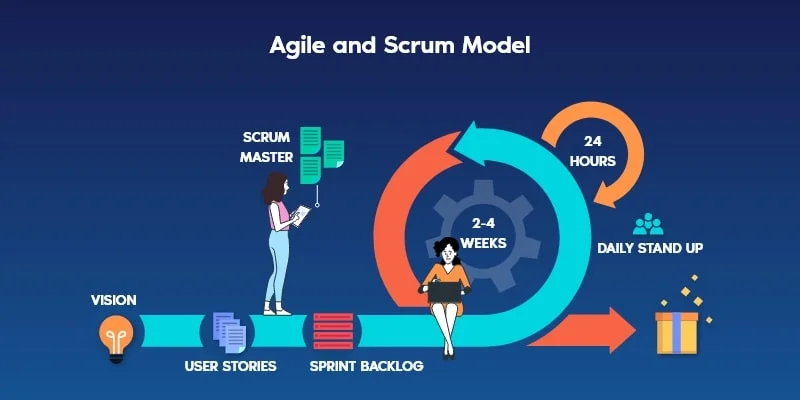
Unlike the Waterfall model, the Agile software development process takes a flexible and iterative path. In this software development process, cross-functional teams work in short cycles called Sprints, usually lasting 3 weeks to 3 months. Each Sprint delivers a working version of the software, which is quickly shared with users for feedback.
This makes Agile fast, user-focused, and adaptable. If feedback goes against the original plan, changes are made early instead of waiting until the end. Popular methods under Agile include Scrum, Crystal, Agile Modeling (AM), and Extreme Programming (XP).
According to a GoodFirms survey, about 61% of projects use Agile, proving its popularity in modern SDLC stages. Unlike Waterfall, Agile doesn’t need a full requirement list before design begins.
Agile software development process steps include:
Incremental and Iterative Model → Building software step by step with continuous improvements
You can think of this as a blend of Waterfall and Agile software development methodologies. It combines the step-by-step nature of Waterfall with the flexibility of Agile, making it both structured and adaptable.
Incremental Phases → Gradually adding features in each phase

In this model, the idea is to build the software in small parts (increments) and get user feedback after each release. Unlike Agile, each release feels more like a mini Waterfall model, where every increment goes through its own planning, development, and testing cycle.
Every increment adds a new feature or functionality to the final product. Before moving forward, that piece is thoroughly tested and validated, ensuring the software grows in a controlled yet flexible way.
Incremental process steps:
Iterative Phases and Versioning → Refining the product through repeated versions

In the iterative software development model, the entire product is built in versions instead of one final release. For example, you might start with Version 1.0, which contains only the most basic features. Then you improve it step by step – V1.1, V1.2, V1.3, and so on – until you reach the final product.
Each version brings upgrades and refinements, helping you gather user feedback early and shape a more user-friendly software. Unlike the rigid Waterfall software development process, iteration allows you to make improvements along the way rather than waiting until the end.
Iterative process steps:
V-Shaped Model → Structured approach with a focus on verification and validation
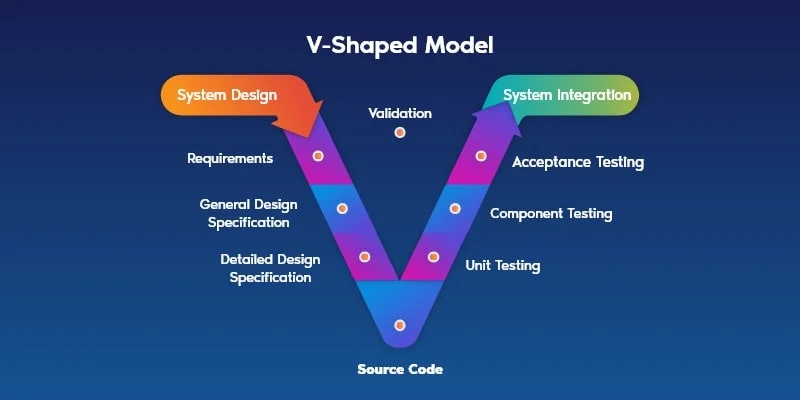
This software development process is like an upgraded version of the classic waterfall model. Instead of building the whole software first and testing later, the V-shaped model adds strict verification and validation steps at every stage.
That means testing happens alongside each phase, so requirements are tested before execution even begins. The focus here is on quality at every step, making it a good choice for small-scale software development where precision matters.
Steps in the V-shaped process:
Spiral Model → Risk-driven model combining iterative development and planning
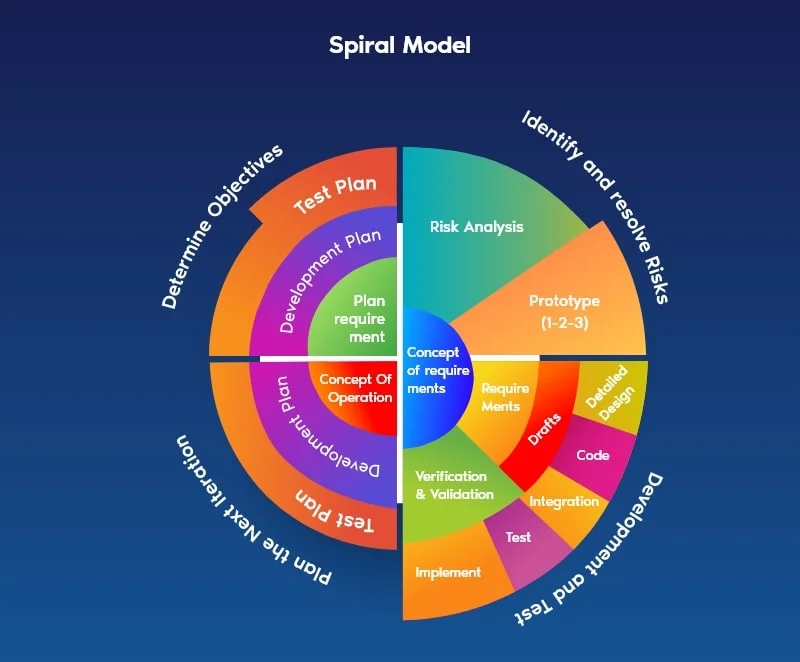
The spiral model software development process is often called a risk-driven model. Unlike linear methods, its flow is more circular than sequential. It combines the strengths of the waterfall approach with new elements like risk assessment.
This model makes use of both top-down and bottom-up approaches, breaking the development into loops or phases. Each loop allows for detailed planning, testing, and user involvement, making the process flexible and reliable.
Steps in the Spiral Model:
Want To Build Your Own Software? Excellent Webworld is Here!
Now you know everything about the software development process. So, are you confident in building software for your business?
If yes, the Excellent Webworld is the right choice for you. The best of this software development company is having experience in almost every domain. Just share your requirements, and get the most lucrative solutions for your business or startup.
Sharing a glimpse of the software development services such as software design, integrating ERP or CRM, and many more, you get from Excellent Webworld.
Here We End – Software Development Process
Hence, we have explained everything that comes under the stages of SDLC. And, now we know that the software development process is inevitable in order to build quality software that stands with the users’ needs. Just like mobile app development team structure is a must for app development similarly software development process is crucial to build software.
Again, the elementary part of the software development life cycle remains the same be it with the waterfall model or a V-shaped model. We hope this article helps you to build your software in the best way possible. In case of any queries, you can get in touch with our experts. Be it any domain, we’ve experts having experience in every niche.
Let’s Brainstorm Your Software Together!
FAQs About Software Development Process
The software development process is the step-by-step way of building software. It usually includes planning, designing, coding, testing, and launching. Think of it as a roadmap that helps teams turn an idea into a working software product.
SDLC means Software Development Life Cycle. It’s a structured way of developing software that makes sure everything is done in the right order, from requirements to testing, so the final product is reliable and efficient.
The best way to build software is to hire a software development company. A few steps you can follow are:
Or even better—just get in touch with Excellent Webworld, and let the experts handle it for you!

Article By


Mayur Panchal is the CTO of Excellent Webworld. With his skills and expertise, He stays updated with industry trends and utilizes his technical expertise to address problems faced by entrepreneurs and startup owners.