A freight management system is the first thing you review when your freight cycle starts slowing down. What affects your operations the most?
- Is it the uncertainty around delivery timing?
- Or the rising cost of every movement?
- Maybe it is the lack of visibility once the shipment leaves your facility.
Freight operations run with tight margins and little room for error. A single delay can push the entire delivery cycle off track. Logistics managers, trucking companies, LTL operators, and 3PL leaders feel this pressure every day while trying to keep each move accurate and within budget.
Many teams turn to freight management software that brings routing decisions, GPS tracking, EDI updates, and pricing checks into one organised flow. These systems also work well with broader logistics tools used by operations heads, CTOs, and ecommerce or manufacturing units.
If you want a quick reference, you can look at how a logistics software development company builds these systems for freight-heavy businesses. This context helps you understand why certain modules matter more than others.
This guide will walk you through how a custom freight management system works, the problems it solves, and the cost involved.
What is a Freight Management System?
A freight management system is a software suite that helps you plan, execute, and track shipments from one place with accurate and updated information. Picture the number of moving parts you handle each day. Bookings. Rate checks. Delays. Customer calls. It only takes one missed update to ripple through your schedule.
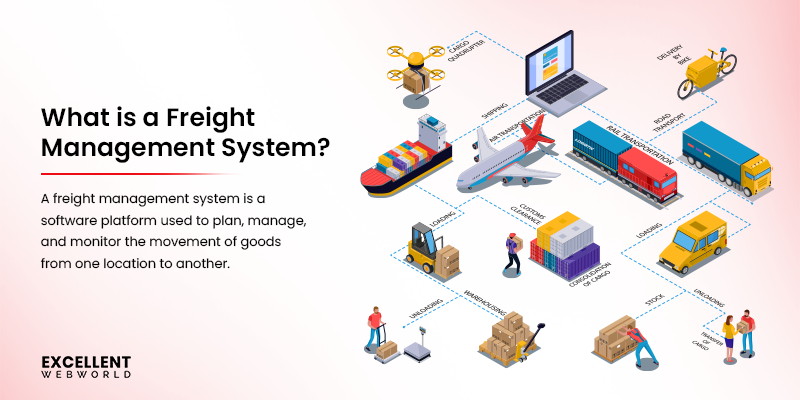 Now consider a simple thought. What if every shipment you manage sat in one workspace where you could view carrier options, check pricing, confirm documents, and monitor delivery without switching between tools? This is similar to how teams use load planning software to organize capacity, schedules, and movements in a structured view.
That is the role of freight management solutions. It brings orders, carrier selection, route planning, cost evaluation, and status tracking into a structured setup. You manage daily freight tasks with less manual work and more clarity over what is happening at each stage.
To understand the scope of an FMS clearly, look at how the industry categorises these systems based on workflow needs.
| Category | Systems Included | Key Benefits / Users |
|---|---|---|
| Operational Systems | TMS, WMS, FMS, YMS, Route Optimization | Operations managers handle day-to-day tasks with better visibility and control. |
| Administrative Systems | Freight Forwarding, 3PL, Carrier, Booking, Dock Scheduling | 3PL and freight forwarding teams manage multi-client operations efficiently. |
| Financial Systems | Audit & Payment, Billing, Rate Management, GTM, Compliance | Finance teams ensure accurate costing, billing, and regulatory compliance. |
| Analytical Systems | ERP, Visibility, Analytics, AI Optimization, Sustainability | Supply chain analysts gain reliable data for reporting and insights. |
| Integrated Platforms | Cloud, Multi-Modal, IoT, Blockchain, Unified Freight Suites | CTOs and CIOs scale systems and integrate seamlessly with ERP/CRM platforms. |
This mix tells you how freight operations are slowly shifting to more centralized and connected systems. When you review recent industry data by DataBridge, the global freight management system market is:
- Valued at USD 26.60 billion in 2024
- Expected to reach USD 95.66 billion by 2032
Businesses are steadily shifting toward structured and data-driven freight operations. Now, let’s discuss who works with freight management solutions.
Why Modern Logistics Companies Need FMS (Freight Management System)
Before you invest time and budget into a freight management system, it helps to understand the gaps it solves in daily operations. Most logistics teams face similar friction points, and a system for freight management in logistics becomes the central tool that keeps these challenges under control.
Many teams also use complementary tools like trucking dispatch software, inventory management systems, and route optimization platforms to automate assignments, track shipments, and reduce manual coordination. To see where improvements are needed, consider these questions:
- How quickly can you track a shipment without making multiple calls?
- How frequently do carrier rates change without a proper record?
- How confident are you in the accuracy of your invoicing?
- How many hours do your teams spend updating spreadsheets?
- How easily can you predict exceptions before they become costly?
If any of these situations feel familiar, an FMS becomes a direct solution rather than an optional upgrade. The World Bank’s Logistics Performance Index (LPI) confirms that efficient freight operations boost trade and lower logistics costs.
To help you understand this more clearly, here is a real case from one of our clients who approached us with fragmented freight operations. This comparison shows how measurable the difference can be when freight operations shift from manual coordination to a unified platform.
This shift reflects what most modern companies gain when they adopt a freight management system.
- Better Visibility Across Shipments: Teams see shipment status, carrier performance, delivery timelines, and delays in one place. This removes guesswork and helps you respond faster to customer queries.
- Reliable Cost Control: An FMS records every rate, surcharge, and billing rule. You avoid pricing mistakes and catch unnecessary expenses early, leading to freight cost optimization.
- Faster Daily Operations: Shipment creation, scheduling, document preparation, and communication move quickly with structured workflows. Your team spends less time coordinating and more time optimizing.
- Fewer Errors From Manual Entries: Automated data capture lowers the chance of incorrect weights, wrong charges, or missed updates.
- Stronger Customer Experience: Your clients receive accurate ETAs, real-time tracking updates, and clear communication, which helps you build trust over time.
- Better Planning For Scale: As shipment volume grows, your processes remain stable because the system handles complexity without increasing manual overhead.
Understanding these benefits is only part of the picture. To see real results, you need to know who in your logistics ecosystem will interact with the freight management software and how each role contributes to smooth operations. Let’s check it out.
The Roles You Must Understand to Build a Successful Freight Management System
A freight management system works best when every stakeholder in your logistics ecosystem is aligned. Understanding how different players interact with the system helps you design workflows that reduce delays, improve cost efficiency, and increase transparency.
| Role | Focus | Use Case | Benefits |
|---|---|---|---|
| Shippers / Manufacturers | Production side | Centralize shipment orders and load data |
|
| Carriers / Freight Brokers | Transport side | Manage fleets, routes, and rates |
|
| Freight Forwarders / 3PL Providers | Coordination side | Coordinate multi-client shipments & documentation |
|
| Supply Chain Managers / Operations Heads | Oversight & data flow | Access real-time analytics and integrate systems |
|
These roles represent the external side of your FMS ecosystem. Aligning their workflows and expectations is key before you start development.
When you begin the software development process for your freight management, you collaborate with a group of specialists who shape each stage of the project. Knowing their roles helps you plan your involvement and set clear expectations from day one. Here is the view of the core team you usually work with.
| Role | What They Focus On |
|---|---|
| Software Consultant | Converts your transportation logistics workflow into a structured development blueprint |
| Product Strategist | Aligns features with your business goals and long-term freight operations |
| UI / UX Designers | Build practical screens and interactions for daily tasks such as bookings or rate checks |
| Engineers | Develop system logic, data flow, and the interface your team will use |
| Quality Analysts | Test complex shipping scenarios and validate every module |
| Integration Specialists | Connect your FMS to platforms like ERP, WMS, and TMS |
| Deployment and Training Teams | Prepare the environment and onboard your staff |
You can also streamline the entire process by working with a team that already understands logistics workflows. If you want your freight platform to be built with reliable tech choices and practical workflows, get our reliable software development services to see how we support projects that need precision, speed, and long-term scalability.
With these roles and responsibilities clearly defined, you can follow a methodical approach to develop your FMS.
How to Build a Freight Management System (FMS) in (Step-by-Step Approach)
Here is the complete step-by-step process of developing a freight management system for your logistics business.
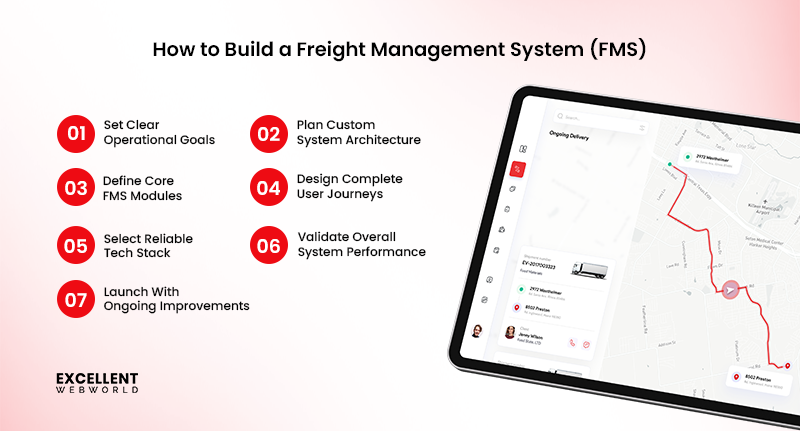
Step 1. Define Operational Goals And Freight Workflows
A custom freight platform performs well only when the objectives are set with clarity. If you are exploring how to start a transport business, a good first step is listing areas where your team faces delays or repeated tasks. This includes booking, dispatch, document handling, invoicing, freight routing, and optimization. Use simple questions to guide the goal setting. Here are a few questions you can use:
Q. What current freight tasks consume the highest time? Q. Which operational gaps cause customer complaints? Q. Where does the team rely on manual work? Q. What information is often missing when making load decisions? Q. Which activities must run automatically during peak demand?
Once the answers are visible, convert them into clear targets. Each target should reflect a practical result. This creates a strong link between business expectations and system behaviour. Check out sample goal types so you get a better understanding.
- Reduce load assignment time
- Improve visibility of shipment status
- Bring all freight documents into one view
- Increase the accuracy of billing and charge calculations
- Support faster carrier communication
This step prepares the base for every decision that follows.
Step 2. Map System Architecture For Your Custom Freight Management System
Start by writing down the events that happen from the moment a shipment request appears to the moment it is closed. Keep it simple. Just list the actions as your team performs them. For example,
- Request arrives
- Initial data check
- Vehicle or carrier matching
- Route planning
- Dispatch confirmation
- Movement updates
- Delivery proof and billing
Once you list this flow, check where delays usually occur. Automating or improving approvals often fixes these delays. Using global standards like UN/EDIFACT helps carriers, ports, and customs work together smoothly.
You can then decide which parts require strong tracking, which need document control, and which need data accuracy to maintain seamless exchange between enterprise systems.
This clarity gives you a stable direction. It also prevents the system from becoming a collection of disconnected features.
Step 3. Define The Core Modules & Features For Your FMS
This step converts your system architecture into practical building blocks. Each module supports a specific stage of your freight workflow, and together they form the functional structure your development team will work on. Check out the table with a clear, complete, and well-formatted table of modules.
| Module & Features | Purpose | Key Responsibilities | Primary Users |
|---|---|---|---|
| Booking and Load Creation | Captures shipment details at the start of the freight management process | Load information, customer data, service requirements | Operations Managers |
| Carrier or Fleet Assignment | Matches loads with the most suitable vehicle or carrier | Capacity check, availability review, assignment rules | Logistics Coordinators |
| Route and Dispatch Control | Approves routes and manages dispatch timing | Route planning inputs, dispatch confirmation, and trip initiation | Operations Managers |
| Real Time Tracking | Monitors shipment movement with continuous visibility | Live location feed, status updates, delay alerts | Operations Heads |
| Document Management | Stores and generates freight-related documents | POD, invoices, permits, compliance files | IT Integrators |
| Billing and Settlements | Manages pricing and billing activities | Rate tables, billing events, settlement summaries | Finance Controllers |
| Customer Communication Panel | Keeps clients informed during shipment progress | Status messages, delivery alerts, support queries | Customer Support Teams |
| Analytics and Reports | Converts operational data into insights | Performance metrics, route accuracy, cost patterns | CIOs and Data Analysts |
You can refine this list based on your workflows.
If you run your own fleet, an enterprise fleet management system helps you maintain records for maintenance tasks and fuel logs without extra manual effort.
If you work with contract carriers, a carrier marketplace module becomes important.
Each module should support a specific task, so your system stays structured.
Finalizing this list gives your FMS a structured shape that will guide interface design and tech stack decisions in the next step.
Step 4. Design User Journeys And Dashboard Layouts
This stage defines how each user interacts with your system. The goal is to keep every journey simple so planners, dispatchers, drivers, and customers can complete tasks without confusion.
Key user flows you need to outline at this point:
- Planners move from bookings to carrier assignment and approvals
- Dispatchers monitor routes and update trip progress
- Drivers follow the trip details and upload delivery documents
- Customers track their shipment timeline and read updates
Once these flows are mapped, convert them into clear screens. Each screen should focus on only what the user needs at that moment. This keeps the experience clean and reduces the number of steps required to complete a task.
Insightful Tip
While designing dashboards, avoid placing critical actions inside secondary menus. Place the most common actions in the primary view because freight teams often work under time pressure. This single change improves adoption significantly and reduces training time for new users, which is a key consideration also in logistics app development.
Step 5. Choose The Right Tech Stack & System Integrations
Your tech stack should match the complexity of your freight flows. High-volume operations need strong backend frameworks. Teams with multi-location tracking need stable real-time capabilities. Businesses managing multiple partners need reliable integration options.
| Layer | Technologies Used | Purpose |
|---|---|---|
| Frontend | React, Angular, Vue | Builds responsive screens for planners, dispatchers, drivers, and customers |
| Backend | Node, Java Spring, Python Django | Handles workflows, assignments, routing logic, and API requests |
| Databases | PostgreSQL, MongoDB, MySQL | Stores bookings, trips, documents, and operational records |
| Real-time services | Socket-based services, MQTT, Firebase RTDB | Supports live tracking and continuous trip status updates |
| Integrations | REST APIs, GraphQL, EDI connectors | Connects the FMS with ERP, TMS, WMS, carrier systems, and payment tools |
| Cloud platforms | AWS, Azure, Google Cloud | Manages hosting, storage, compute, and security resources |
| Mapping and routing | Google Maps API, Here Maps, OpenStreetMap | Provides location visibility and routing suggestions |
| Automation and analytics | Python scripts, ML models, BI tools | Improves predictions, reporting, and repetitive task automation |
These choices give your team predictable performance and a stable base to create booking, dispatch, fleet tracking, and documentation workflows. Now that the tech decisions are clear, the next part of this step focuses on freight management integrations. Here are the must-have categories that support operational continuity.
- Carrier APIs (For live shipment status and event updates)
- Warehouse Systems (For synchronized inventory records)
- Accounting Software (For automated invoices and settlements)
- Telematics Providers (For real-time fleet data)
- Customs Clearance APIs (For faster cross-border processing)
- Identity & Access Management Tools (For controlled system access)
These integrations allow your system to communicate with every key channel in the freight and supply chain management, which reduces manual work and improves the accuracy of freight movement records.
Step 6. Test System Performance, Data Accuracy, And Workflow Reliability
FMS needs to work smoothly under real workloads. This stage focuses on checking how well the system handles large shipment volumes, verifying the correctness of freight data, and maintaining stable workflows for dispatchers, drivers, and back office teams.
You can carry out some of these core tests:
- Load Handling Tests: To check how the system performs during peak shipment periods.
- Data Validation Checks: To ensure order details, carrier records, billing entries, and tracking events remain accurate.
- Workflow Consistency Checks: To confirm task sequences like booking to dispatch to delivery run without interruptions.
- Integration Verification: For Warehouse Management System (WMS), Transportation Management System (TMS), telematics, and carrier APIs.
- User Acceptance Testing: To identify workflow gaps from a real operational standpoint.
Why does this step matter? It’s because testing resolves issues before they impact your shipments. It helps avoid incorrect freight rates, slow routing decisions, or tracking delays that interrupt daily operations.
What you can do is to run a controlled pilot with a small operations team. Their daily actions reveal workflow issues that automated tests often miss.
Step 7. Deploy Your FMS & Plan Continuous Improvements
You have a complete logistics freight management software ready to launch, so your priority must shift to a careful rollout. This allows teams to adjust without pressure and helps you catch early usability gaps. Here is what action you need to consider during this stage.
- Final data import from existing tools.
- Setting user permissions for each team.
- Short training sessions to introduce booking, dispatch, and tracking flows.
After launch, a brief monitoring window helps identify small fixes or upgrades. A simple feedback loop from daily users guides the next round of improvements.
Advanced Technologies Powering Freight Management System
Modern freight operations rely more on fast decisions and constant visibility. Traditional software is not suitable to support that level of complexity. This makes it compulsory to integrate advanced technologies into your FMS.
Many logistics teams also align these improvements with ongoing warehouse automation technology to keep both storage and movement activities connected. When used together, these technologies give your system the speed and foresight required in high-volume freight networks.
| Freight Management Technology | What It Adds To Your FMS | Practical Impact |
|---|---|---|
| Predictive AI Models | Forecasts shipment delays, demand spikes, and capacity changes | Better route planning and optimized load allocation |
| Machine Vision for Document Processing | Reads labels, invoices, and customs files with high accuracy | Faster clearance and reduced manual verification time |
| IoT-Based Asset Monitoring | Real-time location, temperature, and movement data from trucks and containers | More control over trip health and reduced cargo risks |
| Digital Twins | Creates virtual replicas of routes, warehouses, and fleet patterns | Helps plan workload, simulate disruptions, and test changes safely |
| Optimization Algorithms | Generates ideal multi-stop routes and load combinations | Increased capacity use and lower fuel consumption |
| Automated Compliance Engines | Monitors carrier rules, region-specific regulations, and safety standards | Reduced risk of penalties and smoother cross-border movements |
| Freight Analytics Layer | Collects operational data and turns it into performance insights | Clear visibility into bottlenecks and cost-saving opportunities |
Knowing all of this information might have led you to think about how much it costs to build a freight management system, or you might be thinking it already. To answer your question, let’s discuss the breakdown of the entire FMS development cost.-
How Much Does It Cost To Build A Freight Management System (FMS)
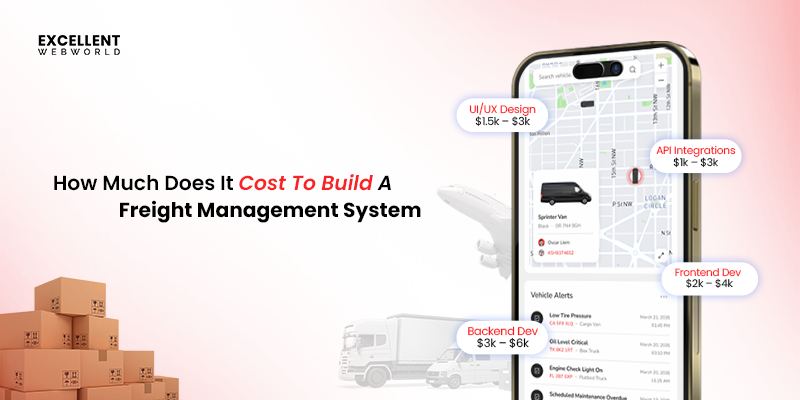 The approximate cost to build a freight management system ranges between $40,000 & $120,000+. This range also expands. Similar to the FMS development timeline, the cost also varies based on feature complexity, operational scale, integrations, and the number of users your system will serve.
Getting to know what influences these numbers helps you plan your spending in an efficient way. Here are the factors on which the FMS development cost depends.
- Scope of Features: More advanced modules increase effort.
- Tech Stack & Integrations: Complex tech and third-party connections add cost.
- Design & UX: Multi-role dashboards and custom interfaces require extra work.
- Data & Security: Migrating data and securing sensitive records adds effort.
- Development Team & Timeline: Larger teams or faster delivery affect the budget.
Here is the table highlighting the FMS development price range.
| Complexity | FMS Development Cost Range | Key Factors Included |
|---|---|---|
| Basic FMS | $20k – $40k |
|
| Mid-Level FMS | $40k – $80k |
|
| Advanced FMS | $80k – $150k+ |
|
Again, the above cost of FMS development is not exact. Yes, this depends on your business requirements, the customization level required, the number of users, and the development team. The software development cost varies based on the number of criteria you require to build your custom logistics software.
If you are carefully planning, your platform gets the right mix of logistics efficiency, capability, and scalability. Such an approach positions you for collaboration with an experienced development team.
Why Partner with an Experienced Freight Software Development Company
The process of developing a logistics freight management system surpasses standard software development due to its operational complexities. The right development partner delivers a platform that is strong and customizable as per the business strategy.
Partnering with FMS development experts like us guarantees a solution that adapts to growth and easily integrates modern logistics technologies. Getting such reliable freight management services helps minimize the exposure of risk and drives higher ROI. Here is what you get when partnering with us:
- Get expertise from 900+ projects executed with 600+ clients, achieving remarkable results.
- A strong team of 300+ experts is driving innovation and precision in every project.
- Experts at using cutting-edge technologies like AI in logistics for smarter operations.
- Skilled in IoT in logistics & supply chain management for real-time tracking.
- Agile and flexible practices keep development on track and scalable.
What do you get when working with a reliable development team? You get operational efficiency at peak. Reduction in the risks. Constant support for business growth. If you are planning to develop a custom FMS or other software solutions for your freight logistics business, reach out to us today.
FAQs About FMS Development
Costs for building a freight management system fall between $50,000 and $250,000, influenced by the platform’s complexity and scope.
- Feature complexity: Advanced analytics, AI routing, multi-platform support
- Operational scale: Fleet size and multi-location operations
- Integrations: ERP, CRM, and third-party connections
- Number of users: Higher user volume requires a strong infrastructure
Last-mile delivery improves when freight management software offers live tracking, efficient routing, and instant notifications. Delays are reduced, accuracy improves, and customers stay informed throughout the delivery journey. Optimized delivery at the last mile increases satisfaction and minimizes process inefficiencies.
Here are the KPIs you need to consider after implementing the freight management system.
- On-time Delivery Rate: To measure how many shipments reach customers on schedule.
- Cost Per Shipment: To track operational costs associated with each delivery.
- Order Accuracy: To monitor mistakes in order fulfillment.
- Fleet Utilization: To ensure vehicles are used efficiently.
- Shipment Delays: To identify bottlenecks or recurring issues.
- Fuel Consumption: To track efficiency and cost-effectiveness.
- Customer Feedback: To measure service quality and satisfaction.
Cloud-based freight management systems allow remote accessibility, streamlined updates, flexibility, and cost-effective setup. On-premise systems allow total control, personalized configurations, and data protection within your own infrastructure. Your decision depends on business size, available IT resources, and future operational objectives.
Here are the mistakes you must avoid when implementing a freight management system.
- Not defining clear requirements can lead to delays and additional costs.
- Skipping thorough testing may cause issues during live operations.
- Failing to provide proper user training can make it difficult for employees to adopt the system.
- Overlooking integrations with existing systems can create workflow gaps.
- Not planning for adoption and updates can reduce the overall effectiveness of the system.
Yes, freight management software supports smaller operations by streamlining processes, tracking shipments, and managing expenses. Startups can adopt strong FMS capabilities cost-effectively through cloud or modular solutions. Adopting an FMS early offers a strategic advantage and supports growth.

Article By


Mayur Panchal is the CTO of Excellent Webworld. With his skills and expertise, he stays updated with industry trends and utilizes his technical expertise to address problems faced by entrepreneurs and startup owners.