Vehicle software failures rarely announce themselves early. They emerge late in the development. Release timelines slip. Features behave unpredictably. Compliance audits expose gaps that demand expensive rework.
In most cases, the root cause lies in early technical decisions that underestimated vehicle constraints and sustained software ownership.
This is precisely where automotive software development matters. It is not about shipping features faster. It is about engineering software that meets regulatory expectations and remains supportable throughout the vehicle lifecycle — which is exactly what automotive software development services are designed to deliver.
If you are evaluating this space, you are likely seeking clarity on questions like:
This guide breaks down those topics and explains what truly drives successful development of automotive software.
What Is Automotive Software Development?
Automotive software development is designing, creating, testing, and maintaining software for the systems equipped in vehicles. It refers to developing code that controls each and every function in your vehicle, from core engine management (ECUs) and safety systems (ADAS).
Developing automotive software goes far beyond simple coding. Every system in a car, from braking and steering to infotainment and navigation, relies on software to function safely and efficiently.
Automotive software defines how vehicles perform, interact with drivers, and connect to the outside world. This is the reason why selecting the right software development company matters when safety and support are involved. Here is what defines effective automotive software development:
To understand how it differs from conventional software, consider the following comparison:
| Feature | Automotive Software | Traditional Software |
|---|---|---|
| Purpose | Controls vehicle functions, ensures safety, supports connected features | Handles general business, entertainment, or productivity tasks |
| Safety & Compliance | Must meet strict standards like ISO 26262 | Usually no mandatory safety compliance |
| Hardware Interaction | Directly interacts with ECUs, sensors, and vehicle networks | Interacts mostly with standard computing hardware |
| Lifecycle | Supports multi-year vehicle lifecycles and over-the-air updates | Often limited to software versions or product lifespan |
| Real-time Operation | Critical real-time processing for braking, steering, and ADAS | Real-time operation is not typically critical |
| Impact of Failure | Safety-critical, errors can cause accidents or recalls | Mostly user inconvenience; minimal safety risk |
Types of Automotive Software Solutions Adopted Across the Industry
Automotive software spans multiple layers of the vehicle and its surrounding ecosystem, something you’ll consistently see in the best automotive software available today. That depth is essential for operating across OEM and supplier platforms.
Each type exists to solve a different problem, which is why the development approach, validation effort, and risk profile vary. Due to such a situation, manufacturers move toward software-defined vehicles, where functionality and behavior are increasingly controlled via software.
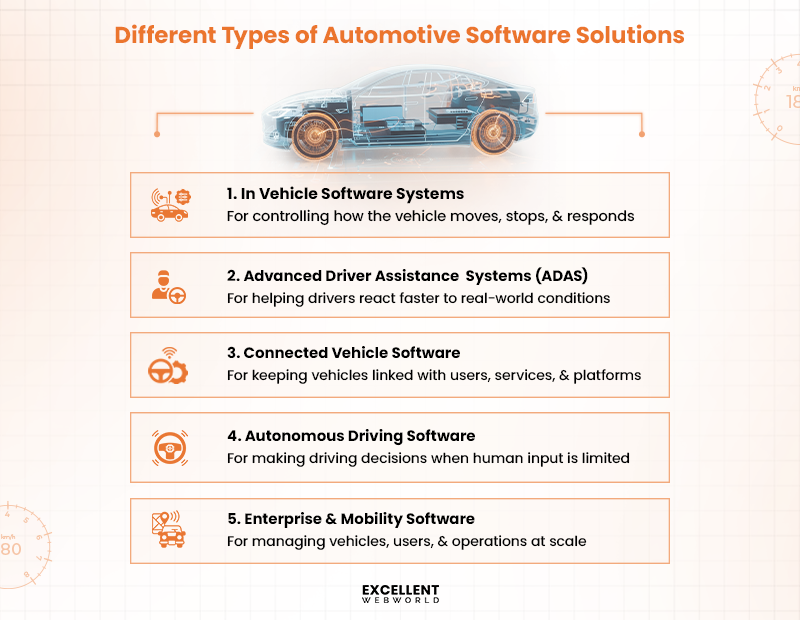
1. In Vehicle Software Systems
If a system directly affects how the vehicle moves, stops, or responds, it belongs here.
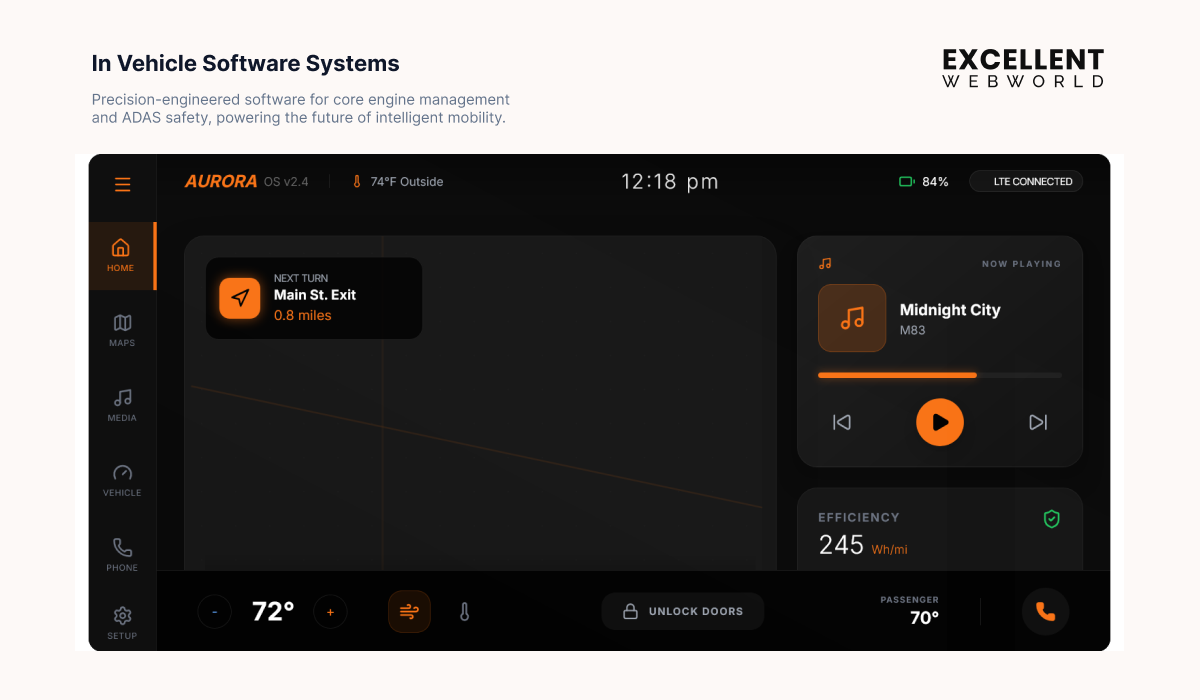
Some responsibilities with this software system include:
This software not only runs continuously, but also interacts directly with ECUs and must respond within strict time limits. Reliability matters more than feature flexibility because failure impacts vehicle operation immediately.
2. Advanced Driver Assistance Systems
This category follows a flow-based structure rather than a feature list.
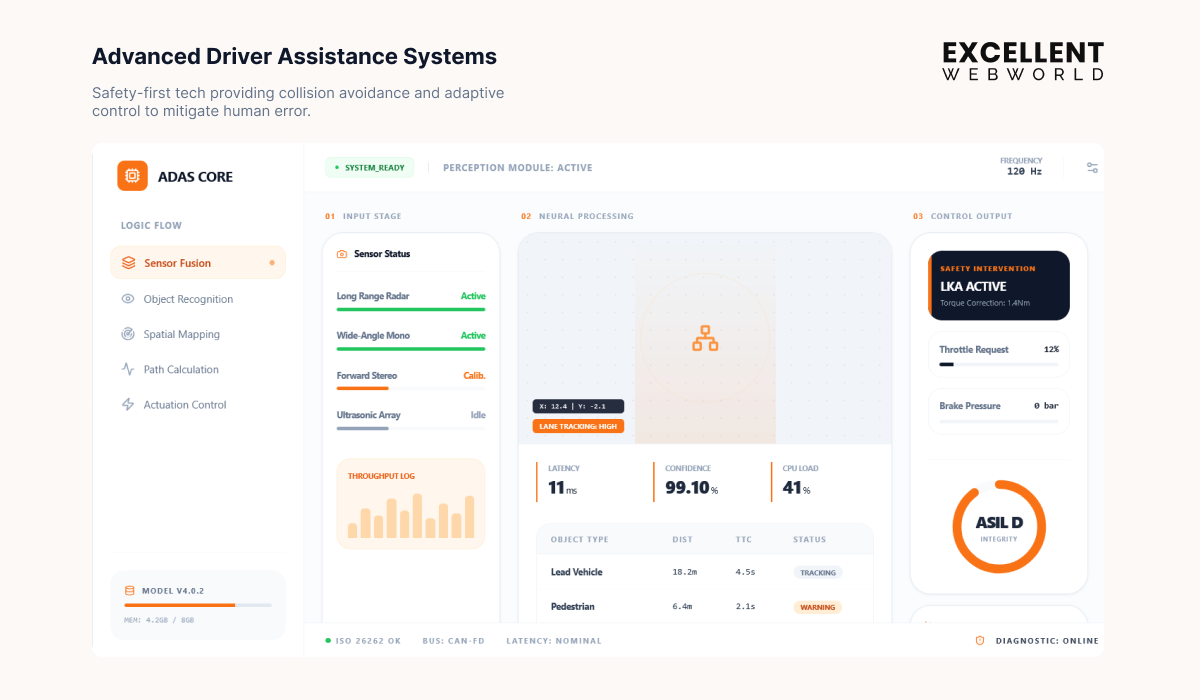
ADAS software is evaluated on accuracy and consistency, making AI integration in software development critical for processing sensor data in real time. Even minor delays or misinterpretations reduce system effectiveness.
3. Connected Vehicle Software
The core purpose is to allow communication beyond the vehicle. Instead of controlling vehicle behavior, this software connects the car to external systems. Many of these capabilities already exist in the best automobile apps expected to lead in 2026.
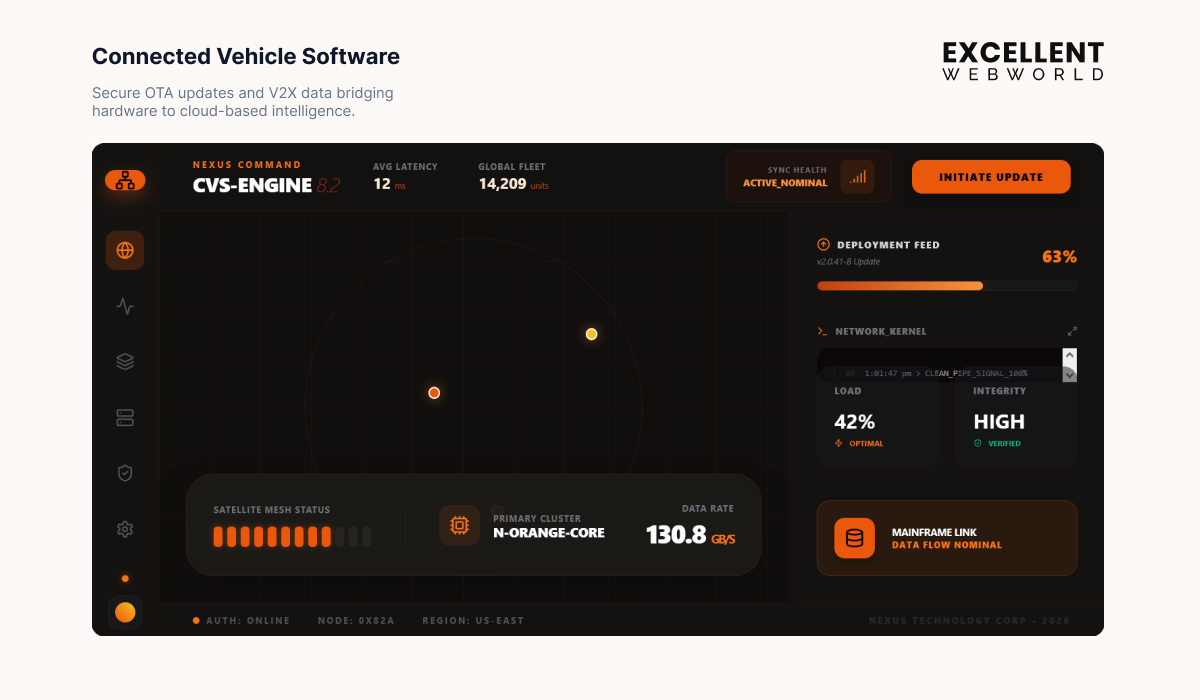
The software supports remote access, telematics, diagnostics, and over-the-air updates. Since the same system supports thousands of vehicles across regions, scalability and security become the central concerns.
4. Autonomous Driving Software
Such type of software allows vehicles to perceive their surroundings and operate with minimal human input. Development here revolves around scenarios rather than components.
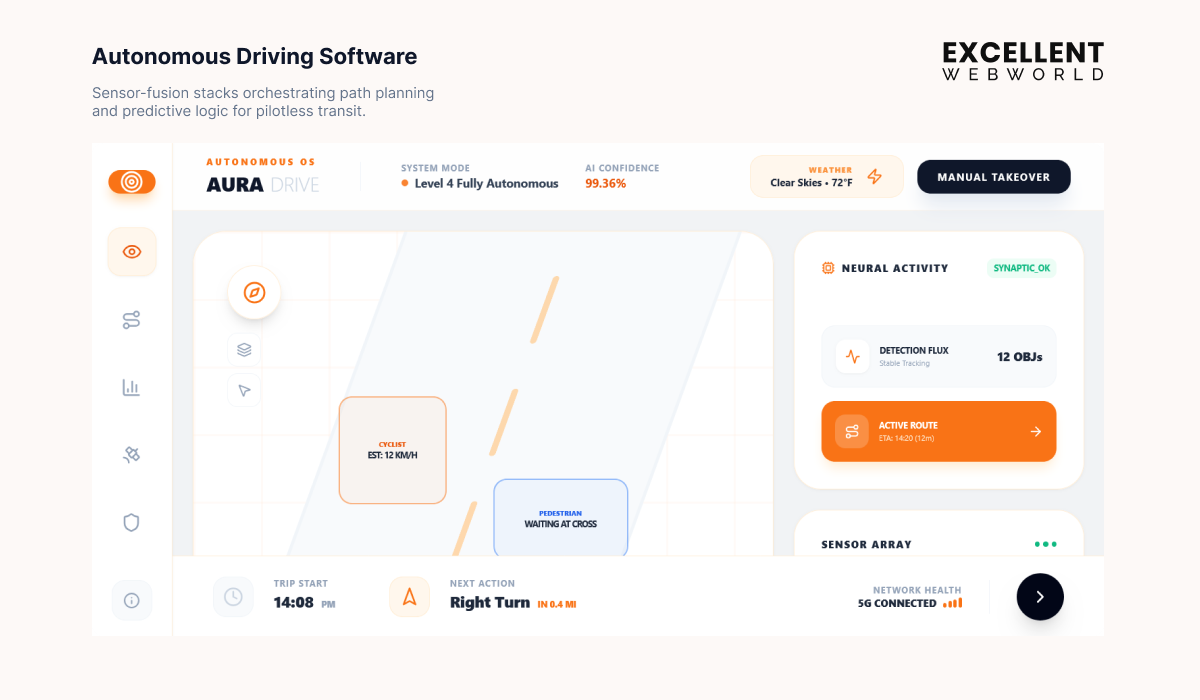
Software must recognize road conditions and decide vehicle actions in real time. Because edge cases are unpredictable, simulation and large-scale testing become central to development and validation.
5. Enterprise and Mobility Software
This category exists outside the vehicle. It supports fleet operations, mobility services, and backend management.
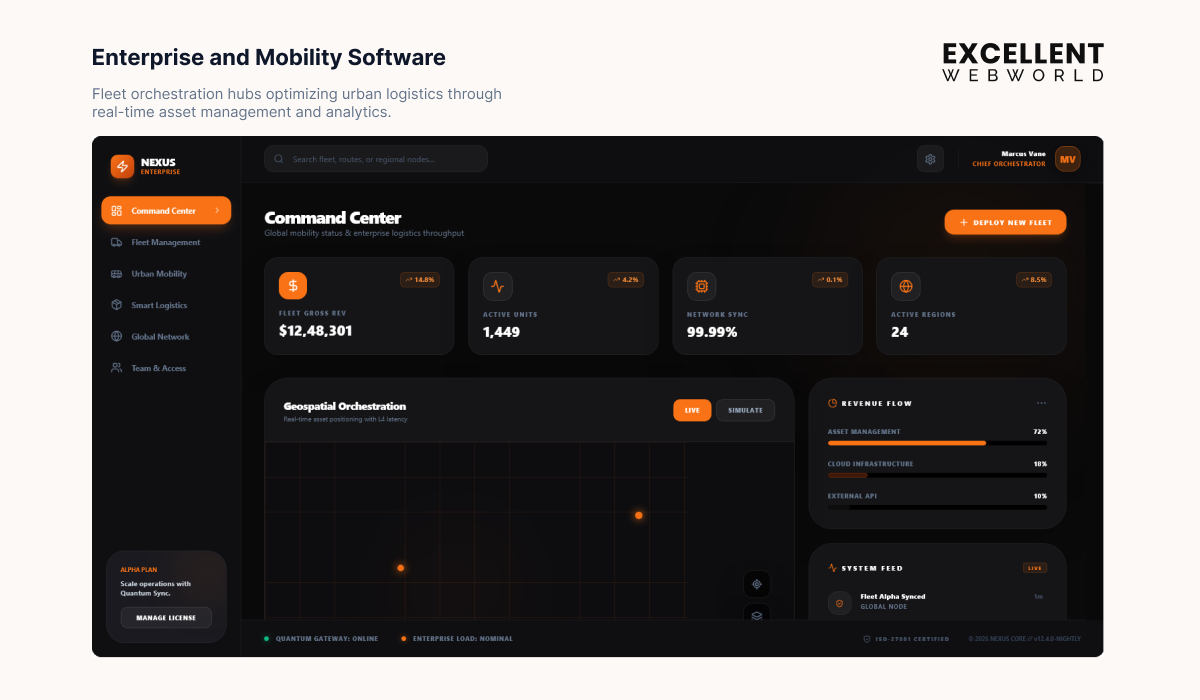
Here are a few use cases that include:
These systems turn vehicle data into operational insight. This is so similar to how trucking dispatch software supports routing and fleet coordination. Each category addresses a distinct layer of the automotive ecosystem.
What are the Use Cases of Automotive Software?
Automotive software covers multiple layers beyond visible vehicle features. The table maps where software operates, what each layer controls, and how it is already used in production vehicles.
| Application Area | Business Objective | Typical Functions Covered | Real World Adoption |
|---|---|---|---|
| In Vehicle Software | Reduce accidents and meet functional safety regulations | Used across EV platforms by Tesla and Volkswagen | |
| Vehicle Control Units ECUs | Ensure precise and reliable control of vehicle subsystems | Implemented across Bosch and Continental ECU platforms | |
| Advanced Driver Assistance Systems ADAS | Improve driving safety and reduce collision risk | Deployed in Toyota Safety Sense and Volvo Pilot Assist | |
| Autonomous Driving | Reduce driver workload and enable higher autonomy levels | Used in Tesla Autopilot and Mercedes Drive Pilot | |
| Connected Vehicle | Enable remote services and continuous feature upgrades | Adopted by BMW ConnectedDrive and GM OnStar | |
| Over-the-Air (OTA) Updates | Minimize recalls and allow rapid software deployment | Used extensively by Tesla and Ford Power-Up | |
| Diagnostic and Health Monitoring | Detect issues early and reduce vehicle downtime | Used in fleet systems by Amazon Logistics | |
| Diagnostic and Health Monitoring | Detect issues early and reduce vehicle downtime | Used in fleet systems by Amazon Logistics | |
| Infotainment and Human Machine Interface | Improve driver and passenger interaction experience | Adopted by Android Automotive and Apple CarPlay | |
| Electrification and Powertrain Management | Improve range, battery health, and energy efficiency | Used in EV platforms by Tesla, Hyundai, and BYD | |
| Body Electronics | Automate comfort and convenience-related vehicle functions | Standard across modern passenger vehicles | |
| Automotive Cybersecurity | Protect vehicle systems from digital threats | Adopted by OEMs aligned with ISO SAE 21434 | |
| Enterprise and Mobility | Operate vehicle fleets efficiently at scale | Used by Uber Fleet, Amazon Logistics, and DHL |
These application areas show how software stays embedded across vehicle lifecycles while also supporting scalable operations. Knowing where each system fits helps teams plan architecture and long-term maintenance early.
What are the Benefits of Automotive Software Development?
Here are the top benefits of automotive software development brought to your business.
1. Predictable vehicle behavior under real conditions
Real-time software control ensures braking, steering, and power systems respond within strict timing limits. This consistency reduces unexpected behavior during high-speed or high-load scenarios.
Such deterministic behavior is important for vehicles tested under U.S. highway conditions. Here, systems are monitored with safety benchmarks defined by agencies like the NHTSA and the ITHS.
You can imagine automotive software as a conductor. Every subsystem follows timing cues precisely, even when traffic density and driving speed increase.
2. Faster rollout of new vehicle features
Instead of redesigning hardware, manufacturers introduce improvements through software updates. For example, driver assistance refinements or infotainment upgrades can be delivered post-launch, which aligns well with how U.S. automakers reduce recall costs and increase vehicle lifecycle value.
3. Built-in safety and regulatory alignment
Safety-driven development aligns software architecture with standards like ISO 26262 from day one. This lowers the risk of late-stage automotive software compliance failures and avoids rework during validation audits.
Even if you look into the U.S. market, this kind of approach supports reviews guided by SAE International practices and reduces risk during safety audits and post-market evaluations.
4. Long-term platform scalability
A shared software foundation allows the same core system to support multiple vehicle models and regions. What once required separate builds now scales across fleets with controlled configuration changes.
Top companies like Ford Motor Company and General Motors use such platform-based software strategies that support diverse models and allow controlled configuration with faster rollout across fleets.
These outcomes show how the benefits of custom software development are reinforced when teams adhere to automotive software development best practices. These advantages also highlight where and how the software gets applied across modern vehicles.
Automotive Software Development Process Explained Step-by-Step
Here is the step-by-step process of how to build an automotive software solution for your business.
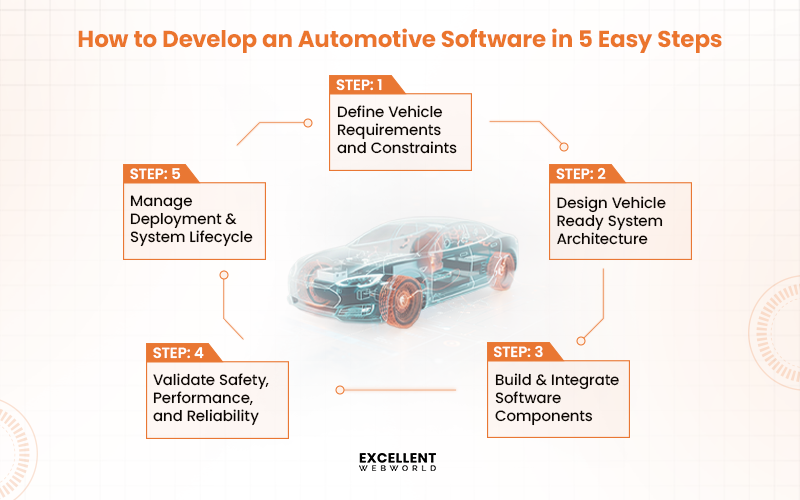
Let’s discuss each step designed to minimize risks and streamline development for better ROI.
Step 1. Define Vehicle Requirements & Operating Constraints
Automotive software development starts by understanding the vehicle, not the feature list. Software must operate within physical, hardware, and safety boundaries that cannot be adjusted later.
At this stage, teams focus on clarifying two things. One is what the software is expected to do, and another is under what conditions it must operate.
Here are some questions for you to ask in such a situation:
Answering these questions helps prevent mismatches between software design and vehicle capabilities. For businesses planning a specific solution like car rental app development, documenting these requirements early ensures apps handle vehicle operations reliably from day one. Once alignment is clear, teams document the essentials.
What to document at this stage?
With these inputs defined, the groundwork is set for designing an architecture that fits the vehicle environment in the next step.
Step 2. Design System Architecture that Fits Vehicle Systems
After defining fleet scope and goals, the platform structure needs to be decided. This step focuses on how the system will behave when the fleet grows across regions, users, and data volume. Architectural decisions made here determine whether expansion feels planned or chaotic later.
The focus stays on structural choices only. Feature logic and integrations are intentionally kept out of scope. Here, make sure you are choosing the right software development frameworks that can guide architectural decisions and ensure that the system is scalable, secure, and maintainable over time.
Here, architectural decisions covered include.
Once the platform structure is finalized, the next step moves into choosing the operational modules that will run on top of this foundation.
Step 3. Develop and Integrate Automotive Software Components
Before a single line of code is written, one decision quietly shapes everything that follows.
What parts of the vehicle operation must the software support on day one?
This step is not about building a complete system. It is about choosing responsibility.
In automotive software development, modules are not just features. They define how teams interact with vehicles, drivers, and data every single day.
Think of this stage as setting the rules of engagement between vehicles, data, and people. If a module influences daily decisions or safety outcomes, it belongs in the first development cycle. Instead of asking what can be built, this step asks a simpler question.
What must work without fail once the software goes live?
The table below helps frame that thinking. Each module listed here solves a specific operational problem and serves a defined user group.
| Module Area | What It Solves | Primary Users |
|---|---|---|
| Vehicle Tracking | Lack of real-time visibility into vehicle movement | Operations teams |
| Driver Management | Inconsistent driver data and assignment issues | Fleet managers |
| Maintenance | Missed servicing and unplanned downtime | Maintenance teams |
| Fuel Monitoring | Rising fuel costs and usage anomalies | Finance and operations |
| Alerts and Notifications | Delayed response to incidents and violations | Compliance and ops |
Not every idea deserves immediate implementation, a principle followed in software development for startups to maintain stability and early growth. Resisting that urge keeps the system stable and easier to scale later.
Once these core modules are agreed upon, the rest of the platform starts to make sense. Data flows become clearer. User roles are easier to define. That clarity is what makes the next step possible without rework.
Step 4. Validate Software for Safety, Performance, and Reliability
This is the phase where automotive software development stops being theoretical and starts facing real constraints. Designs look clean on paper, but once code meets vehicle hardware, assumptions surface quickly.
Instead of thinking in features, teams start thinking in interactions, like:
What matters here is not how advanced a component is, but how it behaves once connected.
Integration happens alongside development, not after it. As components connect, teams observe how data moves, how resources are consumed, and how the system behaves under load. Make sure teams focus on these aspects.
Issues surface naturally here. Message delays, unexpected dependencies, or resource conflicts become easier to identify when systems are connected early.
By the end of this step, the software should operate as a coordinated system. That stability allows the next phase to concentrate on safety checks and performance validation without revisiting core integration decisions.
Step 5. Manage Deployment, Updates, and Lifecycle Support
Once software goes live, the work doesn’t stop. Vehicles run in real conditions, and the software has to keep up without causing disruptions. Updates, patches, and improvements all need careful planning to ensure safety and reliability.
Managing deployment isn’t just about pushing code. It’s about making decisions that keep operations smooth while adapting to evolving needs and regulations. Knowing what to update, when, and how makes all the difference.
Checklist for Deployment & Lifecycle Support
Handled well, this ensures vehicles perform reliably while software evolves quietly in the background. Lifecycle management is what turns a software project into a lasting, dependable system.
Successful Software Development Projects Done by Automotive Giants
Features alone do not define your automotive software. Leading brands design systems that define performance, safety, and connectivity. These examples show how top companies structure their software to stand out in reliability and innovation.
| Automotive Brand | Core Software Capability | What They Built | Why It Matters |
|---|---|---|---|
| Tesla | Over-the-air updates | Platform for remote performance tuning, safety fixes, and interface improvements | Reduces recalls. Keeps vehicles updated throughout their lifecycle. |
| BMW | Modular infotainment and driver assistance | Shared software architecture across vehicle lines | Faster feature rollout. Less redundant development. |
| Toyota | Safety-critical control software | Reliable software for braking and powertrain systems | Predictable vehicle behavior. Meets compliance efficiently. |
| Volkswagen Group | Unified vehicle platforms | Shared software foundation for multiple brands | Reduces development effort. Consistent updates across vehicles. |
| Mercedes-Benz | Connected vehicle and telematics | Software for remote diagnostics and predictive service alerts | Simplifies maintenance. Uses real data for planning. |
These cases show that successful automotive software blends safety, adaptability, and smart design. By learning from industry leaders, businesses develop software that is scalable and built to last.
Advanced Suite of Technologies Used for Automotive Software Development
Developing an automotive software solution requires an integrated approach with the right tools and frameworks for each part of the vehicle system. The technologies listed in the table define a modern and advanced approach to automotive software development.
| Category | Technologies / Tools | Purpose / Use |
|---|---|---|
| Programming Languages | ||
| Operating Systems | ||
| Frameworks & Libraries | ||
| Cloud & Backend | ||
| Databases | ||
| DevOps & Tools | ||
| Testing & Simulation |
If you are sticking to such technologies and frameworks, then surely your automotive software meets strict safety and performance requirements.
Challenges Faced by Automotive Software Development (With Solutions)
Modern vehicles are more software than hardware. Even a single integration error interrupts braking systems or telematics services. Now, let’s help you understand automotive software development challenges with their particular solutions.
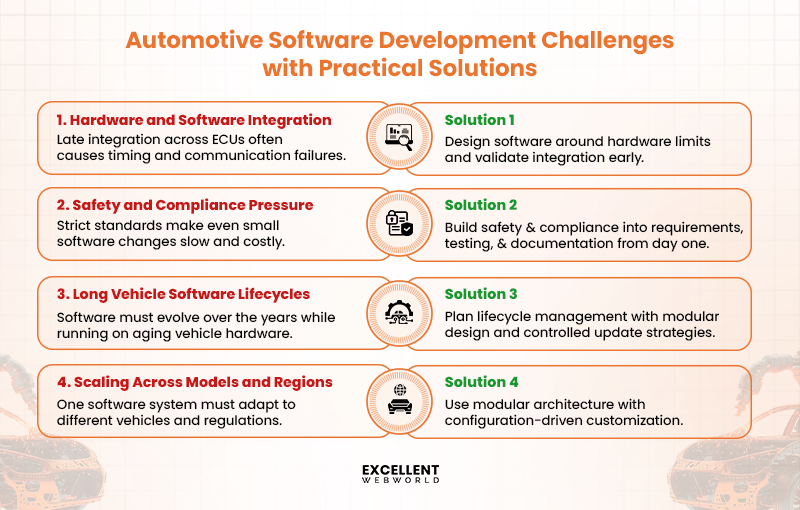
Challenge 1. Hardware and Software Integration Complexity
Automotive software has to function across ECUs with fixed processing power, strict timing windows, and different communication protocols such as CAN or FlexRay. When software developed in parallel meets vehicle hardware late in the cycle, even small mismatches in timing or data flow cause system instability.
Solution
Teams reduce this risk by designing software around hardware constraints from the start, validating ECU communication early, and running integration tests on real or simulated vehicle environments instead of relying only on isolated module testing.
Challenge 2. Meeting Strict Safety and Compliance Requirements
Automotive software is developed under regulations such as ISO 26262 for functional safety and WP.29 for cybersecurity. These standards require detailed risk analysis, traceability, and validation across every software change. Even small updates trigger re-testing and documentation cycles, which directly affect development timelines.
Solution
This challenge is managed by embedding safety and compliance practices into the development process itself. Teams align requirements, testing, and documentation from the start, automate compliance checks where possible, and maintain clear traceability to reduce rework during audits and certification reviews.
Challenge 3. Managing Software Updates Over Long Vehicle Lifecycles
Vehicles remain in use for many years, often far longer than the software technologies they rely on. Over time, automotive software must support security patches, regulatory updates, and new features while continuing to run on older hardware with limited resources. Coordinating updates across different vehicle generations increases operational and technical complexity.
Solution
Teams address this by planning software lifecycle strategies early, including version management, backward compatibility, and controlled update rollouts. Using modular architectures and well-defined update mechanisms helps maintain stability while allowing software to evolve over the vehicle’s lifespan.
Challenge 4. Scaling Software Across Models and Regions
Automotive software is rarely built for a single vehicle or market. The same software often needs to support multiple vehicle models, hardware configurations, and regional regulations. Differences in features, compliance requirements, and infrastructure make scaling software without fragmentation a persistent challenge.
Solution
This is addressed by designing modular software architectures that separate core functionality from model or region-specific logic. Reusable components, configuration-based customization, and centralized governance help teams scale software efficiently while maintaining consistency and compliance.
How Much Does Automotive Software Development Cost?
The cost of automotive software development ranges from $25,000 to $400,000+. The final number depends on the software category, safety criticality, integration depth, and testing requirements. A basic infotainment module sits at the lower end, while ADAS or embedded ECU software moves the cost higher due to compliance and validation efforts.
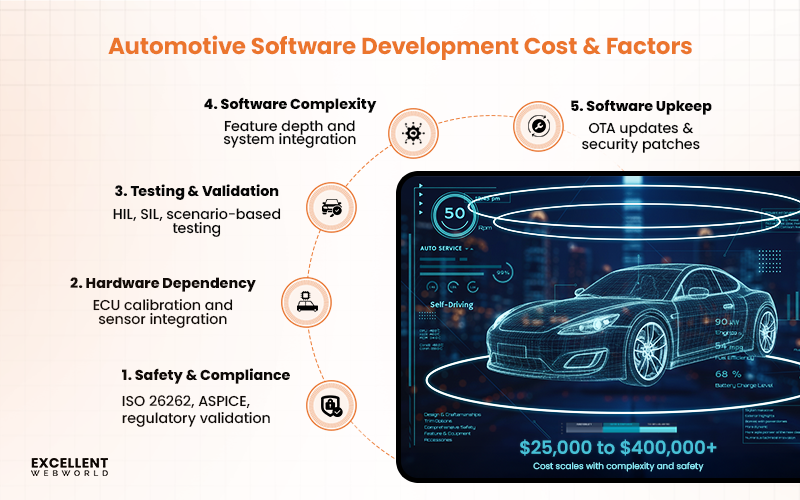
This range exists for a reason. Automotive software is not built in isolation. It operates inside a regulated environment where reliability is non-negotiable, and failure has real-world consequences.
| Software Type | Typical Scope | Estimated Cost Range |
|---|---|---|
| Infotainment Software | $25,000 to $80,000 | |
| Fleet Management Systems | $40,000 to $120,000 | |
| Telematics Solutions | $50,000 to $150,000 | |
| ADAS Software | $120,000 to $400,000 | |
| EV Management Software | $70,000 to $200,000 | |
| ECU Software Development | $60,000 to $180,000 |
The cost mentioned above is approximate. The exact cost to build an automotive software solution depends on the following factors.
How Long Does Automotive Software Development Take?
The time for automotive software development ranges between 4 and 18 months, which is approximately 17 to 78 weeks. The exact timeline depends on how closely the software interacts with the vehicle. On one end, a user-facing infotainment module might move faster, while safety-critical software requires extended validation before release.
Get your timeline estimation easier by understanding the factors affecting it.
In simple terms, the closer the software is to vehicle behavior and safety, the longer the timeline becomes. This is what helps teams plan realistically rather than committing to aggressive schedules that break during validation.
How Standards and Regulations Influence Automotive Software Development
Features alone do not define automotive software. Rules play a defining role in its development. Safety expectations and architectural standards influence system design before development starts.
≻ Why do regulations exist
Vehicles operate in real conditions where software failures impact safety. Standards exist to control that risk. These rules define how software should behave, how failures are handled, and how systems are validated before reaching the road.
≻ ISO 26262 and the role of functional safety
Functional safety aims to reduce hazards caused by software or system failures. ISO 26262 provides a framework for identifying risks and verifying that software behaves predictably during failure.
≻ AUTOSAR as a foundation for scalable development
The primary value of AUTOSAR lies in consistency. It enables a standardized software architecture that allows teams to reuse components across vehicle platforms.
≻ Cybersecurity requirements for connected vehicles
Regulations such as WP.29 address the growing risk of cyber threats in connected vehicles. These regulations require software teams to plan for secure access and update mechanisms from the start, not after deployment.
≻ How compliance reshapes development timelines
Compliance influences every phase of the software development process, from early design decisions to final validation and release approvals. Design reviews become stricter. Automotive software testing cycles become longer. Release approvals require detailed documentation. While this adds time, it also prevents costly redesigns and post-release failures.
Automotive software standards are not barriers to innovation. They are guardrails that keep automotive software reliable and ready for real conditions.
What are the Innovations in Automotive Software Development?
Innovation in automotive software defines whether a vehicle platform remains viable or becomes expensive to maintain. So let’s discuss all the recent innovations in automotive software development.
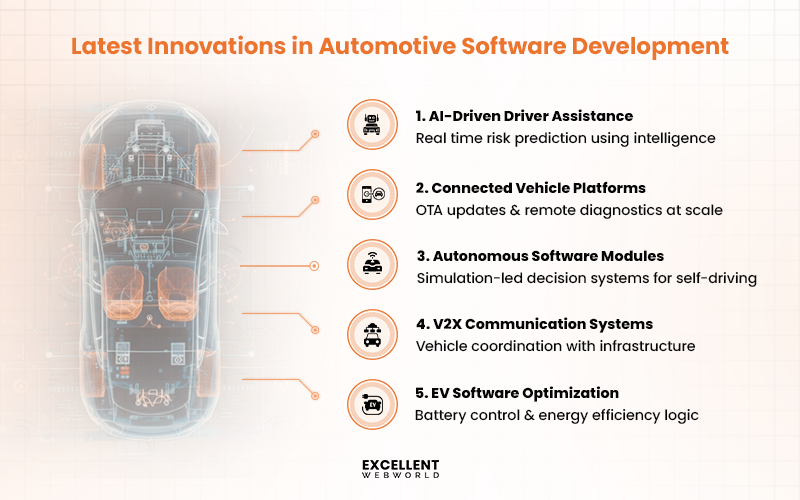
1. AI-Powered Driver Assistance
Modern ADAS systems rely on AI to interpret sensor data in real time. Features like automatic braking, lane keeping, and adaptive cruise control are no longer reactive. They anticipate hazards before they occur.
Example: AI analyzes traffic patterns to warn the driver of potential collisions, reducing accident risks.
2. Connected Vehicle Platforms
Vehicles now communicate with each other and with cloud platforms. This enables over-the-air updates, predictive maintenance, and live traffic adjustments without manual intervention.
Highlight: Updates and new features roll out easily to vehicles already on the road.
3. Autonomous Driving Modules
Software innovation drives self-driving capabilities. High-fidelity simulations, real-time data processing, and sensor fusion allow vehicles to navigate complex environments safely.
Example: Autonomous shuttles in controlled urban zones demonstrate how modular software handles multiple driving scenarios without human input.
4. Vehicle-to-Everything (V2X) Communication
V2X allows vehicles to interact with traffic signals, infrastructure, and other vehicles. Software handles the data exchange and decision-making, improving efficiency and safety.
What will be the Impact: Reduced congestion, faster emergency response, and coordinated traffic flows.
5. Sustainable and Electric Vehicle Integration
Software optimizes battery management, energy consumption, and regenerative braking. This extends EV range and ensures performance remains consistent across conditions.
Example: Adaptive charging schedules and power distribution algorithms reduce battery wear and improve vehicle longevity.
What are the Future Trends of Automotive Software Development?
Automotive software development needs to keep up with rapid change. Teams that miss these shifts risk building systems that age too quickly.
Trend 1. Task-Oriented Conversational AI
Future conversational systems focus on completing specific actions rather than just answering queries. Common examples include appointment scheduling, account updates, and service ticket creation within a single conversation.
Trend 2. Integration With Enterprise Systems
Conversational AI is being directly linked to CRMs, ERPs, and internal databases. This ensures responses are based on real-time business data instead of predefined scripts.
Trend 3. Multimodal Interaction Support
Text-only chat is no longer sufficient. Modern conversational AI supports voice, images, and documents to deliver more context-aware interactions, especially in healthcare and support applications.
Trend 4. Persistent Context Across Channels
Users can resume conversations across devices without repeating information. This improves continuity in sectors like retail, travel, and banking, where interactions span multiple touchpoints.
Trend 5. AI Governance and Response Control
Organizations are implementing response boundaries, fallback logic, and audit trails. This helps maintain compliance and prevents incorrect or risky outputs.
These trends indicate a clear direction toward practical conversational AI systems. Shorter response cycles, better accuracy, and tighter system alignment will define how conversational AI is built going forward.
Align Automotive Software With Safety, Scale, and Usability
Automotive software development reaches its real value when it performs consistently in real conditions. Not in controlled demos. Not only during launch. But with long vehicle lifecycles and daily operational stress. Safety, scalability, and usability are not separate goals. But depend on each other. When one is ignored, the system starts showing cracks over time.
This approach is reflected in a truck booking and fleet management platform developed for a logistics company. The product was built for long-running driver apps and real road conditions. The outcome was clear.
This level of execution reflects why Excellent Webworld is trusted as a reliable automotive software development company for platforms that need to perform beyond launch.
Frequently Asked Questions
Here are the standards automotive software must follow.
Automotive companies and agencies use over-the-air updates (OTA) and structured maintenance cycles. Constant monitoring of telemetry data allows timely patches and incremental improvements, which is something that keeps the software secure and efficient for years.
No, not entirely replace. Hardware engineering remains the foundation. Software improves functionality, safety, and connectivity, but cannot replace mechanical and electrical system design. However, its importance continues to grow as vehicles rely more on software for control logic and feature updates.
Software manages various things, including battery performance, energy efficiency, charging logic, and regenerative braking. Not just this, but it also offers predictive maintenance, fleet monitoring, and optimized range, making EVs and hybrids smarter and safer.
Manufacturers follow platform-based architectures to simplify updates across models. They align software roadmaps with vehicle lifecycle and compliance requirements to ensure the software remains scalable and maintainable.

Article By


Mahil Jasani began his career as a developer and progressed to become the COO of Excellent Webworld. He uses his technical experience to tackle any challenge that arises in any department, be it development, management, operations, or finance.