Large fleets deal with constant pressure.
Vehicles move across regions.
Drivers follow tight schedules.
Managers jump between spreadsheets, calls, and reports.
These daily hurdles show why enterprises like yours look for a reliable enterprise fleet management solution that holds everything together.
A single delay disturbs the entire chain. A missed update can affect cost, safety, and service quality. Leadership faces more difficulties when information stays scattered across different systems.
This shift in operational needs is the reason the fleet management market crossed USD 28.6 billion in 2023 and is projected to reach USD 55.6 billion by 2028.
With the right solution, you get accurate hours of service tracking, real-time safety insights, maintenance planning, and cleaner fleet activity aligned with emission standards.
This guide walks you through how the solution works, the benefits you can expect, and the complete process to build a platform suited for enterprise scale, with insights from a reliable logistics software development company experienced in handling large-scale fleet operations.
What is an Enterprise Fleet Management Solution?
An enterprise fleet management solution is a centralized system that helps established enterprises control vehicle activity and fleet operations.

The core idea is simple. It turns scattered information into a single operational view. Managers can monitor vehicles in real time. Drivers receive clear guidance for routes and tasks. Leadership gets reliable data to plan cost, safety, and asset usage.
For example,
Imagine a company managing hundreds of vehicles across multiple regions. Dispatchers track movement in one dashboard. Drivers receive trip instructions instantly. Maintenance alerts appear before a breakdown happens. Leadership reviews accurate data instead of waiting for manual reports.
This type of workflow is possible only because the system is built on a set of core components that work together from the backend to the driver interface. Here are the core components of an enterprise fleet management solution:
How Does Enterprise Fleet Management Work?
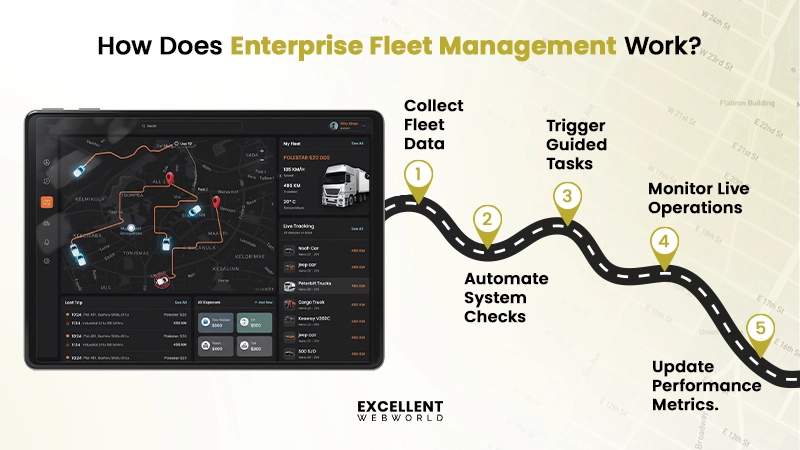
In an enterprise fleet management system, every trip, inspection, fuel entry, or alert produces information that moves through the system. This information supports routine planning and helps the fleet team respond with faster decisions. Here is how the enterprise fleet management system works.
1. Data Intake from Every Source
Information enters the system through telematics devices, driver inputs, maintenance logs, and connected tools. This creates a single view of daily operations.
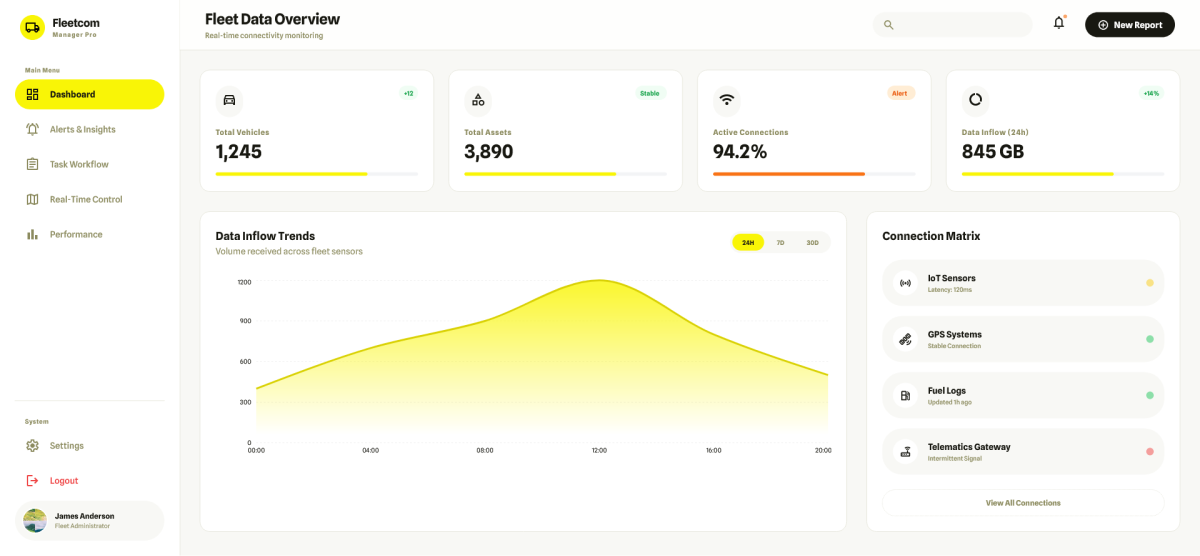
This is also where integrated sensor workflows help enterprises follow IoT driven processes. Teams that plan wider telematics coverage refer to IoT fleet management to structure their connected vehicle design.
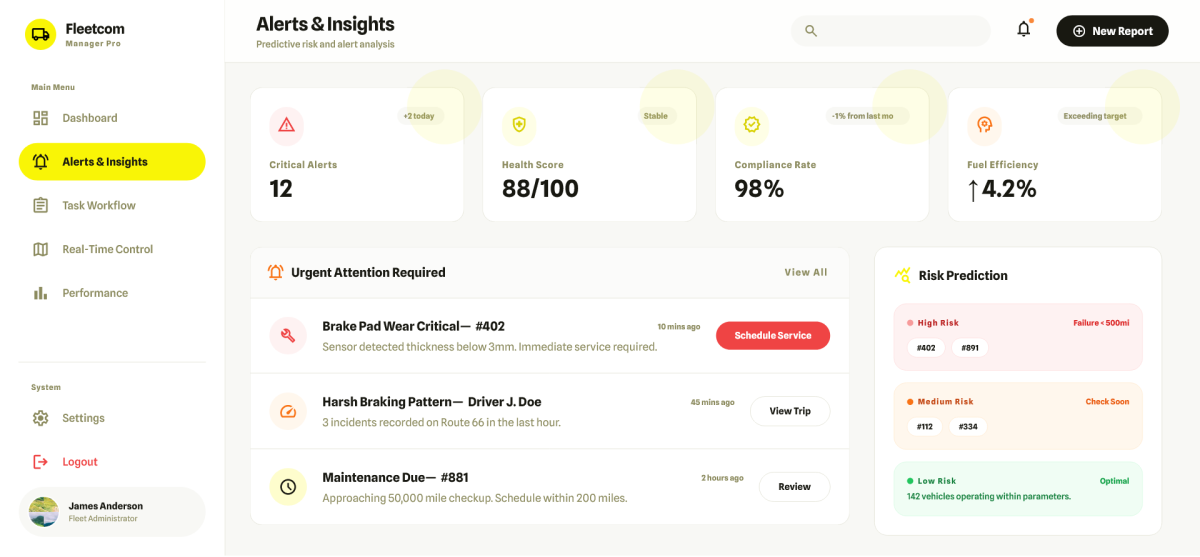
2. Automated Checks and Interpretation
The platform reviews incoming information and identifies delays, safety risks, or unusual patterns that call for action.
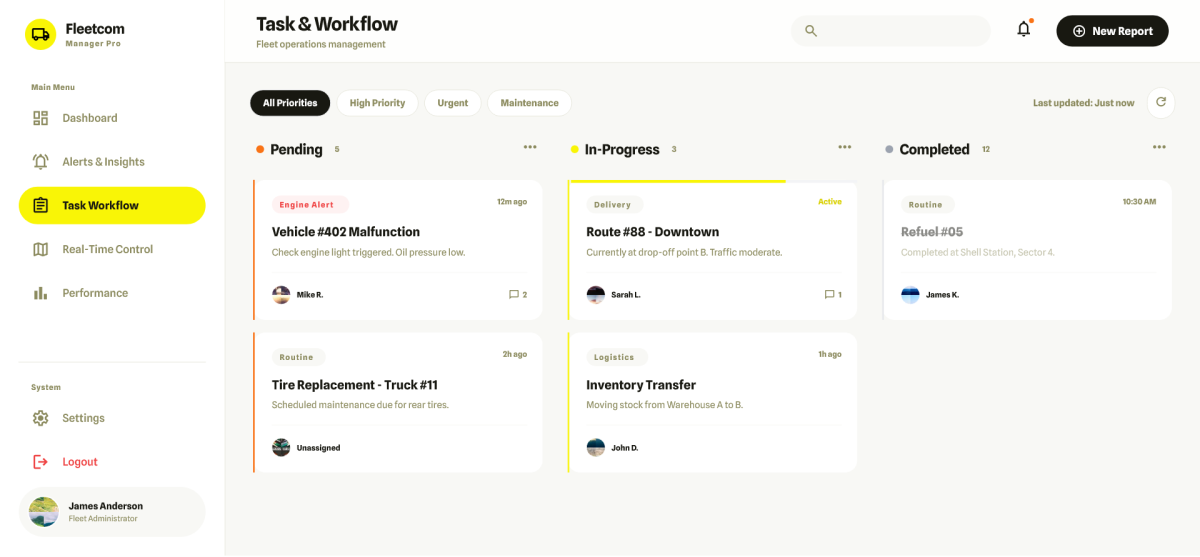
3. Task Triggering and Process Guidance
The system generates tasks such as trip assignment, maintenance reminders, or fuel approvals. These tasks guide the fleet team through the next step.
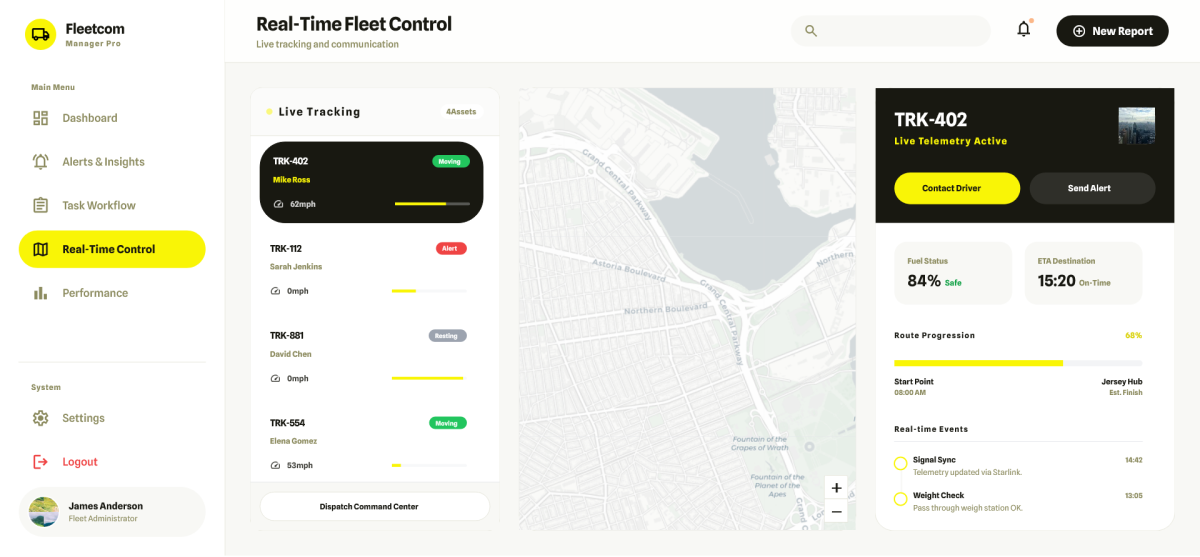
4. Live Tracking and Operational Control
Managers follow vehicle movement, driver activity, and route progress in real time. This prevents blind spots and reduces response time during unexpected events.
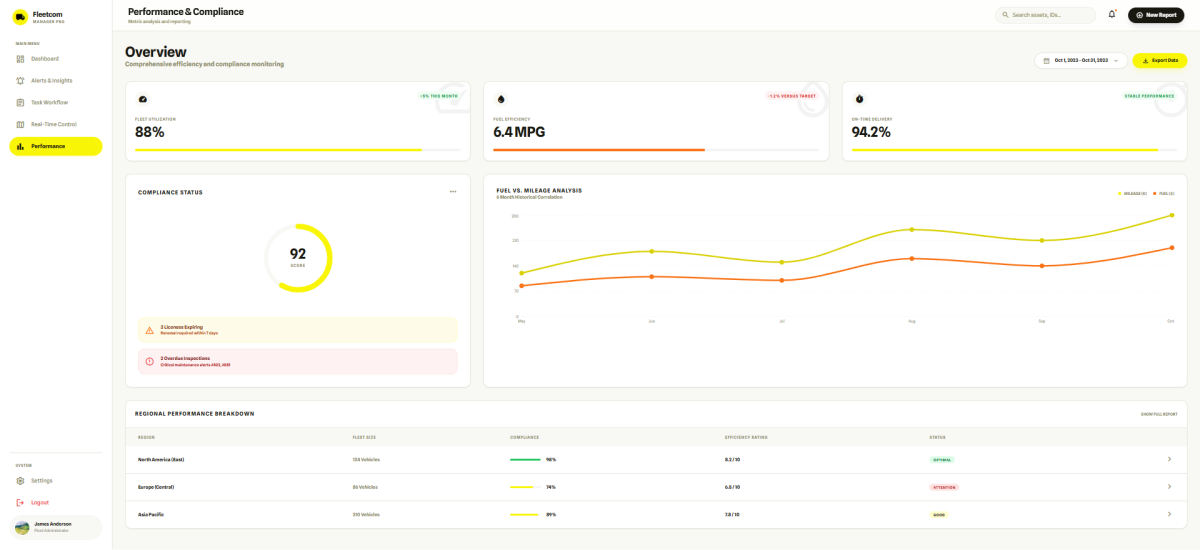
5. Performance Update and Compliance Support
The system keeps updating performance metrics and stores required documents for audits. This helps the fleet stay within regulatory expectations.
When all these steps run together, the fleet becomes easier to control and ready for the next level of optimization. Now, let’s discuss the advantages of an enterprise fleet management solution.
What are the Benefits of an Enterprise Fleet Management Solution?
While managing a large fleet, you face challenges. Scattered information. Tight schedules. Rising costs. Safety risks.

An enterprise fleet management solution at this point addresses these by converting raw data into actionable insights. This gives leadership control over vehicles, drivers, and operations.
1. Better Visibility into Vehicle and Driver Activity
When vehicles and drivers operate across regions, it’s easy to lose track. A centralized dashboard provides a live view of every vehicle and driver.
Many enterprises pair this visibility layer with a freight management system to keep back-office coordination steady and organized. Managers can see trip progress, identify delays, and make decisions immediately.
For example, a delivery company can reroute drivers mid-trip to avoid traffic congestion, keeping customers satisfied without overloading operations.
2. Lower Operational Cost via Data-backed Decisions
Operational inefficiencies are the major factor that impacts your bottom line. With detailed reporting on fuel consumption and route efficiency, enterprises reduce unnecessary expenses. Check out a few ways an enterprise can save costs:
3. Improved Safety Through Real-time Alerts
As you know, safety is something that cannot wait until the end of the day. Here, the fleet management system helps in monitoring driver behavior and vehicle conditions. Imagine a driver exceeding safe speed limits or braking harshly; the fleet system alerts the manager in real time. This is what prevents accidents and also protects assets and personnel.
4. Reduced Downtime and Faster Service Cycles
Downtime is costly when it comes to trucks or heavy-duty vehicles. Predictive maintenance alerts ensure vehicles are serviced before a breakdown occurs. Let’s say a logistics company that tracks engine health can schedule maintenance overnight. This leads to avoiding delivery delays the next day.
5. Stronger Compliance and Documentation Control
Compliance is critical for large fleets spanning multiple regions. The platform automates document management and deadlines. To keep your team audit ready at all times, the system helps through:
With all compliance requirements in one place, enterprises reduce penalties and maintain operational smoothness.
Key Features of an Enterprise Fleet Management Solution
Enterprise fleets require tools that support coordination, control, and clarity.
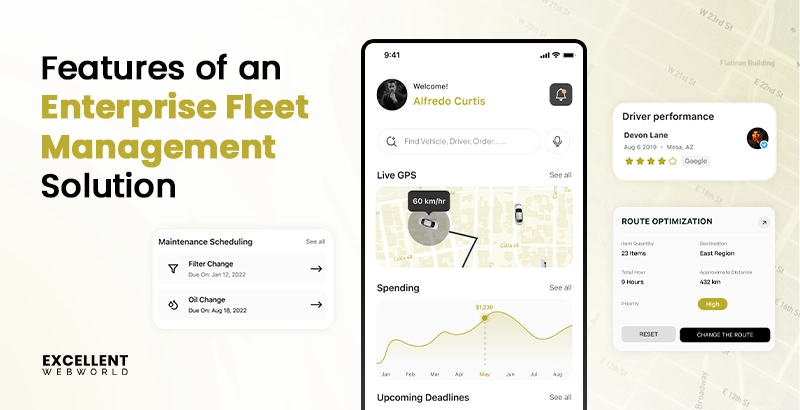
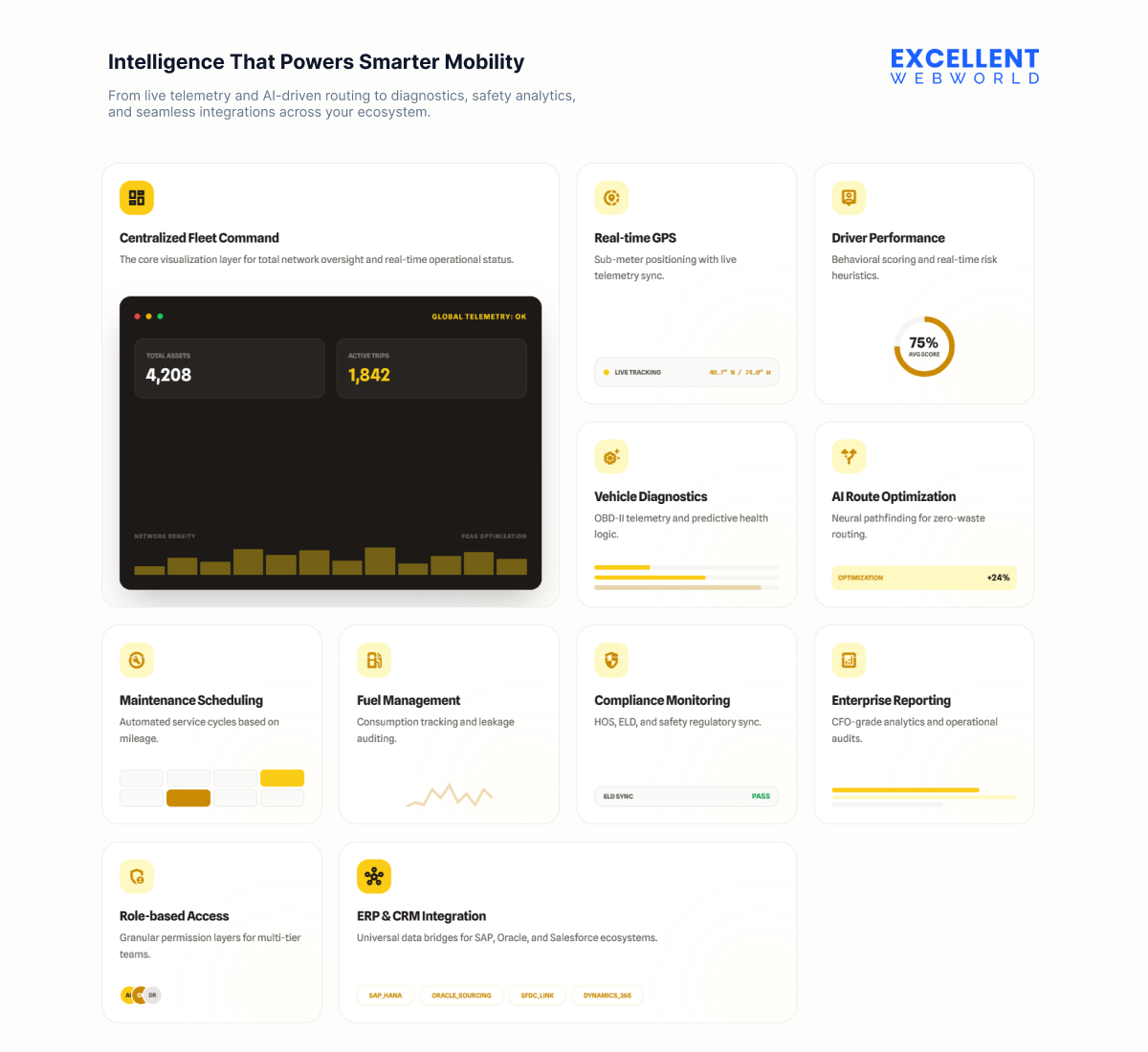
To help you understand what a modern system must offer, here are the enterprise fleet management solution features.
| Feature | What it does | Why it matters |
|---|---|---|
| Centralized fleet dashboard | Shows real-time vehicle and driver activity on one screen | Helps managers run daily operations without switching tools |
| Real-time GPS tracking | Shares accurate location updates for every trip | Improves control and reduces delays |
| Driver performance monitoring | Tracks behavior, speed, and safety patterns | Builds safer driving habits and reduces incidents |
| Vehicle diagnostics | Captures live engine health and fault alerts | Cuts unplanned breakdowns and repair costs |
| AI route optimization | Suggests faster, cost-friendly travel routes | Saves fuel and improves delivery timelines |
| Maintenance scheduling | Automates service reminders based on usage | Keeps the fleet running without interruptions |
| Fuel management | Monitors usage and exceptions | Helps enterprises reduce wastage and control spend |
| Compliance monitoring | Tracks the expiry of permits and certifications | Prevents penalties and improves audit readiness |
| Enterprise reporting | Offers detailed trip, cost, and performance reports | Supports leadership-level planning and review |
| Role-based access | Sets permissions for drivers, dispatchers, and managers | Protects data and avoids operational confusion |
| ERP and CRM integration | Syncs orders, billing, and customer data | Reduces manual work and keeps information accurate |
All of the above features that we discussed give your fleet team the structure required to work with clarity.
Once you prioritize these features & functionalities, enterprises consider logistics app development to create a platform that integrates all modules, supports fleet scale, and ensures smooth operations across regions.
Insightful Tip
If your fleet moves across multiple states or countries, finalize the compliance logic early. It affects the database design, workflow rules, and the way telematics data is stored. Delaying this step forces teams to redo large parts of the system later.
How to Build an Enterprise Fleet Management Software: A Detailed Process
Large fleets work across varied regions, changing regulations, and constant movement. The following steps explain how to build a platform that performs well under these conditions.
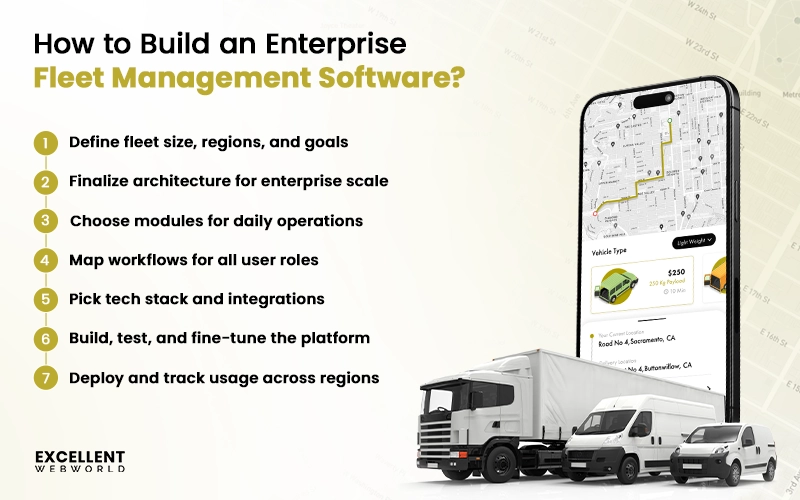
Step 1. Specify Fleet Size, Regions, and Operational Goals
Before writing a single line of code, you need to know what the platform must support. The number of vehicles, asset categories, types of routes, and the regions you operate in determine the system’s scale.
Enterprise fleets have inconsistent operating styles across regions, so your goals help standardize these differences. You outline what needs improvement. It may be visibility, cost control, dispatching precision, or compliance readiness.
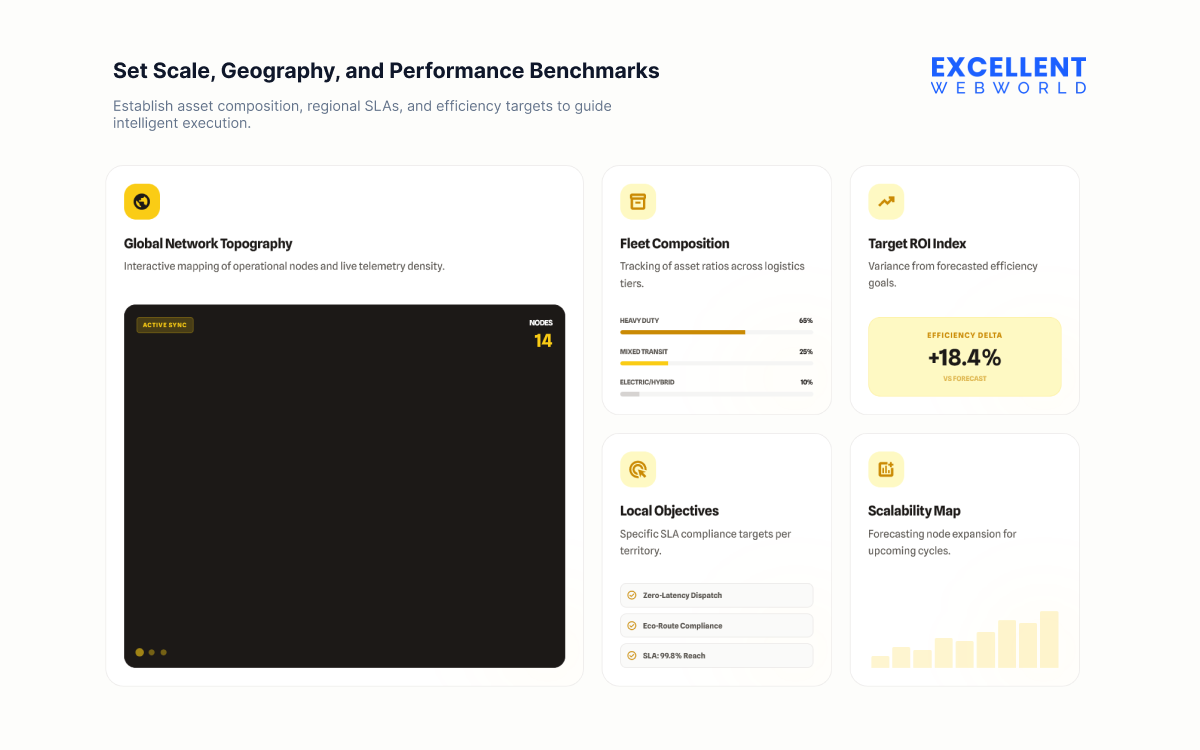
Teams handling mixed assets also review load planning software when preparing initial requirements, specifically when weight limits or load balance influence routing. Here is what you need to define:
Step 2. Finalize the Architecture for an Enterprise-level Platform
A fleet platform is only as reliable as its architecture. Enterprise-scale architecture supports thousands of real-time data points. It must process this information without slowing down. Each layer has a clear purpose.
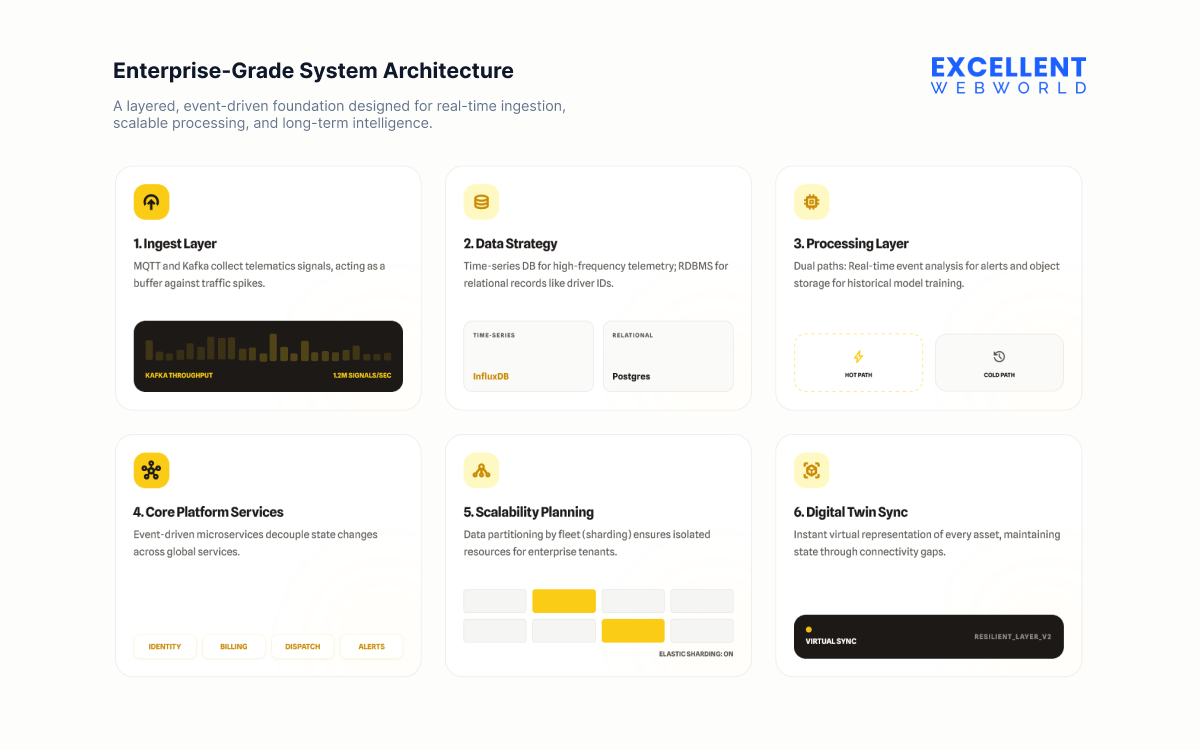
Here are the layers recommended by our experts:
1. Ingest Layer
Use message brokers such as MQTT and Kafka to collect telematics signals, alerts, and app logs. Kafka acts like a buffer that protects the system during sudden traffic spikes and helps maintain steady data flow.
2. Data Strategy
Use a time series database for high-frequency telemetry, such as GPS, fuel usage, and speed. Store relational information such as driver records or trip details in an RDBMS. This separation keeps queries fast and prevents reporting tasks from slowing down operational activity.
3. Processing Layer
Create two processing paths. The first path handles urgent events in real time for alerts such as geofence breaches or unsafe driving. The second path stores historical data in object storage for long-term analysis, reporting, and model training.
This layer is particularly important when it comes to location-based app development, as it ensures accurate handling of GPS data, real-time routing, and geofencing logic within the platform architecture.
4. Core Platform Services
Adopt event-driven microservices so each event flows independently. For example, when a vehicle enters maintenance state, the dispatch service receives an event and stops assigning trips. The notification service receives the same event and informs the manager. This avoids service bottlenecks.
5. Scalability Planning
Partition data by fleet or tenant to avoid resource conflicts. Large enterprise fleets may need isolated database shards so their high usage does not affect smaller clients.
6. Connectivity with Digital Twins
Create a virtual representation of every vehicle. This virtual model stores the last known state and responds instantly to dashboard requests. Managers can view updated information even when a truck moves through areas with weak connectivity.
This architectural approach gives the platform the stability needed to support expansion into new regions and higher data volumes during active fleet hours.
Step 3. Prioritize the Right Modules for Your Fleet Operations
Not every enterprise needs the same modules. A distribution fleet needs optimized routing. A service fleet needs stronger maintenance workflows. A logistics fleet focuses on load planning.
So you start by mapping what your teams struggle with. Once the gaps are clear, you decide which modules your platform must include in the first version and which ones can come later.
Here is your checklist for the modules.
1. Fleet Strategy and Business Criticality
Before selecting modules, validate alignment with operational priorities.
Modules supporting revenue protection or regulatory risk come first.
2. Operational Pain Mapping
Score each pain on revenue impact, compliance risk, and cost leakage from one to five.
Any pain scoring four or higher in two dimensions requires a hardware-integrated module in the first phase.
3. Core Operations Modules for Phase One
These support everyday operational control.
Missing any of these weakens operational scale-up.
4. Industry Specific Priority Modules
For Distribution and FMCG
For Field Service
For Long Haul Logistics
Note: Enterprises looking to boost their drop and hook trucking business can integrate these modules to improve efficiency, reduce idle time, and manage multiple trips seamlessly.
For Public Sector Fleets
Introduce these once core operations are stable.
These create the foundation for CFO grade financial visibility.
6. Intelligence and Optimization Modules for Phase Three
Designed for scale and long-range efficiency.
These support strategic improvement, not day-to-day operations.
7. Integration and Architecture Readiness
Often overlooked but key to data accuracy.
Delays in integration affect data reliability across teams.
8. Security, Compliance, and Scalability Filters
Every shortlisted module must pass these checks.
Prioritizing modules ensures development stays aligned with operational needs rather than random feature selection.
Common Enterprise Mistakes This Checklist Prevents
This checklist helps you sidestep frequent planning errors that create operational delays and unnecessary rework.
Step 4. Design Workflows for Drivers, Dispatchers, and Managers
Imagine a dispatcher working during the morning rush. They check the live vehicle feed, assign pending jobs, and view which driver is closest. A manager reviews the previous day’s delays and approves the maintenance list for the week.
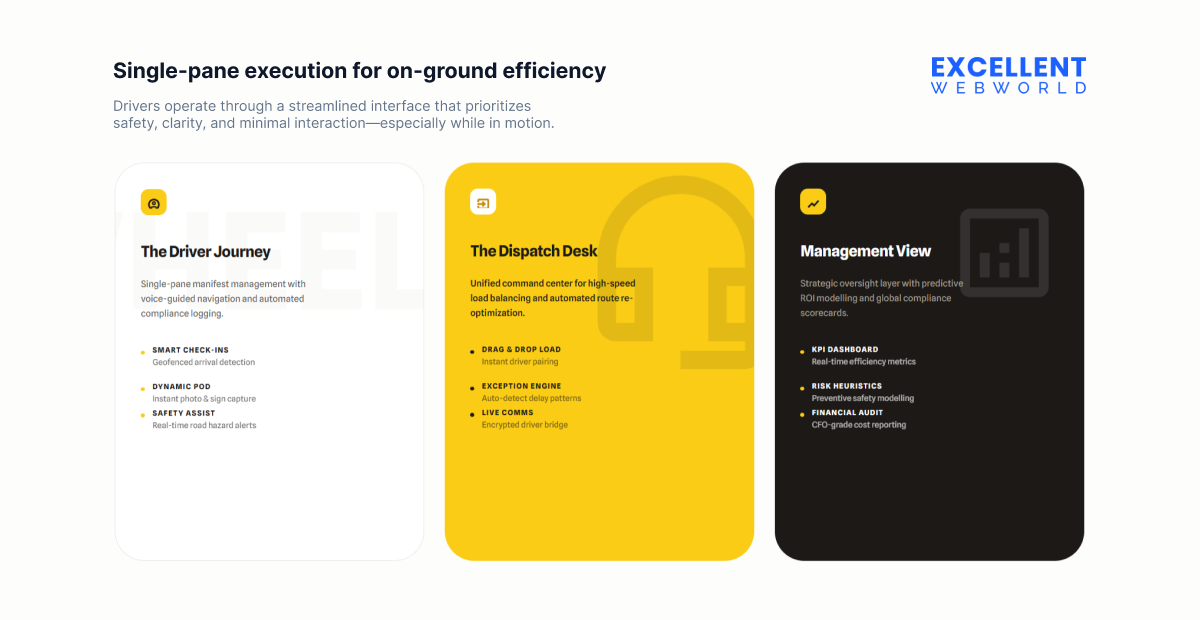
A driver checks their next stop, logs an issue, and receives route instructions. These small moments reveal how people interact with the system. You capture these scenarios and convert them into workflows. Each workflow must reduce steps. Each screen must contain only what the user needs.
This is how the platform supports operations without overwhelming anyone. When workflows mimic real situations, adoption becomes natural, and teams perform better.
Pro Tip Map workflows using real-time heatmaps of clicks and taps. This reveals hidden bottlenecks and lets you simplify screens, boosting driver and dispatcher efficiency by up to 20%.
Step 5. Select the Tech Stack and Third-party Integrations
The technology you choose forms the backbone of your platform. The step also determines how easily your solution can integrate with existing enterprise systems.
| Component | Technologies | Purpose / Use Case |
|---|---|---|
| Frontend Development | Create responsive dashboards for managers, dispatchers, and drivers | |
| Backend Development | Handle high-volume API calls and telematics data processing | |
| Mobile Apps | Build native and cross-platform apps for Android and iOS | |
| Databases | Store relational and unstructured data; caching and fast queries | |
| Cloud Infrastructure | Secure data storage, auto-scaling, and regional deployment | |
| Server & Containerization | Smooth deployment, load balancing, and containerized environments | |
| Real-time Communication & Messaging | Handle live vehicle updates, alerts, and notifications | |
| AI & Analytics | Predictive maintenance, route optimization, and fleet analytics | |
| Security & Compliance | Protect sensitive fleet and driver data | |
| Monitoring & Logging | Track performance, uptime, and error logging |
When your decisions regarding enterprise fleet management technologies are in place, these third-party integrations can help you extend the capabilities of your enterprise fleet management software.
| Category | Technologies / Providers | Purpose / Use Case |
|---|---|---|
| Telematics & Vehicle Tracking | Geotab, Samsara, Webfleet | Provides real-time location tracking and vehicle diagnostics |
| Maps & Routing | Google Maps, Mapbox, Here | Enables route optimization, distance calculation, and traffic updates |
| Fleet Cards & Fuel Management | WEX, FLEETCOR | Monitors fuel consumption and expenses |
| Communication & Alerts | Twilio, SendGrid | Facilitates driver notifications, SMS alerts, and automated emails |
| Payment & Billing | Stripe, PayPal, Braintree | Integrates invoicing, payment collection, or driver reimbursements |
| ERP & CRM Systems | SAP, Salesforce, Oracle NetSuite | Supports enterprise-wide operations and reporting |
Lock the best combination to ensure your enterprise fleet software remains flexible, scalable, and capable of handling the complex operational needs of large fleets. For long-term stability and smoother implementation, what you can do is to consult a team that provides reliable software development services.
Before locking in your tech stack and integrations, it’s important to be aware of common pitfalls
Step 6. Build, Test, and Refine the Platform for Performance
Building the platform is only the halfway point. Enterprise systems require repeated testing because one small issue in tracking, alerts, or data sync can disrupt the workflow of hundreds of drivers.
Testing covers peak hours, poor network zones, complex routes, and long trips. Every failure reveals something that can be improved. To guide the testing phase, teams like yours can review the following areas.
Refinements continue until the platform feels consistent and predictable for every user across all regions.
Step 7. Deploy and Monitor Usage Across Regions
Deployment does not end with installation. Enterprises study how different regions interact with the system. One region may focus on maintenance. Another relies heavily on live routing.
This variation helps you identify what works and what needs correction. Monitoring also shows adoption patterns. It reveals why certain teams adapt quickly and why others need training.
This final step sets the stage for your next development cycle. Regional insights guide upcoming updates. The system continues improving as real-world data shapes the next versions of the platform.
Build or Buy an Enterprise Fleet Management Solution: What Should Enterprises Choose?
Enterprises evaluate the build vs buy software to decide whether developing or purchasing a ready platform better fits their operational goals. Both paths serve different operational needs.
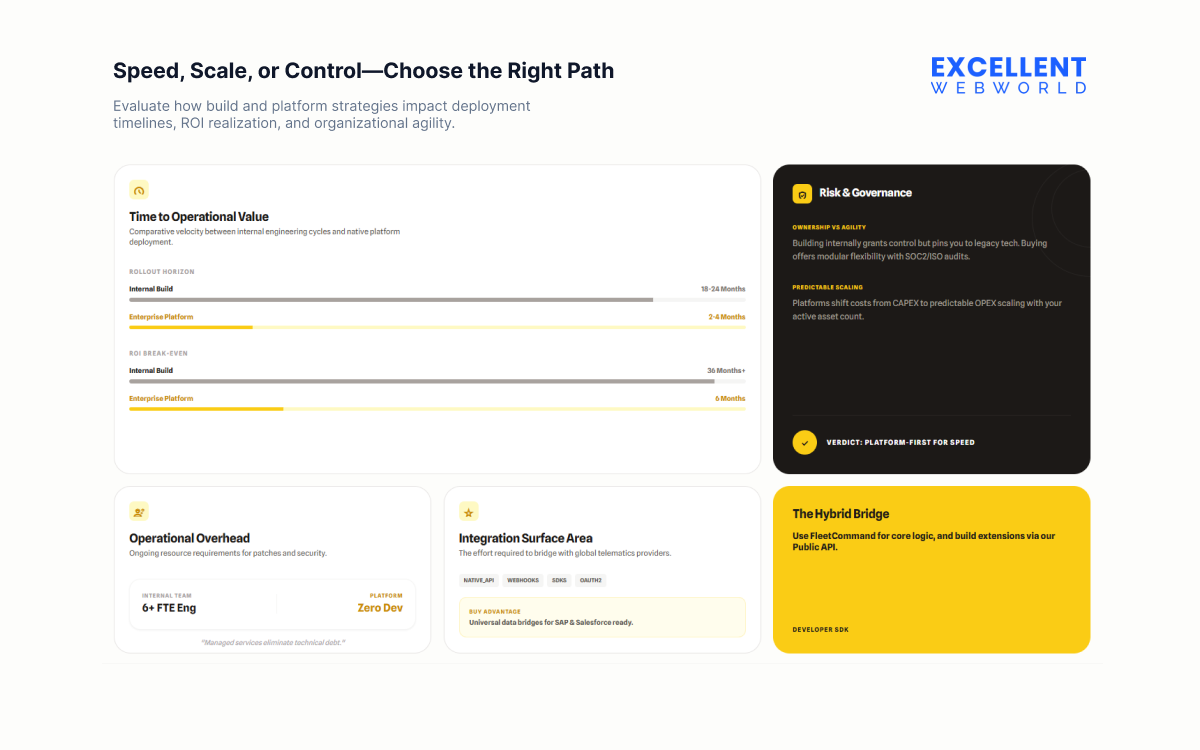
Buying a ready platform works for enterprises that want a faster rollout, a fixed cost model, and standard features for tracking, alerts, and reporting. It suits teams that do not require heavy workflow adjustments or specialized integrations.
| Criteria | Build Internally | Buy a Ready Platform |
|---|---|---|
| Rollout Time | Longer setup due to development and testing | Faster onboarding with pre-built modules |
| Initial Cost | Higher upfront investment | Lower starting cost with subscription pricing |
| Flexibility | Tailored to your workflows and data rules | Limited to the vendor’s structure |
| Data Control | Complete ownership of fleet information | Shared control based on vendor policies |
| Integrations | Custom-fit with ERP, CRM, and telematics | Depends on available vendor integrations |
| Maintenance | Handled by your internal team | Managed fully by the vendor |
| Scalability | Grows based on your architecture | Scales within vendor limits and pricing |
| Long-term Cost | High at start, steady later | Predictable but increases with fleet size |
Building your own system suits enterprises with complex routes, large regional fleets, or unique compliance and reporting needs. It helps create a platform that fits real operations, supports long-term scalability, and offers deeper control over integrations and data flow without depending on a vendor’s roadmap.
However, this type of flexibility comes with planning decisions around scope and timelines, all of which directly influence the overall software development cost and define how the investment scales over time.
How Much Does it Cost to Develop an Enterprise Fleet Management Solution?
The cost to build an enterprise fleet management solution ranges from $40,000 to $250,000+, mainly depending on the requirements. Here is the pricing of the fleet management solutions based on the category.
| Category | Price Range (USD) | Ideal For | Key Inclusions |
|---|---|---|---|
| Basic Systems | $40,000 to $80,000 | Small fleets | GPS tracking, driver logs, maintenance reminders |
| Mid-Level Systems | $80,000 to $1,50,000 | Growing companies | Telematics, route optimization, fuel analysis, driver scoring, mobile apps |
| Enterprise Ecosystems | $1,50,000 to $2,50,000+ | Large or multinational fleets | IoT-based data insights, custom reporting, automated report generation |
Factors that affect the pricing include the scale of your fleet, the regions you operate in, and the complexity of the workflows. To get more information, here are all the factors explained that affect the enterprise fleet management cost.
1. Fleet size and operational depth
Larger fleets need more modules. Regional teams need role-based rules. Both add to development hours.
2. Telematics and hardware integrations
GPS devices, OBD sensors, dashcams, and fuel systems require separate APIs. Each integration carries its own timeline. Enterprises increasingly integrate AI in logistics to analyze this data for predictive maintenance and smarter route planning, which can influence both development time and cost.
3. Type of features included
Basic tracking is quicker. When the system includes routing, load planning, automated alerts, driver scorecards, compliance workflows, and audit reporting, the cost increases.
4. Architecture and scalability decisions
Multi-region deployments need strong architecture, data separation, and load handling. This affects backend effort.
5. Level of customization
Enterprises rarely work with generic workflows. Custom reports, approval paths, multi-department controls, and complex dispatch rules raise the budget.
6. Platforms and environments
You may want admin web panels, dispatcher dashboards, manager apps, or driver apps. Each platform adds separate development lines.
After evaluating all these factors affecting cost, enterprises better understand the software development project estimation for building a fully customized enterprise fleet management solution.
What are the Challenges Faced in Enterprise Fleet Management?
Here are the challenges faced by the team with the enterprise fleet management solution.
1. Lack of Standardized Workflows Across Departments
Large enterprises grow across regions with different teams following different routines. Dispatch approvals work one way in one branch and another way elsewhere. Maintenance sites follow varied record-keeping habits. This inconsistency slows coordination and increases errors during peak load.
Solution
Create a process map that defines how tasks must move across departments. Use a configurable fleet system that supports step-based approvals, structured work orders, and consistent data input. Standardized workflows reduce confusion and help teams operate with the same rhythm even when they’re spread across regions.
2. Unable to Scale the Platform as the Fleet Expands
Many enterprises start with a small tech setup and later add vehicles, drivers, and routes. Systems built for smaller operations begin to lag. Reports take longer to load. The platform crashes during peak usage. Adding new features becomes slow and costly.
Solution
Reach out to a recognised mobile app development company, allowing you to adopt a modular architecture that separates critical functions so each can scale independently. Cloud-based deployment helps handle high traffic while keeping performance stable. Choosing APIs that support future integrations ensures the platform stays ready for new regions, fleets, and service models.
3. Fragmented Data Creating Slow Decision Cycles
Different teams rely on different tools for their daily tasks. Fuel logs stay in spreadsheets. Trip details sit in the TMS. Expense approvals move through email. When leadership needs a combined picture, it takes days to compile, verify, and interpret the data.
Solution
Introduce a unified data layer that gathers information from all operational systems. Automated data syncing removes manual compilation and errors. Shared dashboards help regional managers understand performance patterns and respond sooner. Decision cycles become shorter because teams work on verified, up-to-date numbers.
Plan Your Next Step Toward Smarter Fleet Operations
Enterprise fleets grow through steady improvements instead of sudden moves. Once you have a clear view of your vehicles, people, and workflows, next, you create a system that supports long-term control and predictable decisions. A well-built platform helps your teams work with clarity across regions and prevents operational issues.
Before explaining how the personalization works, it is important to understand the gap companies face. Most fleet teams know what they want to improve, but struggle to convert those needs into a platform that runs smoothly under daily pressure. This is where structured development support from an experienced AI-led custom software & app development company becomes useful.
If you are planning to create an enterprise fleet management solution for your operations, our team can guide you with a clear plan, accurate scope, and the right development path to move ahead with confidence.
FAQs About Enterprise Fleet Management Solution
Enterprise fleet management solution supports managers who handle large fleets, multi-region trips, large driver teams, and strict compliance needs. For example, a logistics firm with 700 trucks can run dispatch, compliance checks, maintenance cycles, and risk alerts from a single system rather than switching between separate tools.
The time it takes to develop an enterprise fleet software is around 4 to 12 months, mainly depending on the following factors.
Fleet management focuses on daily operations like tracking, maintenance, and trip updates. Enterprise fleet management supports multi-region operations, complex workflows, varied vehicle categories, and leadership dashboards. Think of it this way. Fleet management helps run trips. Enterprise fleet management helps run the business around those trips.
Here are the advanced technologies that modern enterprise platforms use to manage scale and real-time decisions.
The application of the enterprise fleet management platform is more in:
Here are the steps to help you choose the right enterprise fleet management service provider.

Article By


Paresh Sagar is the CEO of Excellent Webworld. He firmly believes in using technology to solve challenges. His dedication and attention to detail make him an expert in helping startups in different industries digitalize their businesses globally.