The programming language you choose directly affects:
- How fast does your app get built? (time to market)
- Will it be easy to hire talent? (scalability of your team)
- How many bugs do you have to solve? (user experience & reviews)
- Is it going to be expensive for maintenance? (long-term operational cost)
You are building a business.
You have an idea, a market, and a vision. Now comes the critical question: how do you turn that idea into a scalable digital product?
For many businesses, mobile apps become the fastest way to reach users, validate ideas, and generate revenue. And if Android is part of your strategy, there’s an important decision waiting ahead, one that is more important than just writing code.
But before you invest a single penny in writing a single line of code, there is a decision to choose the most suitable programming language. In case you are making the mistake of thinking, “That’s a developer problem.” Stop right there.
Because this is a business decision.
One wrong choice can mean slower development, more bugs, higher hiring costs, and an app that’s harder to scale. And in Android app development, that choice almost always comes down to two names: Kotlin and Java.
Java has boosted Android apps for almost two decades. It is reliable, mature, and trusted by enterprises globally. On the other hand, Kotlin is known as the modern challenger. It is officially powered by Google and designed to develop faster and write cleaner.
Choosing between Java vs Kotlin can affect your budget, launch timeline, and long-term business success. This guide is exactly what you need to make the right decision between popular mobile app development technologies, Kotlin or Java for Android.
What is Kotlin?
Kotlin is a popular programming language backed by Google for Android development. It’s a modern, open-source, and statically typed language released by JetBrains in 2016. Kotlin is designed to ensure conciseness, safety, and interoperability with Java. It is run on the Java Virtual Machine (JVM). Most people describe Kotlin as “Java light.” It is used globally for creating Android apps, backend services, and multiplatform development.
- Provides null safety.
- Follows coroutines for asynchronous programming.
- Syntax is concise.
- Supports 100% Java interoperability.
What is Java?
Java is a well-known, object-oriented programming language and computing platform. It was released in 1995 by Sun Microsystems. Java gets popular because of its “Write Once, Run Anywhere” (WORA) capability. Developers can build secure and portable applications, which are compatible to run on any device with a Java Virtual Machine (JVM). Mostly, Java is globally used for Android apps, enterprise software, and web applications. Additionally, Java is also considered one of the best web development languages.
- Static typing capabilities are strong.
- Supports robust tooling and frameworks such as Spring and Hibernate.
- Offer backward compatibility.
- The developer community is vast.
Kotlin vs Java: Quick Comparison Table With Key Differences
Kotlin and Java are both powerful languages, but they serve different roles and responsibilities in modern mobile application development. Let’s decode the key differences between Java vs Kotlin.
| Aspect | Kotlin | Java |
|---|---|---|
| Syntax | Short & simple. 40% or less coding as compared to Java. | Verbose; needs semicolons and boilerplate in coding. |
| Null Safety | Have in-built null safety. Non-nullable variables by default. | Prone to NullPointerException (NPE). |
| Concurrency | Follow coroutines. Perform lightweight, non-blocking asynchronous tasks. | Leverages traditional threads (complex to manage). |
| Data Handling | Data Classes. Has the capabilities to generate standard methods in one line. | Manual getters, setters, and constructors are needed. |
| Modern Support | Extension functions and smart casts are supported natively. | Records and Pattern Matching. |
| Interoperability | Interoperability at 100% as it calls Java code natively. | Capability to call Kotlin code, but with some adaptations. |
Kotlin vs Java for Android: What Are the Core Differences Entrepreneurs Must Know?
Explore key differences between Kotlin and Java for Android development. Here’s the detailed explanation in terms of performance, scalability, cost, and long-term business impact for entrepreneurs.
1. Syntax and Readability
When we compare Kotlin vs Java syntax, Kotlin can do more with fewer inputs as compared to Java. A task that takes almost 20 lines of code in Java, mostly completed in 5 lines with Kotlin. Less code means lower possibilities of bugs, faster code review cycles, and lower maintenance costs.
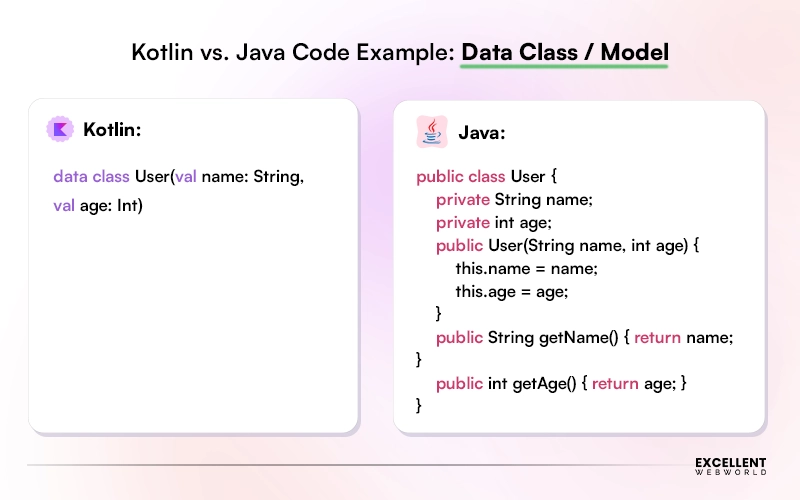
For instance, about data objects, Kotlin data classes are made to automatically generate useful methods like toString(), equals(), hashCode(), and copy(). On the other hand, Java needs to write all these methods manually. Otherwise, it relies on stored records or third-party libraries.
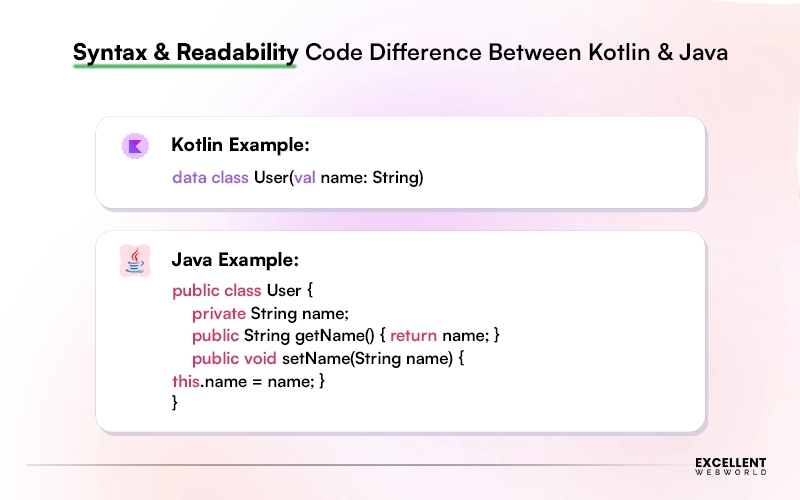
Both of these codes from Kotlin and Java generate the same result.
2. Null Safety Features
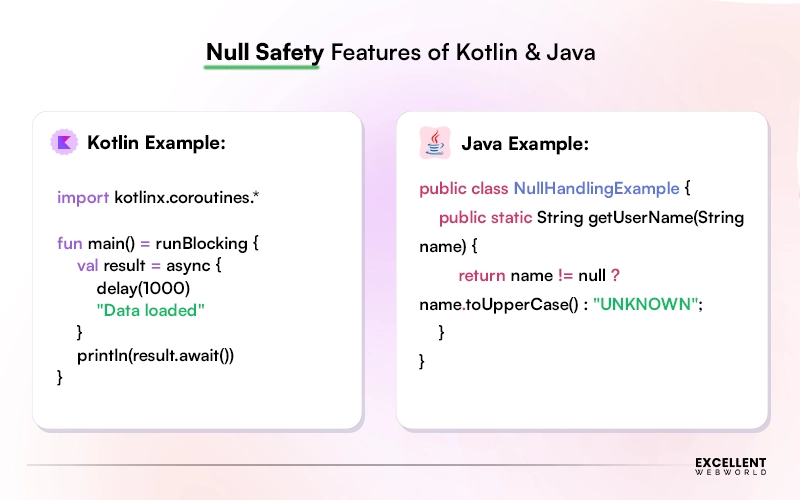
Kotlin has built-in null safety that helps prevent null pointer exceptions during compilation. Java can also manage null values, but it needs more manual checks.
| Scenarios | Kotlin | Java |
|---|---|---|
| Null errors possible? | Rarely, it already has built-in protection. | Yes, very common. |
| App crash risk | Significantly lower. | Higher. |
| Developer effort to fix | Managed by the language itself. | Manual checks are required everywhere. |
3. Performance Benchmarks
Comparing Kotlin vs Java performance gives almost the same outcome. The Android app users won’t feel any difference. Still, Java can start a little faster, but that can matter for very huge and high-demand systems. Kotlin was generally slower, but its new K2 compiler has made it much closer to Java.
That means, if you are not building any large Google-scale applications, then performance is not a reason to choose Java over Kotlin. However, whichever programming language you choose, there are other Android app performance optimization techniques that can help improve overall app performance.
4. Interoperability with Java
This is one of the Kotlin advantages over Java. You don’t have to choose one and abandon the other. Kotlin has capabilities to work together with Java in the same project, side by side.
If you have an existing Android application with Java, your team can directly start writing new features in Kotlin without rewriting what already works.
5. Learning Curve for Developers
Let’s understand the learning curve for developers in three different ways:
- For Java Developers: Those who already know Java can pick up Kotlin in just 2 to 4 weeks and become productive. The concept is too familiar, and the syntax is just cleaner than Java.
- For New Developers: As compared to Java, Kotlin is considered easier to learn due to its less boilerplate and clearer structure.
- For Your Hiring Budget: Kotlin talent is abundant and growing consistently. Most junior Android developers today are trained in the Kotlin programming language first. You can hire Kotlin developers from Excellent Webworld to leverage years of expertise within your budget.
6. Kotlin Multiplatform Capabilities (KMP)
Kotlin Multiplatform (KMP) capabilities are different from Kotlin; it is not limited to only Android. With KMP, your team can write shared business logic once and deploy it across multiple platforms such as Android, iOS, web, and desktop. Java has no equivalent capability in the mobile space.
Companies such as Netflix and Airbnb are already using KMP for production. For startups and growing businesses that have to work within a limited budget, this is a major strategic advantage, for sure.
7. Android Development Edge
Google has officially declared Kotlin as the preferred language for Android in 2019. All new Android APIs, Jetpack libraries, and Google’s own sample code are now written in Kotlin. Undoubtedly, Java still works, but as of now, for Android, it doesn’t have a long future.
8. Backend and Server-Side Use
Java already dominates the backends of legacy enterprises. So, if it is working already in large systems, there is no pressure to replace it. But for greenfield backend projects, entrepreneurs are choosing Kotlin with Ktor as a modern, lightweight alternative. Check the most compatible programming language from Kotlin vs Java as per different use cases:
| Use Case | Better Choice |
|---|---|
| New Android app backend | Kotlin (Ktor framework) |
| Legacy enterprise backend | Java (Spring Boot) |
| Microservices, cloud-native | Both viable |
| Large banking/finance systems | Java |
| Startups building a full Kotlin stack | Kotlin |
9. Cost of Adoption for Teams
Adopting Kotlin doesn’t mean making big, expensive changes all at once; you can move slowly and safely over time. In reality, the bigger risk is not using it at all. You can find yourself with a code that is harder to manage and maintain in a few years. Here’s the Android app development cost estimation and impact with Kotlin and Java in different scenarios.
| Scenario | Estimated Cost Range | Time Estimate |
|---|---|---|
| New project in Kotlin | USD 15,000 to 80,000 (depending on app complexity) | Standard timeline |
| Migrating a Java app to Kotlin | USD 5,000 to 30,000 (gradual, low risk) | 4 to 12 weeks |
| Retraining Java devs to Kotlin | USD 1,500 to 6,000 per developer | 2 to 4 weeks |
| Maintaining a Java-only legacy app | 20–30% higher maintenance cost vs Kotlin long-term | Ongoing |
***Please Note: Cost ranges are estimates based on average developer rates ($40–$120/hr) and vary by team size, location, and project complexity.
10. Coroutines vs. Threads
This aspect of differentiating Kotlin vs Java is completely a technical topic with a simple business translation.
- Kotlin uses Coroutines: Kotlin coroutines are the modern and simpler approach to managing multiple tasks. It handles background tasks like API calls, database reads, and real-time updates more efficiently and with the need of writing less code.
- Java uses Threads: This is the older way to handle multiple tasks simultaneously. But reality is, managing threads is complex, error-prone, and expensive to remove bugs.
11. Extension Functions and DSLs
Kotlin allows your team to add new functionality to already existing code without rewriting it from scratch with its feature called Extension Functions. It also supports DSLs (Domain Specific Languages) that help teams to write code that reads almost similar to normal plain English.
In reality, this is not just about any inconvenience to the developer; it means your team can build and customize features faster than usual and keep code organized as the app grows. Also, a new developer can onboard effortlessly. For scaling a business, agility like this matters a lot.
May You Want to Check On: Kotlin vs. Flutter
12. Community and Ecosystem in 2026
Over the last 30 years, Java has created its ecosystem with libraries, forums, Stack Overflow answers, and enterprise documentation. So, technically, if we compare Kotlin vs Java, the ecosystem of Java is unmatched in depth.
On the other hand, Kotlin has a fast-growing and enthusiastic community. 87% of apps on the US Google Play Store are now built with Kotlin. So, practically, Kotlin is ahead as JetBrains and Google both actively invest in its ecosystem.
Both have strong IDE support, testing tools, and third-party integrations. If you’re hiring developers, both Kotlin and Java communities are large enough that support is never an issue.
13. Future-Proofing with AI/ML Trends
Google’s AI and machine learning tools for Android, such as TensorFlow Lite and ML Kit, are mainly designed and explained considering the Kotlin programming language in mind.
As features like smart suggestions, voice control, and image recognition are now becoming common in apps, Kotlin makes it easier and cleaner to add these features than Java. It’s literally clear that Kotlin is the best choice to match Android app development trends.
Still, you can use Java for this, but it may feel a little harder to work with and might not get as much support in the future.
14. Real-World Case Studies
Here’s the real-world example for a better understanding of Kotlin vs Java:
- Fintech Startup: Rebuilt a digital wallet using Kotlin coroutines. It leads to 25% reduction in API response time compared to their Java prototype.
- Enterprise Logistics Platform: Kept Java for their backend microservices while rebuilding new Android modules in Kotlin. The two worked side-by-side without conflict, proving that a mixed approach is most suitable for large organizations.
Expert Advice: Hire an experienced Java or Kotlin app development company as per your project requirements. As discussed in the real-world example, for your new project, you can opt for Kotlin, and for a large legacy enterprise system, choosing Java is always best. Make sure you check the portfolio completely for the company you hire to ensure a smooth app development journey.
Kotlin vs Java: Side-by-Side Comparison With Code Examples
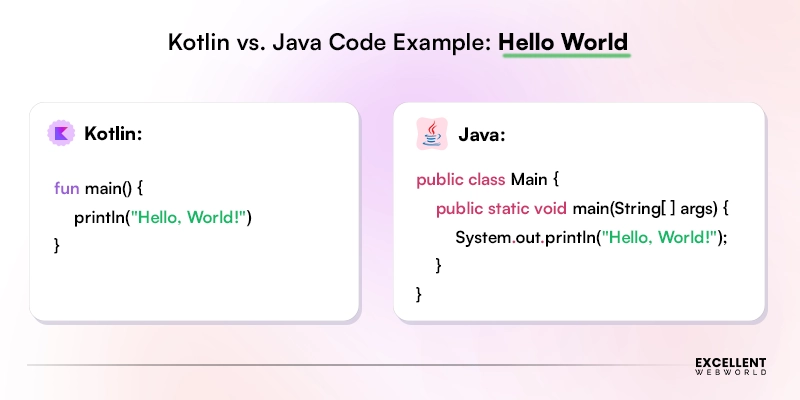
See how Kotlin and Java solve the same problems with different coding patterns through real code examples.
Java vs Kotlin Example: Hello World
Java vs Kotlin Example: Data Class / Model
Kotlin vs Java: What Are the Pros and Cons?
Let’s find out the difference between Java and Kotlin by exploring their strengths and weaknesses, including readability, performance, safety, community support, and long-term maintainability.
Pros and Cons of Kotlin
| Pros | Cons |
|---|---|
| Coding is less, more readable, like simple English. | The learning curve is high for beginners. |
| Safer as it has built-in null safety. | Compilation speed could be slower. |
| Offers modern features such as coroutines and extensions. | The community is smaller than Java. |
| Better choice for Android development. | Tooling is still rising in some of the areas. |
Pros and Cons of Java
| Pros | Cons |
|---|---|
| Popular, widely used, and well-established programming language. | The code is highly boilerplate. |
| Community and resources are huge. | There is no built-in null safety. |
| Known as a stable and highly reliable option. | Need to deal with more verbose. Not so modern. |
| Best for enterprise-grade, larger systems. | For adapting new features, it is a bit slower. |
Final Thoughts: The Verdict of Java vs Kotlin
Selecting one between Kotlin vs Java is not just a technical decision or only a developer concern; it’s a business decision. For most entrepreneurs developing a new Android app in 2026, Kotlin is the smart choice. It is faster to build, secure to ship, and made for the future. On the other hand, Java could be the best choice for enterprises that want to maintain their legacy systems.
So, if you are ready to build your Android app with the right technology from day one, then you should definitely consult with a trusted Android app development agency like Excellent Webworld. We help startups, growing businesses, and enterprises to turn their ideas into high-performing mobile applications. Whether you choose Java or Kotlin, or need better guidance on which technology will suit your project best, our team has covered everything. Connect with us to thrive with your app.
Frequently Asked Questions (FAQs)
Not completely. But Kotlin is clearly the future of Android app development as compared to Java. Google officially recommends Kotlin for all new and upcoming Android projects. On the other hand, Java continues to support legacy apps. Most of the new Android development projects are done with Kotlin.
Yes. Kotlin and Java are 100% interoperable. They can coexist in the same application without any conflict. This makes migrating from Java to Kotlin gradual and completely risk-free, as you don’t have to rewrite everything in one go.
Kotlin started as an Android language, but it is not limited to Android development. With Kotlin Multiplatform (KMP), you can share code across Android, iOS, web, and desktop. And make Kotlin a strong choice for businesses planning multi-platform products.
Kotlin typically reduces development costs over time. Its concise syntax leads to writing less code, shipping faster, and fixing fewer bugs. Java may have a larger community and talent pool, but Kotlin’s efficiency usually offsets any difference in hourly rates.

Article By


Paresh Sagar is the CEO of Excellent Webworld. He firmly believes in using technology to solve challenges. His dedication and attention to detail make him an expert in helping startups in different industries digitalize their businesses globally.